Skip to content
Public Ticket #17149

homepage glitches

Conversation thread

PenciDesign Supporter replied

Staff Reply

Hi,

For the audio file, you can add by edit your post with Gutenberg editor, select Audio block then upload your audio file.
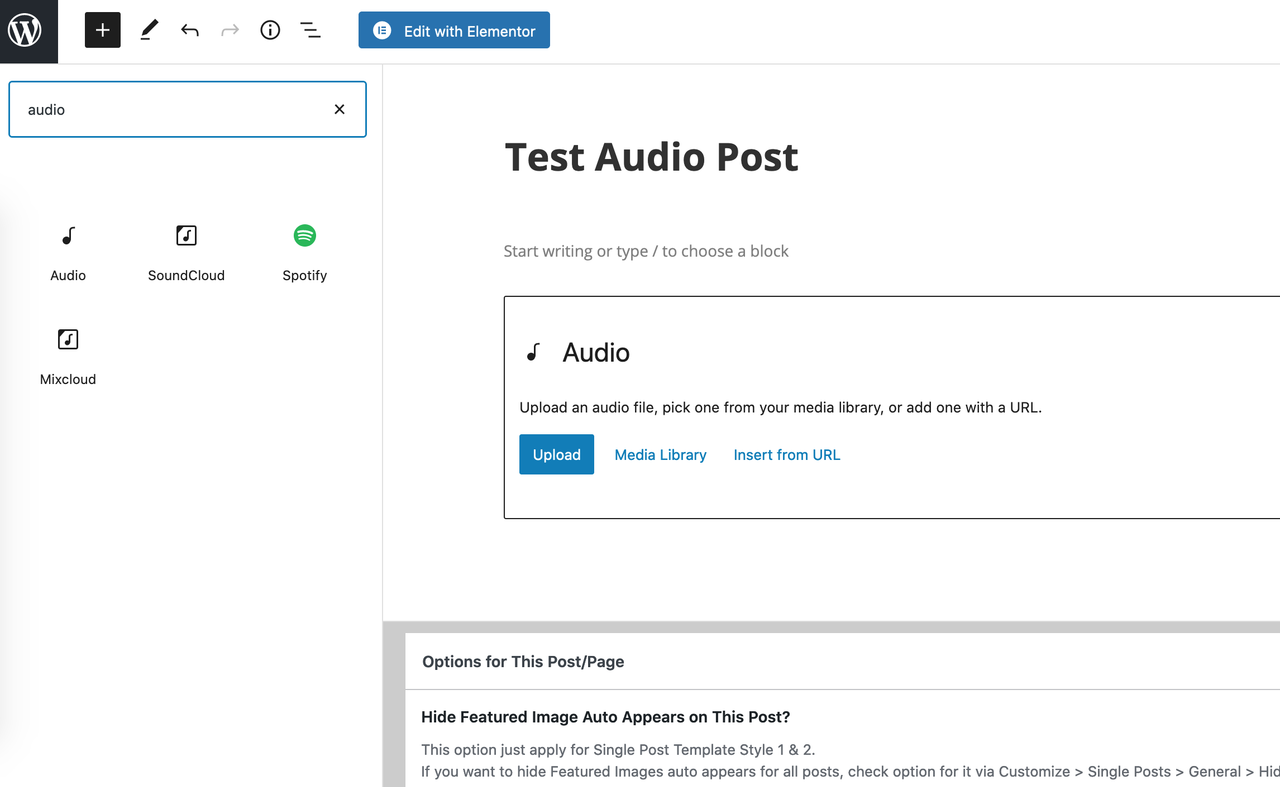
image.png

Regards,
PenciDesign.

SingleandHungryAF replied

Customer Reply

Also, I’m looking online at how to embed an audio file at the top of each post and it isn’t making sense to me. I have the prod press audio but it won’t drag in. I’m sure I’m missing something. Any help appreciated. I just want to attach an audio file of me reading each of my posts.

SingleandHungryAF replied

Customer Reply

yes, I understand, but there is no recipe widget available to embed in the post. I thought i would find it there but it’s not there in the Elementor page editor. So. Ive no idea how I’m intended to create a recipe template.

PenciDesign Supporter replied

Staff Reply

Hi,

The recipes only display when you create a post, not applied to the page.

Regards,
PenciDesign.


SingleandHungryAF replied

Customer Reply

Great, that worked, thanks. 

I want to create recipes with the penci recipe plugin but it doesn’t show up when creating a page…. Am I missing something? I’m not a food blog, but will have a big food section. Can I use the recipe plugin with the theme  I’m using?

PenciDesign Supporter replied

Staff Reply

Hi,

Please modify the CSS code:

#wpforo #wpf-widget-recent-replies .wpforo-list-item-right p.postuser a,
#wpf-widget-recent-replies .wpforo-list-item-right p.postuser a{
    color: gray !important;
}

Regards,
PenciDesign.

SingleandHungryAF replied

Customer Reply

Thank you!

3. pasted code but it didn't fix it

PenciDesign Supporter replied

Staff Reply

Hi,

All theme settings locate in Appearance > Customize, you can go to adjust by following this link.

1. Go to Topbar > General Settings, check Enable Top Bar to display all pages,

2. All social profiles you can manage in the Social panel, remember don't add # character before your link and leave blank the field you want to hide.

3. For the author color, please copy the following custom CSS code and paste it to Appearance > Customize > Custom CSS:

#wpforo #wpf-widget-recent-replies .wpforo-list-item-right p.postuser,
#wpf-widget-recent-replies .wpforo-list-item-right p.postuser {
    color: gray !important;
}
4. You mean all links on your website include internal and external? You can install this plugin to control these options: https://wordpress.org/plugins/wp-external-links/

5. Go to Appearance > Customize > Footer > Footer Signup Form, change color at SignUp Form Submit Hover Background Color

6. All the images on your site auto-crop to the center position. Please edit the image before upload.

Regards,
PenciDesign.

PenciDesign Supporter replied

Staff Reply

Hi,

Please set user pencidesigner as Administrator, I'll check your site config.

Regards,
PenciDesign.

SingleandHungryAF replied

Customer Reply

New issue: put my instagram link in customizing - social media, refreshed, and it still takes me back to my own blog. 

1. thanks 

2. Installed thumbnail regenerator, ran it, still not working on a couple of posts

3.thanks

PenciDesign Supporter replied

Staff Reply

Hi,

1. The post excerpts and the quote in the sidebar display in white color, please go to Appearance > Customize > General > Colors, change the white color at General Text Colors to black.

2. You can install and use the Regenerate Thumbnails plugin to regenerate all thumbnail sizes after you made a change.

3. About text inside the gold bar, please add the following CSS code to Appearance > Customize > Custom CSS:

.penci-page-header-wrap .penci-page-header-title {
    color: black;
}
4. Please go to Appearance > Customize > Posts Review Options, check Hide Review Pie Chart on Featured Image option.

5. Go to Appearance > Customize > General > Show/Hide Social Sharing, check the Hide Like Post option.

Regards,
PenciDesign.

PenciDesign Supporter replied

Staff Reply

Hi,

Please temporarily disable maintenance mode or send me a login credential, I'll log in and check your config.

Regards,
PenciDesign.

SingleandHungryAF started the conversation

Conversation Start

In customizing the homepage from the original template I was able to get everything looking as I want EXCEPT post excerpts and the quote in the sidebar do not show on the homepage - although they do on all the other pages. I'm hoping I don't have to recreate the homepage from scratch just to fix this??

Want to join this conversation or access attachments? Sign in first.