calvinteoh replied
Customer Reply
Thanks for the fix and feedback. I have fix the code as recommended below and it is working :) Thanks.
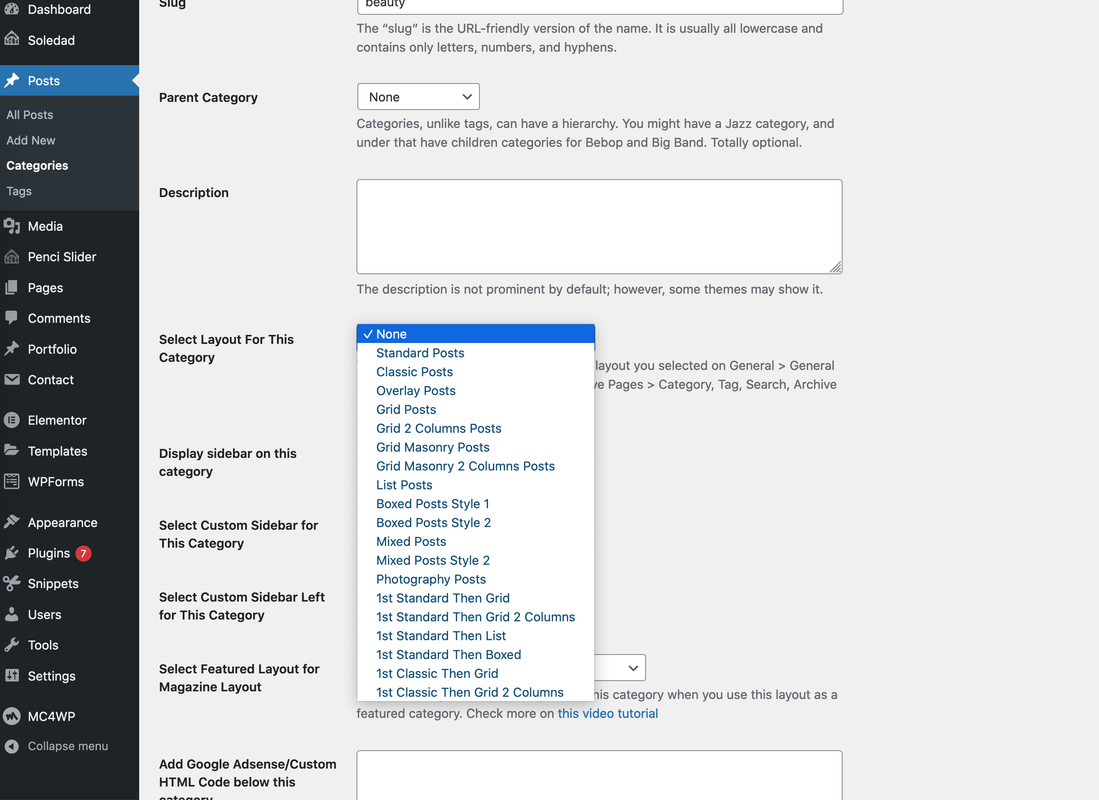
Based on the recommendation below in Posts → Categories, I am not able to change the layout. For example, I try to modify the "Select Custom Sidebar for This Category' by changing it to Custom Sidebar 1 (which I have modified based on the documentation), but this category is still showing the general Sidebar.
On top of that, there is an error displayed on top of when I entered Posts → Categories (which is shown in the image attached).
Thanks for the quick response, where/ how can I create a custom Post Layout so that it would appear in the list as you shown below?
I wanted to create a custom Post Layout template for each category; therefore depending on different category, it would automatically uses different layout. Can you advice how I could create separate Posts Layout using Soledad theme, and then mapped them to each category?
The documentation in "http://soledad.pencidesign.com/soledad-document/#posts" which uses Appearance > Customize > Single Post would change the Post layout generically.
Want to join this conversation or access attachments? Sign in first.
Open your ticket archive, review validated licenses, and continue product support conversations from one customer portal.