johncarnegie replied
Customer Reply
Hi,
Thanks a lot. It works. You're the best.
Hi,
Thanks a lot.
You have changed the font to Roboto and it works. But the font is still 14px, not 16 px. You can tell me where to find it and I can do it myself.
Hi,
I couldn't find Theme Editor there. Probably it has been hidden somhow.
Check: https://ibb.co/JmDbKTK
Hi,
1 It didn't work. I changed the settings as you said. But when I went to the Dashboard --> Posts. It appeared with Roboto 16px for 1-2 seconds, then it turned back to PT Serif 14px.
2 OK. I already contacted them last week. No response yet. Need to wait a bit more I guess.
3 If I understand you correctly, I can use that "pencilang" shortcode everywhere I see some texts?
For instance, if I go to Quick Text Translation, I will see this Text: "Type and hit enter...". If I want it appears in any language I just do as below:
[pencilang en_US='Type and hit enter...' fr_FR='France Type and hit enter...' vi_VN='Nhập và ấn enter...' /]
Then that text will be in 3 different languages including English, French, and Vietnamese. Am I correct?
Besides, did you check the open ticket issue?
Hi,
Thanks a lot. Please check the ticket issue again.
I have 3 questions
1 Font: I am using Roboto Font and I prefer 16 px for the body text. When I went to Dashboard --> Posts, it seems like the Font is only 14 px and the font style is not Roboto. How to change the content from the Dashboard to Roboto 16px for Paragraphs?
Check: https://ibb.co/82txZv2
2 Twitter login critical error: When I tried to login using Twitter, there was a critical error warning.
Check: https://ibb.co/9W4Nd7k
3 Translation: I am using WPML for multi-language site. I read your article related to translation.
"
Soledad allows you to transition text online via WordPress Customizer. You just need to go to Appearance > Customize > Quick Text Translation translate all the text there to the text as you want. If your site is multiple languages ( use WPML or Polylang ), you can put the shortcode "[pencilang]" in the language transition options to translate it.
The structure of a [pencilang] shortcode would look like this:
[pencilang en_US='Share' fr_FR='Partager' language_code='Your language text' /]
In the shortcode above, en_US & fr_FR is the languages code. You can see the languages code here"
I don't really understand. Normally, I just use WPML to translate all of the pages, string, etc. So what special things do I need to get notice here? Why should I use some code like, [pencilang], and when should I use it? Doesn't WPML work as usual on your theme?
Hi,
When I wanted to submit a ticket today, the system kept asking me to submit Envato purchase code. But I did that already. That's why I could send a few tickets before. WHy asking again now? Also, when I clicked verify Envato Purchase code, it didn't show anything for me to fill in the code.
Hi,
It works.
You're awesome.
Hi,
6: OK
3: I added the code again and cleared the cache. But the Google Logo was still not displayed.
Hi,
Thanks a lot for your response.
1, 2, 4: DONE
3: I tried to add that super long code to CSS, but it didn't work. The logo icon was normal before I did the CSS steps and cache.
I also experience that kind of issue sometimes when I did Minify CSS and Combine CSS using WP-Rocket on some other themes. I think this issue may be caused by Minify CSS or something like that.
I will also send a message to Super Socializer to see what we can do about this issue.
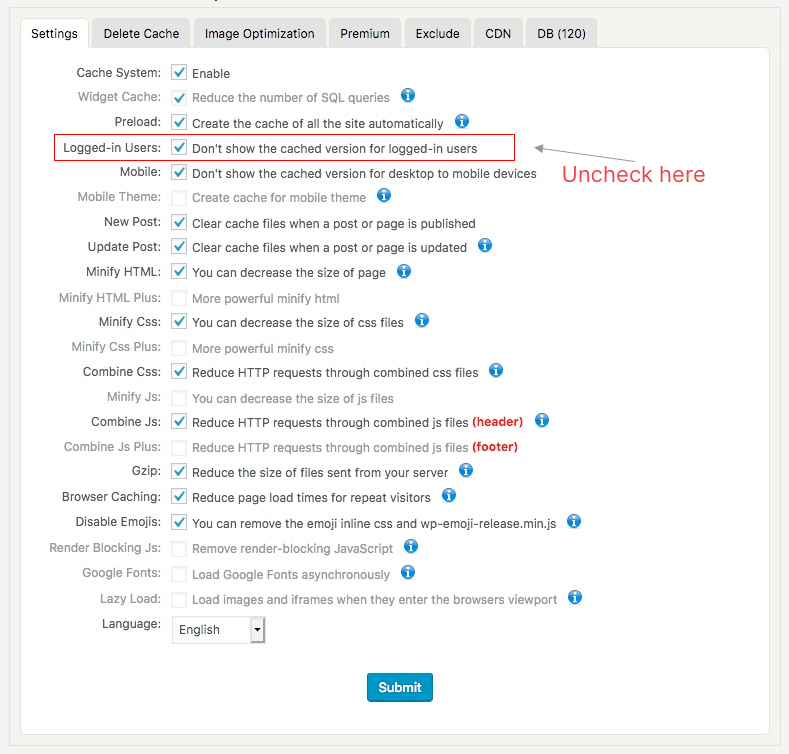
6 If we use cache for logged-in users as your suggestion, does it cause any issue? I often see lots of suggestions saying that we should not enable cache for logged-in users. May I ask what kind of cache can logged-in users see? Can they see the cache from some other logged-in users if we enable cache for logged-in users?
If user A only see cache for based on user A's view, I think it is good. But if user A can also see cache from User B's view. that may cause some problem. Some checkout pages or private info or credit info may be seen by some other users. Is that correct? Could you please explain a bit more on this?
Hi,
I have a few questions
1 How to disable a featured image from a single page?
I used the same featured image as the one in the content. SO I have the same image at 2 positions now. I need to disable the Featured image.
Check: https://ibb.co/gJtMSB0
Link: https://www.blog.advanedu.com/lien-he
2 All pages dashboard - Overlapped
When I went to All pages to edit a page and scrolled down, I saw items overlapped each other
I followed your Speed Optimization instruction such as CSS generator and WP Super fast cache to speed up my website. It is working well. There are some little issues related to that. Hope you can help me.
3 If you click Login or "Đăng nhập" from my website, you will see that The Google logo was not displayed:
Link: https://www.blog.advanedu.com
4 Logo was not displayed on mobile device: If you click the 3-bar icon to open the left sidebar menu, you won't see the logo.
5 iPad - horizontal dimension: When I view the website on my iPad using horizontal dimension (not vertical dimension), I saw that Some icons on the right side were sticky. That means when I scrolled down, those icons kept going down and overlapping with the right sidebar.
6 Please let me know which cache plugin works best with your theme? I followed your instruction regarding speed. Therfore, I used WP Fatest cache. It works well and makes the site load fast for not logged-in users. But for logged-in users, it loads quite slowly. I know there is no-cache for logged-in users. Do we have any way to make the website load fast even for logged-in users?
P.S: I really love your theme, especially the speed optimization process. I think it is the easiest theme which helped me achieve more than 90 points on Pagespeed without putting too much effort. For the other themes, I always have had to change and optimize too much to achieve the same result.
Want to join this conversation or access attachments? Sign in first.
Open your ticket archive, review validated licenses, and continue product support conversations from one customer portal.