Skip to content
Public Ticket #17466

How can I have mobile menu on the right side?

Conversation thread

thewebstylist replied

Customer Reply

Ahhh GRT Thanks!

PenciDesign Supporter replied

Staff Reply

Hi,

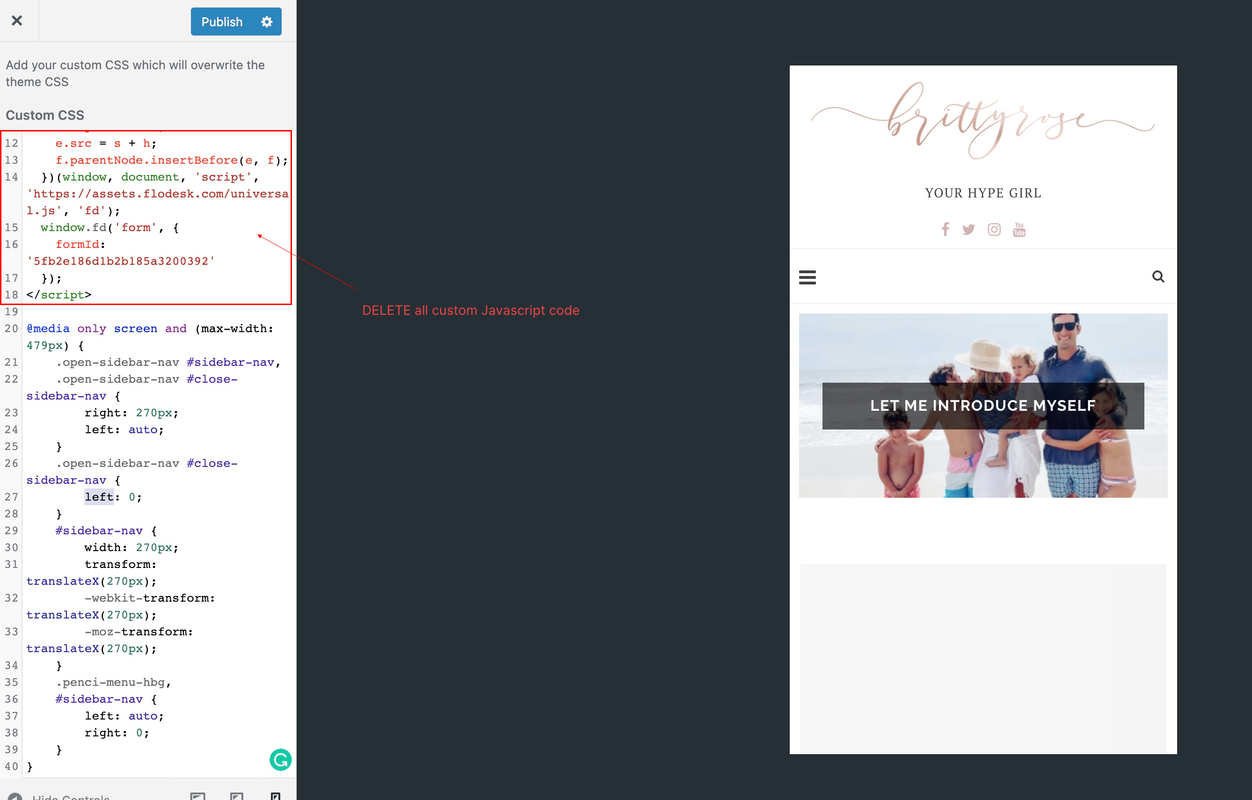
The custom CSS code doesn't work because you've added the JS code to this area.

image.png

Please note: this field only accepts CSS code, please REMOVE all the JS code, then add:

@media only screen and (max-width: 479px) {
    .open-sidebar-nav #sidebar-nav,
    .open-sidebar-nav #close-sidebar-nav {
        right: 270px;
        left: auto;
    }
    .open-sidebar-nav #close-sidebar-nav {
        left: 0;
    }
    #sidebar-nav {
        width: 270px;
        transform: translateX(270px);
        -webkit-transform: translateX(270px);
        -moz-transform: translateX(270px);
    }
    .penci-menu-hbg,
    #sidebar-nav {
        left: auto;
        right: 0;
    }
    #navigation .button-menu-mobile {
        float: right;
        margin-left: 10px;
    }
}
If you want to add custom JS code to your site, please go to Appearance → Customize → Logo & Header → General, put your code on Add Custom Code Inside <head> tag OR Add Custom Code After <body> tag

Regards,
PenciDesign.


thewebstylist replied

Customer Reply

Thanks so much for getting back so quick and I'll try Akismet.

The CSS didn't change anything about the menu though, I added and saved https://BrittyRose.com Do you need access to the site to checkout? thnks

PenciDesign Supporter replied

Staff Reply

Hi,

1. Please go to Appearance → Customize → Custom CSS then add the following custom CSS code:

@media only screen and (max-width: 479px) {
    .open-sidebar-nav #sidebar-nav,
    .open-sidebar-nav #close-sidebar-nav {
        right: 270px;
        left: auto;
    }     .open-sidebar-nav #close-sidebar-nav {
        left: 0;
    }     #sidebar-nav {
        width: 270px;
        transform: translateX(270px);
        -webkit-transform: translateX(270px);
        -moz-transform: translateX(270px);
    }     .penci-menu-hbg,
    #sidebar-nav {
        left: auto;
        right: 0;
    }
}
2. You can install and use the Akismetplugin for WordPress to prevent visitor spam their comment to your website. Another option: you can add the captcha to the Comment Form by following the instruction here: https://www.wpbeginner.com/plugins/how-to-add-recaptcha-to-wordpress-comment-form/

Regards,
PenciDesign.


thewebstylist started the conversation

Conversation Start

How can we have mobile menu on the right side (most people are right handed so it makes easier to navigate) and how pls do you recommend to allow Blog comments but prevent spam? She has 5000 spam comments and am not sure how to prevent but alllow legit comments on her posts. GRT THEME!

Want to join this conversation or access attachments? Sign in first.