HannahKao replied
Customer Reply
Hi,
thank you~ This is exactly what I m looking for!
Hannah
Hi,
I apologize for my poor English. Maybe I didn't describe my quetion clearly.
Actually I have used WordPress many many years, I completely understand how the Customizer and Theme Function working.
My quetion is NOT about "How to customize the post" NOR "How to apply customize settings". My question is nothing to do with the funcion.
---------
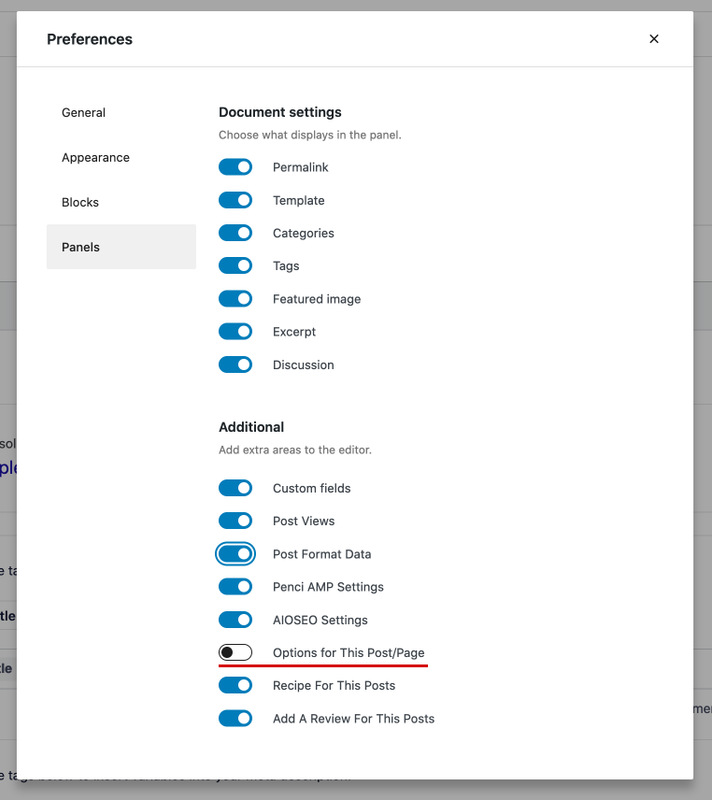
When you add a new post, you will see an expanding BIG METABOX named "Options For This Post/Page" .
Since this metabox covers almost the whole block editor, I just want to know if it's possilble to minimize this metabox, make it contracted by default, so that I won't need to mannually close it every time I write a new post.
Thanks for your patient. Sorry again if my English is still too bad to make you understand, I will keep trying untill my question is understandable.
Hannah
Thanks for the quick reply!
I have checked the customize Appearance → Customize → Single Posts many times, but I am sure I didn't see any setting for contracting the "Options For This Post/Page" toggle by default.
ActuallyI have no question with the post appearance. The "Options For This Post/Page toggle" I metioned is the one on the backend ( the bottom of post editor).
Could you show me how to keep it contracted by default? Because every time I start a new post, it always covers most of the editor section.
(I attach an image to describe more clearly)
Thanks~
Hannah
Hi,
I want to know if we can keep the single post options (Options For This Post/Page) contracted by default?
It doesn't sound a big problem, but the UX will be better if we don't need to manually contract the single post options toggle every time when staring a new post.
Thanks~
Want to join this conversation or access attachments? Sign in first.
Open your ticket archive, review validated licenses, and continue product support conversations from one customer portal.