Skip to content
Public Ticket #17678

footer instagram widget

Conversation thread

PenciDesign Supporter replied

Staff Reply

Hi,

The Instagram widget doesn't update because your homepage displays a cache version by WP-Super-Cache.

For next time, please go to the Settings » WP Super Cache page and click on 'Delete Cache' button to refresh Instagram images.

Regards,
PenciDesign.

vaninasimon replied

Customer Reply

I'm ok finally.

I tried with Date Ascending , and then Date Descending just to check and now it's ok, my last intagram photos are displayed.

Thanks guys ! 

vaninasimon replied

Customer Reply

Thank you for your answer.

I just added the widget today and on my instagram the last photo I posted was more than 12 hours ago. So the 22 photos missing were posted 2 days ago, 3 days ago, 4 days ago... and 1 year ago so it seems there is a problem. 

Do you know what is the problem?

Thanks 

PenciDesign Supporter replied

Staff Reply

Hi,

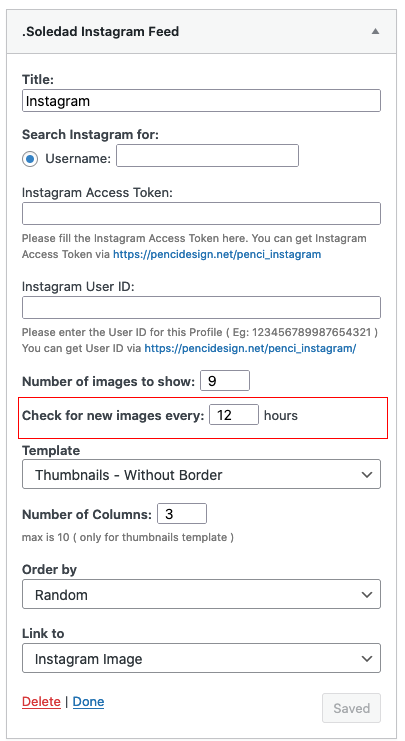
By default, the Instagram widget will get a new image after 12 hours, you can change this time to get a new image faster by going to the Widget Settings, set the time on Check for new images every: field.

image.png

Regards,
PenciDesign.


vaninasimon started the conversation

Conversation Start

Hi,

I added the Footer Instagram Widget on my homepage but it doesn't display the last photos. I miss the last 22 photos I don't know why. 

My instagram : https://www.instagram.com/anotherepicjourney/

Thanks for your help 

Want to join this conversation or access attachments? Sign in first.