Skip to content
Public Ticket #17859

Featured Categories

Conversation thread

PenciDesign Supporter replied

Staff Reply

Hi,

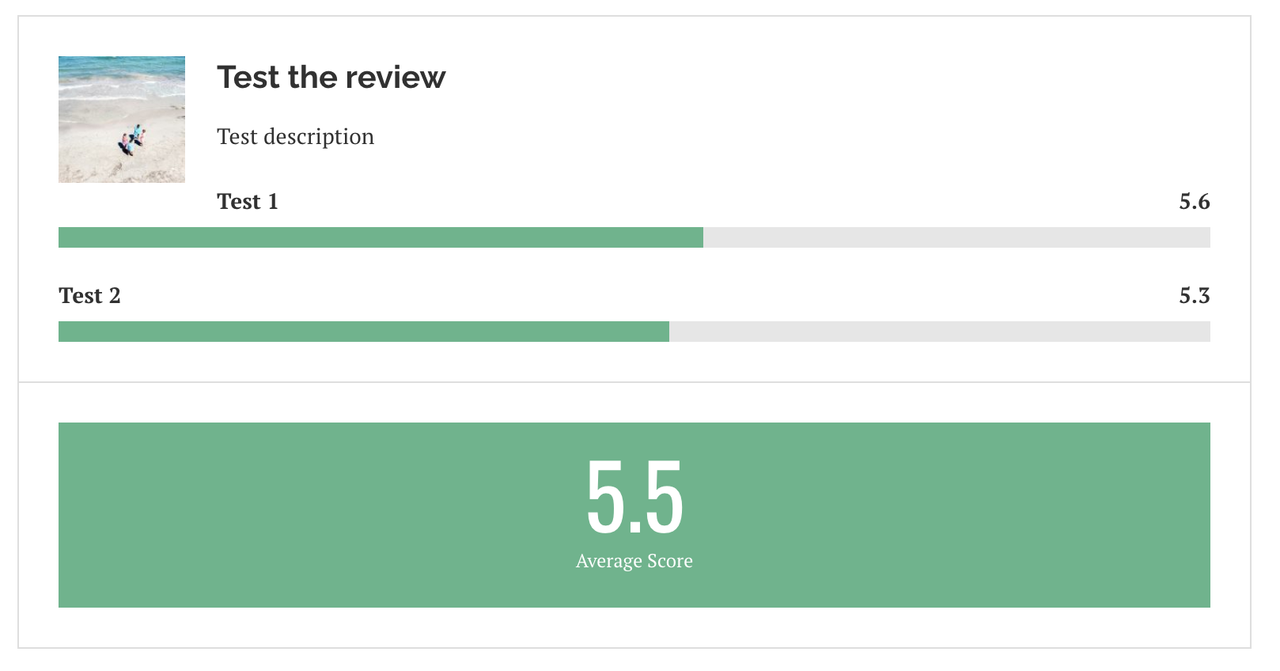
Please go to Appearance → Customize → Table of contents → General → Exclude Headings: enter ".penci-review-title".

Regards,
PenciDesign.


littlepellizza replied

Customer Reply

dear penci

there ia a bug with penci review and yout table of contect

i use h5 for title and h6 for sub title

if u check 

CULT OF LAMB - Playretro

u see that you table of contec index penci review

it's normal?

littlepellizza replied

Customer Reply

really thx hope u make an update of penci review with all fix and code that u give me

PenciDesign Supporter replied

Staff Reply

Hi,

I've fixed this issue.

Please check.

Regards,
PenciDesign.


PenciDesign Supporter replied

Staff Reply

Hi,

Please send me your WordPress admin account in a PRIVATE reply. I'll log in and help you check it.

Regards,
PenciDesign.


littlepellizza replied

Customer Reply

here the screen

the first is colur that not change

the second it's the errore when i save, i select hide pphone

PenciDesign Supporter replied

Staff Reply

Hi,

Please send me a screenshot and URL related to this issue, I'll check and help you fix it.

Regards,
PenciDesign.


littlepellizza replied

Customer Reply

DEar penci

i use penci review 2.6 instead of 2.7  because u give me some code that allow me to to use half numbers and choose the final vote manually .Those things are not present in version 2.7

with last update of u'r theme the colur settings are reset to default.If i try to choose /change coulours nothing happen, dose not work.

Also if i deselect some options like "address" and publish site .Its give me error

Willu fix this things and make a more powerful penci review plug in ?

PenciDesign Supporter replied

Staff Reply

Hi,

In this case, please send me the WordPress admin account. I need to log in then check this issue.

Regards,
PenciDesign.


littlepellizza replied

Customer Reply

also in the page i try to add pencil recents post.

i select a categoy but its always show all categories ( note the single that i select)

and in preview its give me this error

Warning: explode() expects parameter 2 to be string, array given in /home/ukyd5630/domains/playretro.it/public_html/wp-content/themes/soledad/inc/widgets/lastest_post_widget.php on line 81

littlepellizza replied

Customer Reply

Don't know if is a template bug

i create this page

Jun^ - Playretro

i choose to show category post list and it's ok. than i slect to show miniatures or date but dose not  anything

i send a screen

PenciDesign Supporter replied

Staff Reply

Hi,

The number input field display by default of the browser setting. We'll check and improve the input & add more features in the future release.

Regards,
PenciDesign.


littlepellizza replied

Customer Reply

ok seems works, i don't get the message anymore 

its remain that i use arrow to selects number are without *.x but it's ok i put manually

Also hope in the future the possibility to save a personal present with vote voice inherit ( gfx, sound etc..)

PenciDesign Supporter replied

Staff Reply

Hi,

Please download the attachment file then overwrite it to:

wp-content/plugins/penci-review/init.php

Regards,
PenciDesign.


littlepellizza replied

Customer Reply

i use chrome latest versione on windows 10

i see that i try to save article  seems to get its

but cause message error the save option remain not selectable anymore until i refresh the page n the browser ( like un infinite save)

this problem of course it's not present if i don't use *.x numbers.

Maybe disable this check  ? or enable the use of 0,x numbers ( instead of of 5-6 the possibility to use 5.1 5.2 using the arrows in the box)

PenciDesign Supporter replied

Staff Reply

Hi,

Everything working properly on my browser.

Please send me your browser version and OS name. I'll check again.

Regards,
PenciDesign.


littlepellizza replied

Customer Reply

it's give me error

i send a screen

PenciDesign Supporter replied

Staff Reply

Hi,

Please download and overwrite this functions.php file on the penci-review folder.

Regards,
PenciDesign.


littlepellizza replied

Customer Reply

you give me a modified function file where i can force the final vote using box 10

i try :

if i enter 5.5  in box 10 its shows 5 in final vote

if i inter 5.6 in box 10  its shows 5  in final vote

I see that i can enter 5.1 or 5.5 in box from 1 to 9 but not the modified 10

PenciDesign Supporter replied

Staff Reply

Hi,

By default, the Penci Review plugin doesn't round any number you entered.

Please check the number you fill in again.

image.png

Regards,
PenciDesign.


littlepellizza replied

Customer Reply

sorry for late reply, i fixed problem 

reducing the length of a menu item

There is any possibility tha u modifiy function file of pencil review ( post September 3, 2021 at 11:21pm) that u give me  to show *.X numbers?

Now i show final vote only 5 -6-7-8-9  i like to show example 5.1 or 5.5 ( if i write in the box it's show always 5)


PenciDesign Supporter replied

Staff Reply

Hi,

In this case, I just need normal access.

Regards,
PenciDesign.


littlepellizza replied

Customer Reply

need ad admin account or normal access ?

littlepellizza replied

Customer Reply

got its so long .

a question : menu and sticky menu works fine in main page , but in single post are short and some voice are missed. i slect display without sidebar .maybe is becouse space post is less than main page

i send 3 pix

PenciDesign Supporter replied

Staff Reply

Hi,

We've updated the Soledad theme, so the latest version is 8.0.

Please check and update.

Regards,
PenciDesign.


littlepellizza replied

Customer Reply

it tells me that is update to latest vrsion but i have 7.9.6

littlepellizza replied

Customer Reply

dear how update theme?

i read that i must select another theme then delete soledad , is correct?

littlepellizza replied

Customer Reply

Thx remember to add the final vote voice ( u sent me a function.php file to overwrite)  in columbs 10 so i don't lost the modify that u send me.

PenciDesign Supporter replied

Staff Reply

Hi,

For your request, We'll add this to the future plugin update.

Regards,
PenciDesign.


littlepellizza replied

Customer Reply

Dear other 2 thing for Penci review

1- i can put decimal vote : example  i can put 8 or 9  but not 8.1 or 8.5 

2- for game review, lots of game are multiplataform,  in game preset is missed the "plataform voice" and multi link buy

PenciDesign Supporter replied

Staff Reply

Hi,

Please send me your table page URL.

Regards,
PenciDesign.


littlepellizza replied

Customer Reply

Dear pencil i have a problem with tablet

i create a tablet with tiny mce,

It's works fine on site desktop but on mobile phone is cutted

is possible have mobile tablet on mobile?

i send 2 pix

PenciDesign Supporter replied

Staff Reply

Hi,

1. You can add the background for the slider section by edit on Elementor,

2. If you want to custom order posts/pages/portfolio/... please install the Simple Custom Post Order plugin here: https://wordpress.org/plugins/simple-custom-post-order/,

3. There are no options to show a "All" link as button for the single mega menu item. The user can click this link on the parent menu item.

Regards,
PenciDesign.

littlepellizza replied

Customer Reply

Hope u add background also for slider ( i see that it's possible put a backgrpound for logo header)

Also hope the pobbility to choose wtch featured categories put over and down last post

Btw in mega menu if a page/categories have no sub menu, it's possible to show tumbail with "all" button?

I see now that it's only possible if it's present a sub menu

PenciDesign Supporter replied

Staff Reply

Hi,

We'll consider adding this feature in the future release.

Regards,
PenciDesign.

littlepellizza replied

Customer Reply

i'll add code but hope u make and update of plug in with possbility to load image !

using css code is in this way is impossible to use if i post 1 post for day

PenciDesign Supporter replied

Staff Reply

Hi,

1. I've written in the previous reply, if you want to display a Paypal button on the sidebar, please put the shortcode correctly on the HTML widget.

2. If you want to add the background for the review box, please go to Appearance → Customize → Custom CSS then add the following custom CSS code:

.wrapper-penci-review *, .wrapper-penci-review a {
    color: #fff !important;
}
.wrapper-penci-review {
    background-image: url('imgage-link-here');
    background-size: cover;
    background-position: center center;
}
In case you want to customize the background for every single post, please modify this code:
body.postid-21 .wrapper-penci-review {
    background-image: url('imgage-link-here');
}
On the above code, 21 is the single post ID, if you don't understand the post ID, please read this post: https://www.wpbeginner.com/beginners-guide/how-to-find-post-category-tag-comments-or-user-id-in-wordpress/

Regards,
PenciDesign.

littlepellizza replied

Customer Reply

THE PENCI review effect is like the image that i send u now, an image in backgroud( darker) tu put under box where i choose every vote or in the box where is the final vote

PenciDesign Supporter replied

Staff Reply

Hi,

1. The shortcode working all entire site,

2. How the background image do you want to display? Please send me detail of your request,

3. You can upload the image with a ratio of 1:1 (min-width & height: 1200px)

Regards,
PenciDesign.


littlepellizza replied

Customer Reply

il'try again

but i must pust in widget -> html code righ?

btw will be in the future add the possibility to add a background image in pencil review?

Also if i choose to display pix in horizontal mode which resolution is reccomend? to avoid the crop

PenciDesign Supporter replied

Staff Reply

Hi,

Please make sure you've activated the PayPal Donation plugin and copy exactly the shortcode show in this plugin. Example:

image.png

Regards,
PenciDesign.


littlepellizza replied

Customer Reply

i insert short code in widget -> html code but don't work , it's show the code

littlepellizza replied

Customer Reply

i'd like to aDD PAYPAL BUTTON ON SIDEBAR, IN OLD Template i insert [wpedon id=6222] in html code widget but in your not work 

how can add this code?

PenciDesign Supporter replied

Staff Reply

Hi,

Please install the Ditty News Ticket plugin, create and configure your News Ticket, then add the Shortcode immediately above or below the embed video code. Example:

[ditty_news_ticker id="1791"]

For more information, please read the plugin document here: https://www.metaphorcreations.com/documentation/ditty-news-ticker/

Regards,
PenciDesign.


littlepellizza replied

Customer Reply

oh nice and it's possible insert in home page home page over last post and under video? or better is nice the effect showed in that template demo ( scroll from right in the same line of last post)

PenciDesign Supporter replied

Staff Reply

Hi,

For the item license & copyright, you can't activate 1 license for multi environments or end products (test/demo/production/...). Please cancel the license first then register on the new site OR you can support our team by purchase the new license.

Regards,
PenciDesign.

littlepellizza replied

Customer Reply

thx for all help!

a commercial question : my site where is your template is a try and buy free from the providere, i'd like move to normal host now.I read that i must cancel license e move to the new site.

It's possible keep it active in both ? i ask this because try and buy

allows you to test changes, like a draft

PenciDesign Supporter replied

Staff Reply

Hi,

Yes. A final vote is the latest item you've added to the review settings.

Regards,
PenciDesign.


littlepellizza replied

Customer Reply

final vote is a new box where i put score?

PenciDesign Supporter replied

Staff Reply

Hi,

Please download the attachment file then overwrite it to:

wp-content/plugins/penci-review/inc/functions.php

This custom file will show the final vote as the review score.

Regards,
PenciDesign.


littlepellizza replied

Customer Reply

I'll check

hope you will update pencil review with possibility to choose the final vote , i like this plug in but i can't use for the moment

PenciDesign Supporter replied

Staff Reply

Hi,

1. Please check the Smart Grid Gallery plugin, this plugin enqueue JS error on your site,

2. Clear all your site cache then check again OR test your site on the private/incognito tab.

Regards,
PenciDesign.


littlepellizza replied

Customer Reply

i copy the code but not is showed smalled in wide 100% by default

( i send pix)

for review i'd like to show not the highest but force to give final vote that i think, hope will be a specific voice in your plug in future realese

PenciDesign Supporter replied

Staff Reply

Hi,

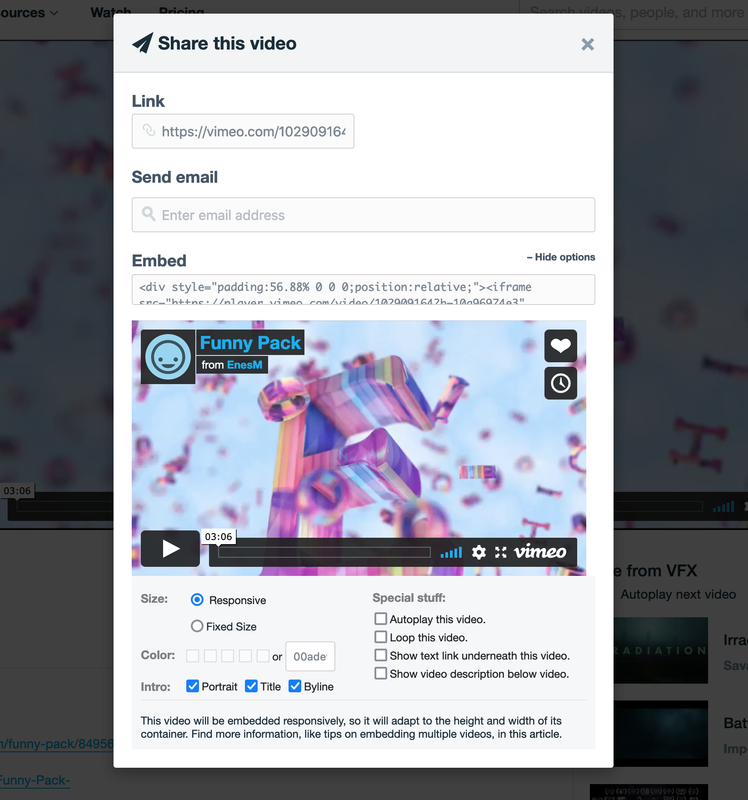
1. This is embed code:

<iframe src="https://player.vimeo.com/video/596049991?h=4ea7171772&title=0&byline=0&portrait=0" style="width:100%;height:100%;margin:0 auto;" frameborder="0" allow="autoplay; fullscreen; picture-in-picture" allowfullscreen></iframe>

2. In case you want to show the highest score of the review, please download the attachment file then overwrite it to:

wp-content/plugins/penci-review/inc/functions.php

Regards,
PenciDesign.

littlepellizza replied

Customer Reply

exacltly where? in embed code? may u give me the correct embed code with centered video?

btw in penci review i see that final vote is an average of the others voice.It's possible force the final vote? Ther was game that have bad gfx or sound but nice playability and get vote higher ( example gfx 4 , sound 4 , playablity 8 - final vote 8 )

PenciDesign Supporter replied

Staff Reply

Hi,

If you want to align centre the iframe, add this code to the inline style:

margin:0 auto;

Regards,
PenciDesign.

littlepellizza replied

Customer Reply

thx i see that i can modify, and to get  video to the center? no is left side

width:100%;height:100%

PenciDesign Supporter replied

Staff Reply

Hi,

This is a modified embed code:

<iframe src="https://player.vimeo.com/video/596049991?h=4ea7171772&title=0&byline=0&portrait=0" style="position:absolute;top:0;left:0;width:100%;height:100%;" frameborder="0" allow="autoplay; fullscreen; picture-in-picture" allowfullscreen></iframe>

Regards,
PenciDesign.

littlepellizza replied

Customer Reply

i send the embed code

where i modify the wide?

PenciDesign Supporter replied

Staff Reply

Hi,

1. If you want to display video above the slider, please go to Appearance → Widgets: put video embedding code to HTML Widget and assign to Header Signup Form, then go to Appearance → Customize → Custom CSS, add the custom CSS code:

.penci-header-signup-form {
    padding: 0;
    margin: 30px 0;
    background: transparent;
}
2. You can resize the video width by modifying the embedding code OR install the use the Wonder Video Embed plugin: https://wordpress.org/plugins/wonderplugin-video-embed/

Regards,
PenciDesign.

littlepellizza replied

Customer Reply

i got it!

there is possible put above slideshow under the logo?

and resize the video window?

PenciDesign Supporter replied

Staff Reply

Hi,

You've pasted the wrong HTML embed code. Please go to the video you want to insert, config and get the code like the screenshot below:

image.png

Regards,
PenciDesign.


littlepellizza replied

Customer Reply

in insert embed code from a vimeo video

but there is to much white space up and down the video 

my site playretro.sviluppo.host

PenciDesign Supporter replied

Staff Reply

Hi,

You can add a video/slider under the featured slider by adding the custom HTML/Shortcode to Appearance → Customize → Featured Slider → General → Add Google Adsense/Custom HTML Code Below Featured Slider.

Regards,
PenciDesign.


littlepellizza replied

Customer Reply

ah

hope will possible in the future, i'd like to show a promo video/trailer under or up slideshow 

PenciDesign Supporter replied

Staff Reply

Hi,

If you choose to show the featured video background, the featured slider will be hidden.

Regards,
PenciDesign.


littlepellizza replied

Customer Reply

Dear , if i choose to show featured video background on the top,I have to give up  featured slider ?

littlepellizza replied

Customer Reply

yes elementator offer lots of flexibility ( even if must buy pro to get all features)

but i'm a beginner and have few time to work on the site ( i have a job) so i buy your template to get all easy.

I know that's impossible to get all things i like ( i thank u for support) but with elementator i must start from zero.

So i hope in the future the possibility to add a background like The Game News 2 Sidebar, to choose if put some featured categories up last post and some under .Also i see that The Game News 2 Sidebar have 2 featured categories style 1  in same line ( in your template is possible only with styles 2 or 14)

I like u'r template and hope will adds lots of new things .

Btw there is a plug in  for sidebar/footer that show random video from youtube/vimeo personal channel?

littlepellizza replied

Customer Reply

Game News 2 Sidebar customize only with elementator right?

hope in the future will add this option withouth using elementator

PenciDesign Supporter replied

Staff Reply

Hi,

1. You can use a WordPress backup solution to save your template then restore it in the future. Example: Updraft Plus

2. The Game News 2 Sidebar is built with the Elementor Page Builder, you can import this demo and customize it as you want.

Regards,
PenciDesign.


littlepellizza replied

Customer Reply

thx now is all ok! thx for help

it's possible save differente model of your template? so i can load wich i like ?

and i see in soledad-game-news-two-sidebars that top slider have  black baground with coulour effect /\\__/\\  how can get this?

PenciDesign Supporter replied

Staff Reply

Hi,

Your code doesn't work because you've inserted the wrong CSS syntax. 

Please replace all the custom CSS with this code:

.grid-post-box-meta span,
.grid-post-box-meta a {
    font-size: 12px
} .widget ul.penci-feed-2columns li .side-item .side-item-text h4 a {
    font-size: 12px
} .widget ul.side-newsfeed li .side-item .side-item-text h4 a {
    font-size: 12px
} .penci-sidebar-content .widget-title {
    margin: -10px -10px 30px;
} .penci-sidebar-content .widget {
    background: #fff;
    width: 60%;
    padding: 10px;
    box-shadow: 10px 10px 0px 0px rgba(189, 189, 189, 0.25);
    margin: 10px 10px 60px;
    border: 1px solid rgba(0, 0, 0, 0.1);
    border-radius: 10px;
    overflow: hidden;
    transition: all 0.3s ease-in-out;
    -moz-transform: translate(0, 0);
    -webkit-transform: translate(0, 0);
    -o-transform: translate(0, 0);
    -ms-transform: translate(0, 0);
    transform: translate(0, 0);
} .penci-sidebar-content .widget:hover {
    -moz-transform: translate(0, -15px);
    -webkit-transform: translate(0, -15px);
    -o-transform: translate(0, -15px);
    -ms-transform: translate(0, -15px);
    transform: translate(0, -15px);
} .penci-grid li .item>.thumbnail,
.penci-masonry .item-masonry>.thumbnail .hentry>.thumbnail {
    transition: all 0.3s ease-in-out;
    -moz-transition: all 0.3s ease-in-out;
    -webkit-transition: all 0.3s ease-in-out;
    -o-transition: all 0.3s ease-in-out;
    -ms-transition: all 0.3s ease-in-out;
    -moz-transform: translate(0, 0);
    -webkit-transform: translate(0, 0);
    -o-transform: translate(0, 0);
    -ms-transform: translate(0, 0);
    transform: translate(0, 0);
} .penci-grid li .item:hover>.thumbnail,
.penci-masonry .item-masonry:hover>.thumbnail .hentry:hover>.thumbnail {
    -moz-transform: translate(0, -15px);
    -webkit-transform: translate(0, -15px);
    -o-transform: translate(0, -15px);
    -ms-transform: translate(0, -15px);
    transform: translate(0, -15px);
} .penci-grid li .item,
.penci-masonry .item-masonry {
    padding: 40px;
    background: #fff;
    border-radius: 3%;
    border: 1px solid rgba(0, 0, 0, 0.1);
} .penci-grid li .item>.thumbnail,
.penci-masonry .item-masonry>.thumbnail .hentry>.thumbnail {
    margin: -15px -15px 30px;
    overflow: hidden;
    width: calc(100% + 30px);
} .penci-grid li .item,
.penci-masonry .item-masonry,
.home-featured-cat-content .mag-post-box {
    padding: 50px;
    background: #fff;
    border-radius: 3%;
    box-shadow: 10px 10px 0px 0px rgba(189, 189, 189, 0.25);
    border: 1px solid rgba(0, 0, 0, 0.1);
    transition: all 0.3s ease-in-out;
    -moz-transform: translate(0, 0);
    -webkit-transform: translate(0, 0);
    -o-transform: translate(0, 0);
    -ms-transform: translate(0, 0);
    transform: translate(0, 0);
} .penci-grid li .item:hover,
.penci-masonry .item-masonry:hover,
.home-featured-cat-content .mag-post-box:hover {
    -moz-transform: translate(0, -5px);
    -webkit-transform: translate(0, -5px);
    -o-transform: translate(0, -15px);
    -ms-transform: translate(0, -15px);
    transform: translate(0, -10px);
} .home-featured-cat-content .mag-post-box .magcat-thumb,
.home-featured-cat-content .mag-post-box .magcat-detail {
    margin-bottom: 60px;
} .home-featured-cat-content .mag-post-box {
    padding-bottom: 0;
} .container.penci_sidebar .penci-grid>li {
    width: 31%;
    margin-right: 3.5%;
} .container.penci_sidebar .penci-grid li:nth-of-type(2n+2),
.penci-grid li.grid-2-style:nth-of-type(2n+2),
.container.penci_sidebar .penci-grid li:nth-of-type(2n+1),
.penci-grid li.grid-2-style:nth-of-type(2n+1) {
    margin-right: 3.5%;
    clear: none;
} .container.penci_sidebar .penci-grid li:nth-of-type(3n+1),
.penci-grid li.grid-2-style:nth-of-type(3n+1) {
    clear: both;
} .container.penci_sidebar .penci-grid li:nth-of-type(3n+3),
.penci-grid li.grid-2-style:nth-of-type(3n+3) {
    margin-right: 0;
    clear: none;
} @media only screen and (min-width: 1170px) {
    .container {
        width: 100%;
        padding: 0 60px;
    }
} .penci-home-popular-post {
    margin-top: 30px;
    width: 89%; } .penci-sidebar-content .widget {
    width: 90%;
    padding: 0 60px;
} .penci-single-style-10 .penci-single-s10-content,
.container.penci_sidebar #main {
    width: 79%;
} .penci-sidebar-content {
    width: 21%;
} .container.penci_sidebar .penci-masonry .item-masonry,
.penci-masonry .item-masonry.grid-masonry-2 {
    width: calc(33.3333333333% - 30px);
    margin: 0 15px 30px;
} /* Featured Categories 3 Columns */
.home-featured-cat.mag-cat-style-2 {
    width: 31%;
    margin-right: 3.5%;
} #main .theiaStickySidebar>div.mag-cat-style-2:nth-of-type(2n+2),
#main>div.mag-cat-style-2:nth-of-type(2n+2) {
    margin-right: 3.5%;
} #main .theiaStickySidebar>div.mag-cat-style-2:nth-of-type(3n+2),
#main>div.mag-cat-style-2:nth-of-type(3n+2) {
    margin-right: 0;
} #main .theiaStickySidebar>div.mag-cat-style-2:nth-of-type(3n+3),
#main>div.mag-cat-style-2:nth-of-type(3n+3) {
    clear: both;
} /* Categories Bakground */
.penci-featured-infor .cat a.penci-cat-name,
.penci-grid .cat a.penci-cat-name,
.penci-masonry .cat a.penci-cat-name,
.penci-featured-infor .cat a.penci-cat-name {
    padding: 5px 10px;
    background: #f1f1f1;
    /* change the background color here */
    border-radius: 10px;
} .penci-featured-infor .cat a.penci-cat-name:after,
.penci-grid .cat a.penci-cat-name:after,
.penci-masonry .cat a.penci-cat-name:after,
.penci-featured-infor .cat a.penci-cat-name:after {
    display: none;
} .home-featured-cat-content.style-2 .mag-post-box .magcat-thumb {
    float: none;
    margin-bottom: 15px;
} .home-featured-cat-content.style-2 .mag-post-box .magcat-thumb .penci-image-holder.small-fix-size {
    width: 50%; } @media only screen and (min-width: 1170px) {     .container.penci_sidebar .penci-grid.penci-fea-cat-style-13>li,
    .penci-grid.penci-fea-cat-style-13>li {
        width: 25%;
    }     .container.penci_sidebar .penci-grid.penci-fea-cat-style-13>li:nth-child(3n+1),
    .penci-grid.penci-fea-cat-style-13>li:nth-child(3n+1) {
        clear: none;
    }     .container.penci_sidebar .penci-grid.penci-fea-cat-style-13>li:nth-child(4n+1),
    .penci-grid.penci-fea-cat-style-13>li:nth-child(4n+1) {
        clear: both;
    }
} .home-featured-cat-content.style-2 .mag-post-box .magcat-thumb {
    text-align: center;
} @media only screen and (max-width: 767px) {
    .home-featured-cat.mag-cat-style-2 {
        width: 100%;
        margin-right: 0;
        margin-bottom: 30px;
        clear: both;
    }     .theiaStickySidebar {
        position: static !important;
    }     .penci-single-style-10 .penci-single-s10-content,
    .container.penci_sidebar #main {
        width: 100%;
    }     .penci-masonry {
        padding: 0 30px 0 0;
    }
}

Regards,
PenciDesign.

littlepellizza replied

Customer Reply

i tried to clear cache on chrome and other 2 browser but didn't works

PenciDesign Supporter replied

Staff Reply

Hi,

Please add this CSS to your site, clear all the cache then check again.

I've tested this code on my device before reply to you.

Regards,
PenciDesign.


littlepellizza replied

Customer Reply

dosen't work

PenciDesign Supporter replied

Staff Reply

Hi,

Please add this CSS to your site:

@media only screen and (max-width: 767px) {
    .home-featured-cat.mag-cat-style-2 {
        width: 100%;
        margin-right: 0;
        margin-bottom: 30px;
        clear: both;
    }
    .theiaStickySidebar {
        position: static !important;
    }
    .penci-single-style-10 .penci-single-s10-content, .container.penci_sidebar #main {
        width: 100%;
    }
    .penci-masonry {
        padding: 0 30px 0 0;
    }
}

Regards,
PenciDesign.


littlepellizza replied

Customer Reply

Thx

I tested the site on mobile phone but there it 3 problem:

1- style 2 feutered categories : title of small post are cutted

2- style 13 : categories are one on the top of the other

3- at the end sidebar post are all missed, not showed, if i scroll down it return to the top

PenciDesign Supporter replied

Staff Reply

Hi,

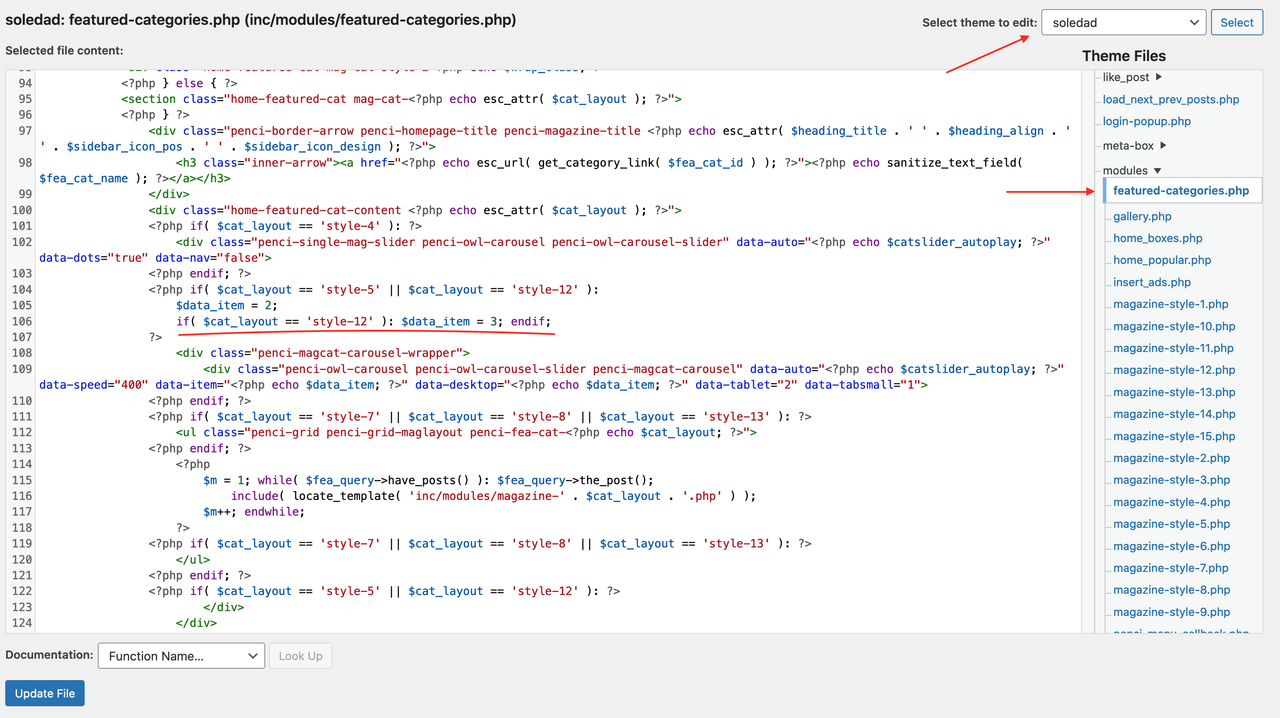
Please go to Appearance → Theme Editor:

- Select theme to edit: Soledad,

- Navigate to inc/modules/featured-categories.php,

Find:

if( $cat_layout == 'style-12' ): $data_item = 3; endif;

Replace to:

if( $cat_layout == 'style-12' ): $data_item = 4; endif;

Screen-Shot-2021-08-28-at-05-17-56.png

Regards,
PenciDesign.

littlepellizza replied

Customer Reply

sorry may faul because have only 3 post in that category. it's ok

it's possible have the same in the slider ? (style 12)

PenciDesign Supporter replied

Staff Reply

Hi,

it's ok for category 13 the title center but i ask if possible the 3 columbs centered or 
have a 4 (that cover the empy space to the right)

I've replied to this question in the previous reply, please read carefully and paste this CSS to your site. That code will show style 13 in 4 columns.

https://pencidesign.ticksy.com/ticket/2856827/#comment-15148988

Regards,
PenciDesign.


littlepellizza replied

Customer Reply

it's ok for category 13 the title center but i ask if possible the 3 columbs centered or have a 4 (that cover the empy space to the right)

thx

PenciDesign Supporter replied

Staff Reply

Hi,

Add this CSS:

.home-featured-cat-content.style-2,
.penci-fea-cat-style-13 .grid-header-box  {
    text-align: center;
}
.home-featured-cat-content.style-2 .first-post .magcat-detail .mag-header:after {
    left: 50%;
    right: 50%;
    margin-left: -30px;
}

Regards,
PenciDesign.


littlepellizza replied

Customer Reply

thx

-may have style 13 columbs centered ( now start form left)

-style 2  : the title under the thumbail centered

thx

PenciDesign Supporter replied

Staff Reply

Hi,

This is a CSS for your request:

@media only screen and (min-width: 1170px) {
    .container.penci_sidebar .penci-grid.penci-fea-cat-style-13 > li, .penci-grid.penci-fea-cat-style-13 > li {
        width: 25%;
    }
    .container.penci_sidebar .penci-grid.penci-fea-cat-style-13 > li:nth-child(3n+1), .penci-grid.penci-fea-cat-style-13 > li:nth-child(3n+1) {
        clear: none;
    }
    .container.penci_sidebar .penci-grid.penci-fea-cat-style-13 > li:nth-child(4n+1), .penci-grid.penci-fea-cat-style-13 > li:nth-child(4n+1) {
        clear: both;
    }
}
.home-featured-cat-content.style-2 .mag-post-box .magcat-thumb {
    text-align: center;
}

Regards,
PenciDesign.

littlepellizza replied

Customer Reply

It woks, but i like thumbail big as first , i modify wight 1005 to 50% and is ok but thumbail it's not centered

for the slider style slider it's possible to get a bit small? ora a 4 square

PenciDesign Supporter replied

Staff Reply

Hi,

1. Add this CSS to your site:

.home-featured-cat-content.style-2 .mag-post-box .magcat-thumb {
    float: none;
    margin-bottom: 15px;
} .home-featured-cat-content.style-2 .mag-post-box .magcat-thumb .penci-image-holder.small-fix-size {
    width: 100%;
}
2. There is no option to modify the columns on featured categories in the Customizer settings. You can only build the custom layout & slider via Elementor Page Builder.

Regards,
PenciDesign.


littlepellizza replied

Customer Reply

thanks for all

-It's possible for the small box in categories style 2 have title under the pictuter like the first big?

-in featured categories style slider i can choose slider with 1-2-3 columbs, possible to get 4 or 5 ?

PenciDesign Supporter replied

Staff Reply

Hi,

Please go to Appearance → Customize → Custom CSS then add the following custom CSS code:

/* Featured Categories 3 Columns */
.home-featured-cat.mag-cat-style-2 {
    width: 31%;
    margin-right: 3.5%;
} #main .theiaStickySidebar>div.mag-cat-style-2:nth-of-type(2n+2),
#main>div.mag-cat-style-2:nth-of-type(2n+2) {
    margin-right: 3.5%;
} #main .theiaStickySidebar>div.mag-cat-style-2:nth-of-type(3n+2),
#main>div.mag-cat-style-2:nth-of-type(3n+2) {
    margin-right: 0;
} #main .theiaStickySidebar>div.mag-cat-style-2:nth-of-type(3n+3),
#main>div.mag-cat-style-2:nth-of-type(3n+3) {
    clear: both;
} /* Categories Bakground */
.penci-featured-infor .cat a.penci-cat-name,
.penci-grid .cat a.penci-cat-name,
.penci-masonry .cat a.penci-cat-name,
.penci-featured-infor .cat a.penci-cat-name {
    padding: 5px 10px;
    background: #f1f1f1;
    /* change the background color here */
    border-radius: 10px;
} .penci-featured-infor .cat a.penci-cat-name:after,
.penci-grid .cat a.penci-cat-name:after,
.penci-masonry .cat a.penci-cat-name:after,
.penci-featured-infor .cat a.penci-cat-name:after {
    display: none;
}

Change #f1f1f1 to your background color.

Regards,
PenciDesign.


littlepellizza replied

Customer Reply

thanks it works! Ah i hope in the future u can add this choose. I use your costumize and now i can't return to Elementor because i must start from zero

Just other to question

1-categories text on the post in main page: i can choose colour but i didn't see if i can choose backgroud.It's possible ? also it's possible to trasform in a button like "READ MORE"  o "VIEW ALL"? 

2- With 3 columbs ( thx very much) i have now lots of page for featured categories,  can i add a 3 elements instead of of 2 if a i choose style 2 ( i send a pix) ???. I try to make 3 categories with style 2 but only 2 are in same line, the 3 go under

Also i think would be nice to have at least 2 columbs for all style

PenciDesign Supporter replied

Staff Reply

Hi,

1. Please modify the CSS to add the spacing at the bottom:

.container.penci_sidebar .penci-masonry .item-masonry, .penci-masonry .item-masonry.grid-masonry-2 {
    width: calc(33.3333333333% - 30px);
    margin: 0 15px 30px;
}

2. If you build your homepage with the Customizer settings, there is no way to put the Latest post middle of the featured categories. But you can build this layout by using the Elementor Page Builder.

Regards,
PenciDesign.


littlepellizza replied

Customer Reply

hi it's works bettween post left right  but not for bottom

i send a pix

also i ask u, i see that i can choose to put feautered all categories above last post o all under

i can choose to put some categories above e some under? so last post are in the middle

PenciDesign Supporter replied

Staff Reply

Hi,

Please modify the CSS code as below:

.container.penci_sidebar .penci-masonry .item-masonry, .penci-masonry .item-masonry.grid-masonry-2 {
    width: calc(33.3333333333% - 30px);
    margin: 0 15px;
}

Regards,
PenciDesign.


littlepellizza replied

Customer Reply

FINALLY WORKS!!

just a bit problem, there is nop space between post, can u add?

i send a pix

PenciDesign Supporter replied

Staff Reply

Hi,

Please add this CSS code to enable 3 columns on the masonry layout:

.container.penci_sidebar .penci-masonry .item-masonry, .penci-masonry .item-masonry.grid-masonry-2 {
    width: 33.3333333333%;
}

Regards,
PenciDesign.


littlepellizza replied

Customer Reply

Hi , sorry to bother you

it's possble to add the 3 columbs also in Grid Masonry Posts layout  so i can test uf works fine like i need?

thx

littlepellizza replied

Customer Reply

You are right, i don't care image size beacuse template resize for me all.

It's very very hard for me to get all same size iamge beacause in originale come different

i try  "Grid Masonry Posts" and is like i i want!!! but there is only 2 columbs instead of  3

may u add ?

PenciDesign Supporter replied

Staff Reply

Hi,

The problem because you've uploaded many image sizes for blog posts, please resize it correctly on your PC before upload.

In case if you want to display mixed image size, you should select your post as a masonry layout.

Regards,
PenciDesign.


littlepellizza replied

Customer Reply

i send a pix to explain well

in your template all feautered last post image are same lenght

in my old are a different lenght to adapt the container

littlepellizza replied

Customer Reply

does not works image in main page last post are still cropped

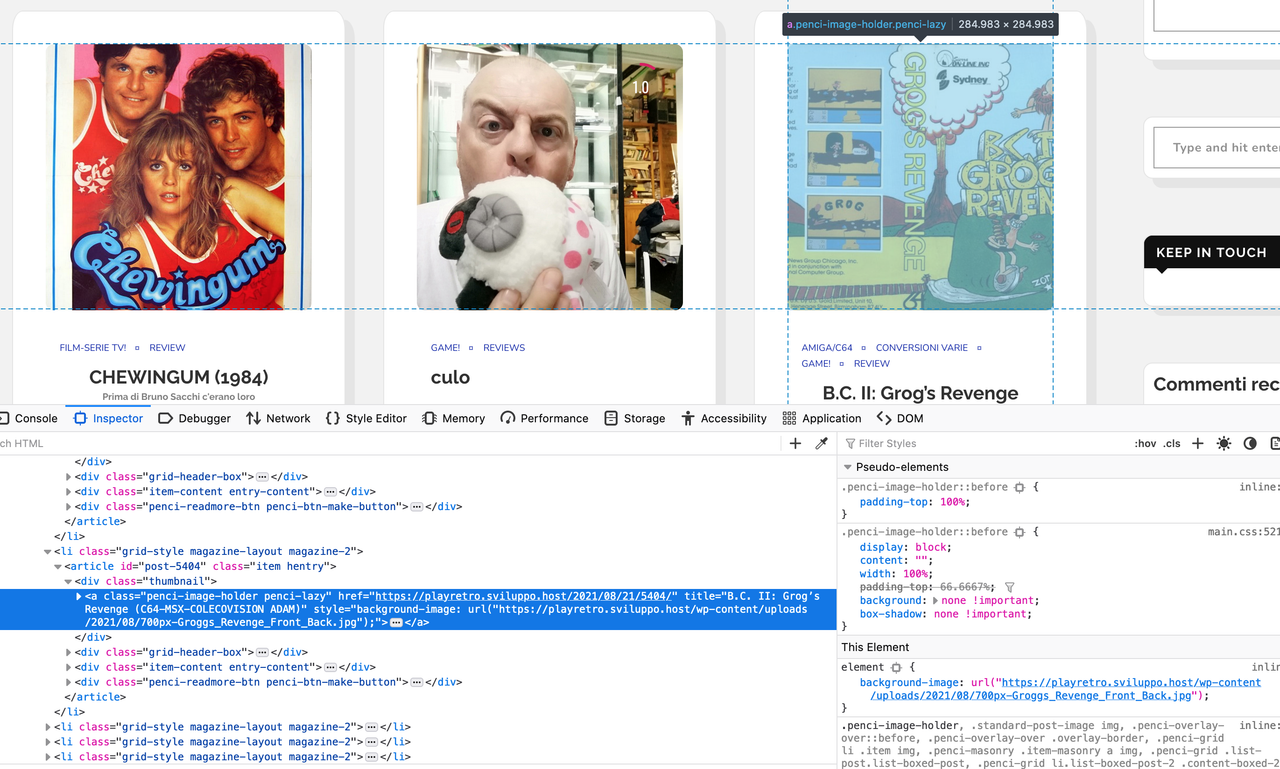
there is a choice that is not horizontal, vertical or square that display the iamge thumbail resized but full?

PenciDesign Supporter replied

Staff Reply

Hi,

About the image auto crop, please go to Appearance → Customize → Speed Optimization → General & Lazyload: check Disable Lazyload Images on All Posts Layouts & Widgets option then reload your page.

Regards,
PenciDesign.


littlepellizza replied

Customer Reply

hi are still cropped

i resend the pix to explain well

If us see the thunmbaill on my original site  ( www.littlepellizza.club) have the name of actors abow e below ( the tempalte resize correctly) in your is cropped

PenciDesign Supporter replied

Staff Reply

Hi,

All images on your site now display as full size, please clear your browser cache then check again.

image.png

Regards,
PenciDesign.


PenciDesign Supporter replied

Staff Reply

Hi,

I've written in the previous reply: this code will display all thumbnails as a full size - original image when you upload without resize.

Regards,
PenciDesign.


littlepellizza replied

Customer Reply

i tried but does not effect

PenciDesign Supporter replied

Staff Reply

Hi,

Please install the Code Snippet plugin, then create a new snippet with the following content:

if ( ! function_exists( 'penci_get_featured_image_size' ) ) {
    function penci_get_featured_image_size( $id, $size = 'full' ) {
        if ( ! has_post_thumbnail( $id ) ) {
            $image_holder = get_template_directory_uri() . '/images/no-image.jpg';
            return $image_holder;
        } else {
            $image_html = get_the_post_thumbnail( $id, 'full' );
            preg_match( '@src="([^"]+)"@', $image_html, $match );
            // Speed Optimizer
            if( empty($match) || strpos($match[count($match)-1],';base64,')!==false || strpos($match[count($match)-1],apply_filters('hpp_defer_src_holder', ';base64,'))!==false ){
                preg_match( '#(data-src|'.md5('hw-attr-data-src').')="(.*?)"#', $image_html, $match );
            }
            $src = array_pop( $match );
            $src_check = substr( $src, -4 );             if( $src_check == '.gif' ){
                $image_full = get_the_post_thumbnail( $id, 'full' );
                preg_match( '@src="([^"]+)"@', $image_full, $match_full );
                // Speed Optimizer
                if( empty($match_full) || strpos($match_full[count($match_full)-1],';base64,')!==false || strpos($match_full[count($match_full)-1],apply_filters('hpp_defer_src_holder', ';base64,'))!==false ){
                    preg_match( '#(data-src|'.md5('hw-attr-data-src').')="(.*?)"#', $image_full, $match_full );
                }
                $src = array_pop( $match_full );
            }             return esc_url( $src );
        }
    }
}
This code will force display all thumbnails as a full size.

Regards,
PenciDesign.


littlepellizza replied

Customer Reply

i see the option : Appearance → Customize → General → General Settings: Featured Images Type.

But no one has the same result like my old site : i try horizontal, square vertical but nothing


i send a pix to see difference.It's possible to have full pix resized? and not cropped

PenciDesign Supporter replied

Staff Reply

Hi,

1. Please add the CSS to your site:

.penci-sidebar-content .widget {
    width: 100%;
} .penci-single-style-10 .penci-single-s10-content,
.container.penci_sidebar #main {
    width: 79%;
} .penci-sidebar-content {
    width: 21%;
}
2. You change the image size display by going to Appearance → Customize → General → General Settings: Featured Images Type.

Regards,
PenciDesign.


littlepellizza replied

Customer Reply

it's works! Thx

it's possible have widget more to right (5cm +0-)

also i see that image in latest post are cut and less clear

my old template set variable box whide to adapt image , i think (www.littlepellizza.club)

it's possible to get same thing?

PenciDesign Supporter replied

Staff Reply

Hi,

Please try to add this CSS:

.penci-home-popular-post {
   margin-top: 30px;
}

Regards,
PenciDesign.


littlepellizza replied

Customer Reply

thx it's works but popular post title is covered ( see pix)

it's possbile to reduce popolar post of 30% or 40% ? and see the title?

PenciDesign Supporter replied

Staff Reply

Hi,

Please add this CSS code:

@media only screen and (min-width: 1170px) {
   .container {
      width: 100%;
      padding: 0 60px;
   }
}

Regards,
PenciDesign.


littlepellizza replied

Customer Reply

thanks for the css code, but i see that use always the center space in homepage , in my old template use also the empty space to left to get big post

if yes

Also is possble that is compatible with featured categories ?

for a better understanding  this is my old site : https://www.littlepellizza.club

i like to use left empty space both latest post and featured categories

PenciDesign Supporter replied

Staff Reply

Hi,

1. Elementor is a page builder, help you build a custom layout & element from the scratch, this plugin doesn't support edit the homepage build with Customizer,

2. You can use the free version of Elementor without any limit. Please read the document & tutorial video here: http://soledad.pencidesign.com/soledad-document/#homepage

3. If you want to show the latest post as 3 columns, you can use this CSS:

.container.penci_sidebar .penci-grid > li {
   width: 31%;
   margin-right: 3.5%;
} .container.penci_sidebar .penci-grid li:nth-of-type(2n+2),
.penci-grid li.grid-2-style:nth-of-type(2n+2),
.container.penci_sidebar .penci-grid li:nth-of-type(2n+1),
.penci-grid li.grid-2-style:nth-of-type(2n+1) {
   margin-right: 3.5%;
   clear: none;
} .container.penci_sidebar .penci-grid li:nth-of-type(3n+1),
.penci-grid li.grid-2-style:nth-of-type(3n+1) {
   clear: both;
} .container.penci_sidebar .penci-grid li:nth-of-type(3n+3),
.penci-grid li.grid-2-style:nth-of-type(3n+3) {
   margin-right: 0;
   clear: none;
}

Regards,
PenciDesign.


littlepellizza replied

Customer Reply

thanks for all

i try to use elementor to get 3 columbs , but i can't edit current template. It's make me start a new with empty body

Also i see most options are for pro.

Hope in the futures u add a style with 3 columbs and sidebar like in my old template. I really like if u can

PenciDesign Supporter replied

Staff Reply

Hi,

Please add this CSS to your site:

.home-featured-cat-content .mag-post-box .magcat-thumb,
.home-featured-cat-content .mag-post-box .magcat-detail {
    margin-bottom: 30px;
}  .home-featured-cat-content .mag-post-box {
    padding-bottom: 0;
 }

Regards,
PenciDesign.

littlepellizza replied

Customer Reply

semms all works

excpet for the bottom of post pix on menu style2 featured categories

i send a pix

PenciDesign Supporter replied

Staff Reply

Hi,

Please add this CSS to your site:

.penci-grid li .item, .penci-masonry .item-masonry,
.home-featured-cat-content .mag-post-box {
    padding: 15px;
    background: #fff;
    border-radius: 3%;
    box-shadow: 10px 10px 0px 0px rgba(189,189,189,0.25);
    border: 1px solid rgba(0,0,0,0.1);
     transition: all 0.3s ease-in-out;
    -moz-transform: translate(0, 0);
    -webkit-transform: translate(0, 0);
    -o-transform: translate(0, 0);
    -ms-transform: translate(0, 0);
    transform: translate(0, 0);
} .penci-grid li .item:hover, .penci-masonry .item-masonry:hover,
.home-featured-cat-content .mag-post-box:hover {
    -moz-transform: translate(0, -5px);
    -webkit-transform: translate(0, -5px);
    -o-transform: translate(0, -5px);
    -ms-transform: translate(0, -5px);
    transform: translate(0, -5px);
}

Regards,
PenciDesign.


littlepellizza replied

Customer Reply

i see also that trsformation affect only the pix, it's possible have all post have the effect? i have this in my old tempalte

also in transition get shadow

littlepellizza replied

Customer Reply

Thx for all

hope this was my last question

Get all this also for "featured categories" ? I see not changed

-white background

-transformation effect

PenciDesign Supporter replied

Staff Reply

Hi,

Please modify the CSS code like this:

.penci-grid li .item, .penci-masonry .item-masonry {
    padding: 15px;
    background: #fff;
    border-radius: 3%;
    border: 1px solid rgba(0,0,0,0.1);
}
.penci-grid li .item > .thumbnail,
.penci-masonry .item-masonry > .thumbnail
.hentry > .thumbnail {
    overflow: hidden;
    width: calc(100% + 30px);
}

Regards,
PenciDesign.

littlepellizza replied

Customer Reply

it's works but i like more white on the left ,right top

PenciDesign Supporter replied

Staff Reply

Hi,

Please add this CSS to your site:

.penci-grid li .item, .penci-masonry .item-masonry {
    padding: 15px;
    background: #fff;
    border-radius: 3%;
    border: 1px solid rgba(0,0,0,0.1);
} .penci-grid li .item > .thumbnail,
.penci-masonry .item-masonry > .thumbnail
.hentry > .thumbnail {
    margin: -15px -15px 30px;
    overflow: hidden;
    width: calc(100% + 30px);
}

Regards,
PenciDesign.


littlepellizza replied

Customer Reply

really thanks again

another question 

i set background light grey , how i can set post in main page to white

i send u an example of may old template ( sorry to bother you with all this question)

PenciDesign Supporter replied

Staff Reply

Hi,

Please add this CSS to apply the transition to your post thumbnail:

.penci-grid li .item > .thumbnail, .penci-masonry .item-masonry > .thumbnail
.hentry > .thumbnail {
    transition: all 0.3s ease-in-out;
    -moz-transition: all 0.3s ease-in-out;
    -webkit-transition: all 0.3s ease-in-out;
    -o-transition: all 0.3s ease-in-out;
    -ms-transition: all 0.3s ease-in-out;
    -moz-transform: translate(0, 0);
    -webkit-transform: translate(0, 0);
    -o-transform: translate(0, 0);
    -ms-transform: translate(0, 0);
    transform: translate(0, 0);
} .penci-grid li .item:hover > .thumbnail, .penci-masonry .item-masonry:hover > .thumbnail
.hentry:hover > .thumbnail  {
    -moz-transform: translate(0, -15px);
    -webkit-transform: translate(0, -15px);
    -o-transform: translate(0, -15px);
    -ms-transform: translate(0, -15px);
    transform: translate(0, -15px);
}

Regards,
PenciDesign.

littlepellizza replied

Customer Reply

really thanks!

i can get the transition effect aldo fo the post in main page?

PenciDesign Supporter replied

Staff Reply

Hi,

Please go to Appearance → Customize → Custom CSS then add the following custom CSS code:

.penci-sidebar-content .widget-title {
    margin: -10px -10px 30px;
} .penci-sidebar-content .widget {
    padding: 10px;
    box-shadow: 10px 10px 0px 0px rgba(189,189,189,0.25);
    margin: 10px 10px 60px;
    border: 1px solid rgba(0,0,0,0.1);
    border-radius: 10px;
    overflow: hidden;
    transition: all 0.3s ease-in-out;
    -moz-transform: translate(0, 0);
    -webkit-transform: translate(0, 0);
    -o-transform: translate(0, 0);
    -ms-transform: translate(0, 0);
    transform: translate(0, 0);
} .penci-sidebar-content .widget:hover {
    -moz-transform: translate(0, -15px);
    -webkit-transform: translate(0, -15px);
    -o-transform: translate(0, -15px);
    -ms-transform: translate(0, -15px);
    transform: translate(0, -15px);
}

Regards,
PenciDesign.


littlepellizza replied

Customer Reply

i'll try.

last question

how can get left widgets  with this effect? i send a pix .In my old tempalte give me a css code to get shdow and border

also how can get every post or widget have moving effect when pass mouse over?

PenciDesign Supporter replied

Staff Reply

Hi,

In case if you want to build your Categories post in 3,4 or 5 columns, please using the Elementor Page Builder. The current version of Soledad already supports this layout.

For more information, please read the document & video tutorial here: https://soledad.pencidesign.net/soledad-document/#homepage

Regards,
PenciDesign.

PenciDesign Supporter replied

Staff Reply

Hi,

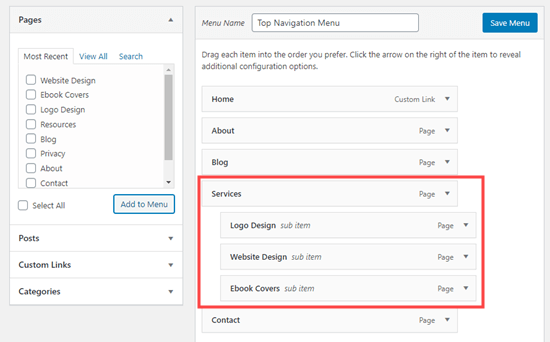
As you saw on the image below, all the sub-menu indent under Services is a child menu. For example: if you set the Services menu as the mega menu item, you MUST delete all the child menu.

image.png

For more information, please read the document here: http://soledad.pencidesign.com/soledad-document/#menu

Regards,
PenciDesign.


littlepellizza replied

Customer Reply

in the future your template will support 3 columbs instead of two? in my old site the template gets 3 columbs  ( i send a pix)

aLso in old template when i pass mouse over a post it's move to me (like a little pop up)

littlepellizza replied

Customer Reply

ok i find it, it's menu tree that i used! thanks for support

PenciDesign Supporter replied

Staff Reply

Hi,

Please delete all child menu of the menu you’ve set as mega menu. Menu item you selected to display category mega menu need to be top level of your menu and this menu item doesn't have any child menu items.

Regards,
PenciDesign.

littlepellizza replied

Customer Reply

really thanks!

i have another problem ( i don't want tyo open ticket again)

in mega menu i got double choose , how i can delete the bottom?

i send u a pix

PenciDesign Supporter replied

Staff Reply

Hi,

If you want to show your category post similar to the screenshot you've sent, you must select display as Style 2.

Regards,
PenciDesign.


littlepellizza replied

Customer Reply

i select style 1 for both Ps4 e nintendo switch but i can't get double columbs

i send a pix

PenciDesign Supporter replied

Staff Reply

Hi,

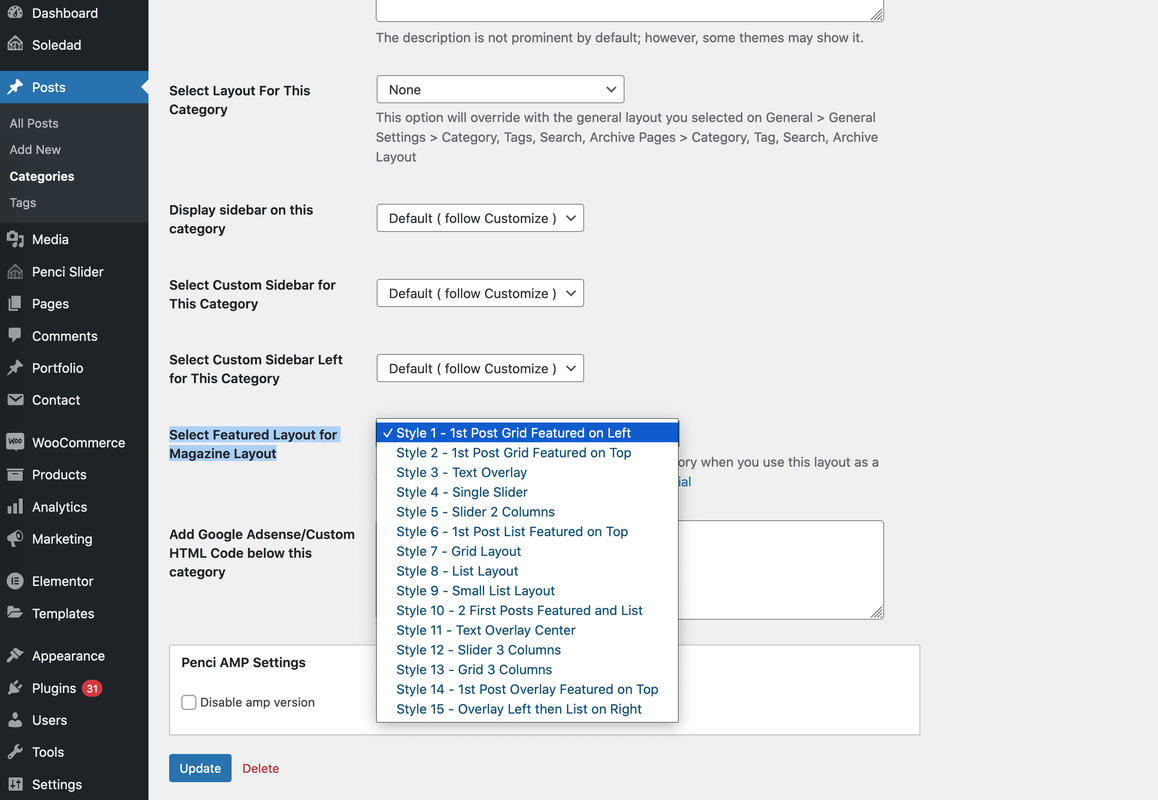
Please go to your site Dashboard → Posts → Category, click the Edit link on the category you want to edit, then select the layout display at Select Featured Layout for Magazine Layout.

image.png

Regards,
PenciDesign.


littlepellizza started the conversation

Conversation Start

Hi i have your nice template soledad but i can get Featured Categories like in u'r demo ( i send u a pix) i try so see the tutorial but i get only to choose style 14 in categories and get first post with pix than only text .How can get like the pix in u'r demo?

Want to join this conversation or access attachments? Sign in first.