Skip to content
Public Ticket #17981

Post format data

Conversation thread

PenciDesign Supporter replied

Staff Reply

Hi,

The comment count number locate in the WP Bakery Page Builder, please go to the page you've added this element, edit the Featured Slider, then check the Hide Comment Count option:

image.png

Regards,
PenciDesign.


nightstorm replied

Customer Reply

Thanks :)

I know that there is checkbox to disable post view count but i don't see one to disable comment count on the main page, is there another way to disable it ?

PenciDesign Supporter replied

Staff Reply

Hi,

Unfortunately, the current version doesn't support count total view for Pages. You can install the Page view count plugin to implement this feature to your site: https://wordpress.org/plugins/page-views-count/

Regards,
PenciDesign.


nightstorm replied

Customer Reply

I was talking about a page no a post (article)

PenciDesign Supporter replied

Staff Reply

Hi,

Please clear your browser cache then check again. The post view now showing correctly.

image.png

Regards,
PenciDesign.


nightstorm replied

Customer Reply

It's enable as you can see here.

PenciDesign Supporter replied

Staff Reply

Hi,

Please go to Appearance → Customize → Single Posts Options: make sure you uncheck Hide Post Count View option.

Regards,
PenciDesign.


nightstorm replied

Customer Reply

I've added LiteSpeed Cache, i will let you know. 

Is it possible to add the view count on a single page ?

Regards

nightstorm replied

Customer Reply

Ok cause i 've got a weird issue, the website is poorly loading on mobile, got some timeout page and just after when i try on my computer it does the same...

ERR_FAILED on google Chrome

PenciDesign Supporter replied

Staff Reply

Hi,

No. Our team already develop and included the plugin name Penci PenNews AMP, please install it on the Dashboard → PenNews → Install The Required Plugins.

Regards,
PenciDesign.


nightstorm replied

Customer Reply

Thanks for this :)

I've noticed that your template is using AMP,  should i need the AMP plugin on the wordpress plugin store ?

Regards

PenciDesign Supporter replied

Staff Reply

Hi,

Please go to Appearance → Customize → Additional CSS then add the following custom CSS code:

body:not(.home) .penci-container {
    background: #000;
    padding: 30px;
}

Regards,
PenciDesign.


nightstorm replied

Customer Reply

Thanks, hope you will add it :)

I've managed to add a black background for the front page, but can i do you on a single page or article page ?

PenciDesign Supporter replied

Staff Reply

Hi,

1. You can change the body background by picking the background colour on WP Bakery Page Builder for the section & columns you want.

image.png

2. Unfortunately, the current version doesn't support add links to the featured image, we'll consider adding this in the future release.

Regards,
PenciDesign.


nightstorm replied

Customer Reply

Another question, is it possible to have a whole back background behind the body ?

I want to only have the background image on the sides and a black background behind the content.

https://ark-france.fr/wordpress/

nightstorm replied

Customer Reply

Working fine thanks :)

In that block, is it possible to make the picture clickable instead of only the title ? 

PenciDesign Supporter replied

Staff Reply

Hi,

Please go to Appearance → Customize → Additional CSS then add the following custom CSS code:

.penci-social-buttons .fa {
    font-family: 'FontAwesome';
}

Regards,
PenciDesign.


nightstorm replied

Customer Reply

Hi again, it seems that when i use "Use Fontawesome Version 5" The sharing icons like facebook, twitter, doesn't show anymore as you can see on my attachment

nightstorm replied

Customer Reply

Thanks for your help :)

PenciDesign Supporter replied

Staff Reply

Hi,

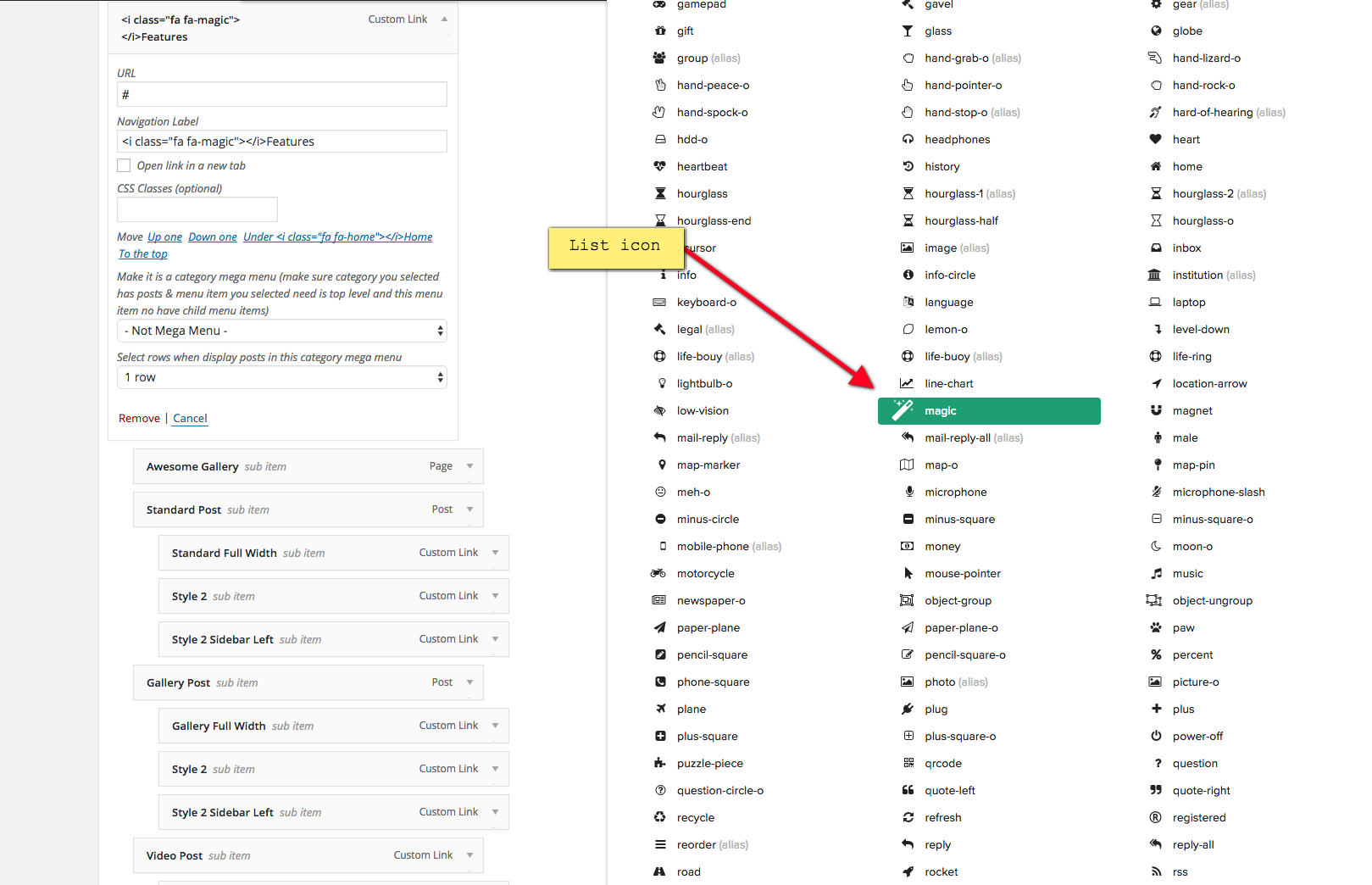
Please follow the instruction to add the icon to your menu:

  1. See list icons here
  2. Go to Dashboard > Appearance > Menu and fill "Navigation Label" of your menu with this code: <i class="fa fa-home"></i>
  3. Change the text "home" in the above code to the icon name you want to display

For example, I want to add the icon "magic" to my menu, I will change the above code to: <i class="fa fa-magic"></i>

menu-icon.png

Regards,
PenciDesign.

nightstorm replied

Customer Reply

Working :) Thanks 

Another question, is it possible to add icon on the main menu ?

PenciDesign Supporter replied

Staff Reply

Hi,

Please manually select the post format type on the top of the sidebar:

image.png

Regards,
PenciDesign.


nightstorm started the conversation

Conversation Start

Hi there, 

i' was trying to set up a video with the post custom format data, but everytime i set the video link and save my post. It's back to standard format.

Any clue ?

Regards

Want to join this conversation or access attachments? Sign in first.