Skip to content
Public Ticket #18039

Avoid post from child categories

Conversation thread

PenciDesign Supporter replied

Staff Reply

Hi @weslei,

Please create a new private ticket with your WordPress admin account.

I'll check and help you.

Regards,
PenciDesign.


weslei replied

Customer Reply
Good morning, I have a problem with the categories, like before the categories and subcategories were separated right, in the mobile and tablet versions the menu is correct but in the PC version when I place the mouse pointer on top it shows all the categories and subcategories I created .

PenciDesign Supporter replied

Staff Reply

Hi,

Please modify the PHP code like this:

if ( !function_exists('fb_filter_child_cats') ) {
    function fb_filter_child_cats( $cats ) {
        global $wp_query, $wpdb;
        if ( is_category() ) {
            // get children ID's
            $catID = (int) $wp_query->get('cat');
            if ( $excludes = get_categories( [ 'child_of' => $catID ] ) ) {
                // set array with ID's
                foreach ( $excludes as $key => $value ) {
                    $exclude[] = (int) $value->cat_ID;
                }
            }
            // remove child cats
            if ( isset($exclude) && is_array($exclude) ) {
                $cats .= " AND " . $wpdb->prefix . "term_relationships.term_taxonomy_id NOT IN (" . implode(",", $exclude) . ") ";
            }
        }
        return $cats;
    }
    if ( !is_admin() ) {
        add_filter( 'posts_where', 'fb_filter_child_cats' );
    }
}

Regards,
PenciDesign.


fioridizuccaimmagine replied

Customer Reply

Hi, the code I used to exclude posts of child categories in parent categories doesn't work anymore with wordpress 6. 

Actually it shows me an empty parent category .

Can you tell me if there is a way to see in my categories only post that belong to that category with seeing the ones of child categories?

PenciDesign Supporter replied

Staff Reply

Hi,

Yes. This code also works by the concept you want. I'll find another solution with the best performance then update this ticket soon.

Regards,
PenciDesign.


fioridizuccaimmagine replied

Customer Reply

It seems that this code works well, what do you think about?

if ( !function_exists('fb_filter_child_cats') ) {
    function fb_filter_child_cats( $cats ) {
        global $wp_query, $wpdb;
        if ( is_category() ) {
            // get children ID's
            if ( $excludes = get_categories( "child_of=" . $wp_query->get('cat') ) ) {
                // set array with ID's
                foreach ( $excludes as $key => $value ) {
                    $exclude[] = $value->cat_ID;
                }
            }
            // remove child cats
            if ( isset($exclude) && is_array($exclude) ) {
                $cats .= " AND " . $wpdb->prefix . "term_relationships.term_taxonomy_id NOT IN (" . implode(",", $exclude) . ") ";
            }
        }
        return $cats;
    }
    if ( !is_admin() ) {
        add_filter( 'posts_where', 'fb_filter_child_cats' );
    }
}


fioridizuccaimmagine replied

Customer Reply

Thanks, I put it in child theme functions file and now it is ok.

PenciDesign Supporter replied

Staff Reply

Hi,

This file is still not enough data to debug your site. Can I check your site via TeamViewer?

Regards,
PenciDesign.


PenciDesign Supporter replied

Staff Reply

Hi,

Please go to your Dashboard → Tools → Export, choose All content, then upload the export file here. I need to check your post settings.

Regards,
PenciDesign.


PenciDesign Supporter replied

Staff Reply

Hi,

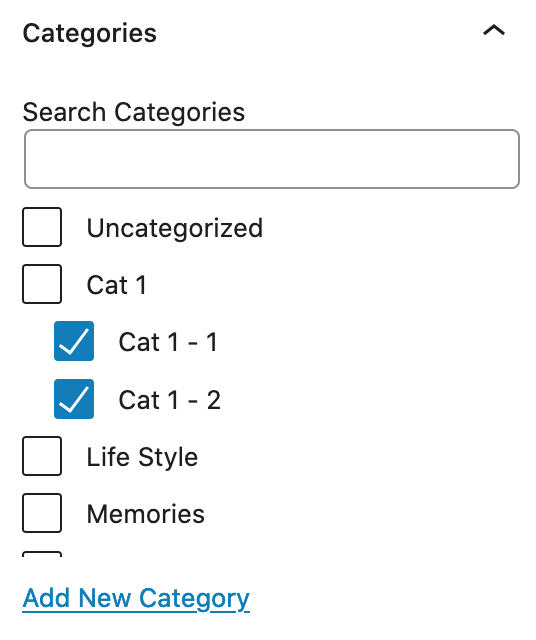
If you want this post doesn't visible in the parent cat (cat1), please do not select this category while editing a post.

image.png

Regards,
PenciDesign.


fioridizuccaimmagine replied

Customer Reply

Actually I'm working on it in a local path.

I didn't understand if you got the problem,

I have a parent category "cat1" and inside two child categories "cat1-1" and "cat1-2",

the post will have as categories cat1-1 and cat1-2,

so the question is "that post will be visible in categories page like cat1-1 and cat1-2 or also in cat1 list posts?

PenciDesign Supporter replied

Staff Reply

Hi,

Please send me your site credential in a PRIVATE reply, I'll edit a demo post for you.

Regards,
PenciDesign.


PenciDesign Supporter replied

Staff Reply

Hi,

No. This is not a bug. Your post will show all categories you've selected on the post editor.

Regards,
PenciDesign.


fioridizuccaimmagine started the conversation

Conversation Start

Hi, I've noticed that in a parent category I see also posts from child categories.

Is it a bug? How I can disable this?

Want to join this conversation or access attachments? Sign in first.