Skip to content
Public Ticket #18263

edit

Conversation thread

PenciDesign Supporter replied

Staff Reply

Hi,

Please expand the Soledad Instagram Feed settings, enter the columns of images you want to display at Number of Columns: option.
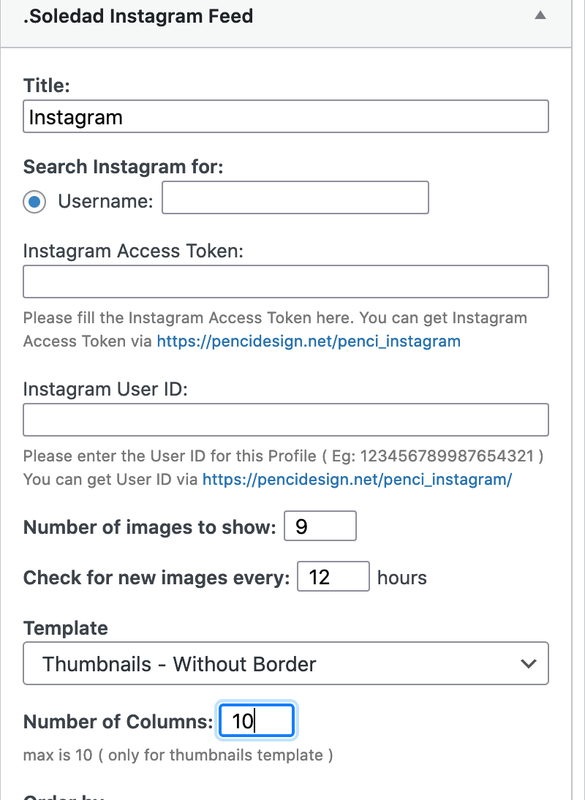
image.png

Regards,
PenciDesign.


Paxos Magazine replied

Customer Reply

The problem now is that the inserted images are huge, how can I set them as small as they appear in the demo?

PenciDesign Supporter replied

Staff Reply

Hi,

Do you mean the top image on the header? This is an Instagram image feed, please go to Appearance → Widgets: select a .Soledad Instagram Feed, assign it to the Top Instagram area as the screen below:

image.png

Then config the .Soledad Instagram Feed widget by going to https://pencidesign.net/penci_instagram/, get the token information then fill it out on the Instagram Widget settings.

Note: All the Instagram Access Token is only available in 60 days, you must create a new token after that time: https://developers.facebook.com/docs/instagram-basic-display-api/guides/long-lived-access-tokens/

Regards,
PenciDesign.

Paxos Magazine started the conversation

Conversation Start

I leave you attached the image of what I would like to add in the site only that I do not succeed to find

Want to join this conversation or access attachments? Sign in first.