Skip to content
Public Ticket #18406

Categories in mega menu

Conversation thread

PenciDesign Supporter replied

Staff Reply

Hi,

Unfortunately, the current version of Soledad doesn't support displaying child category as the row instead of columns, We'll consider and try to implement this feature in the future update.

Regards,
PenciDesign.

Dani replied

Customer Reply

No, I don't think you understand what I mean.

Category A is the top level category, with categories b-z as child categories.

I want to display Category A as mega menu and choose which child categories are shown in the rows (not columns) of the megamenu.

Or will it not work?

PenciDesign Supporter replied

Staff Reply

Hi,

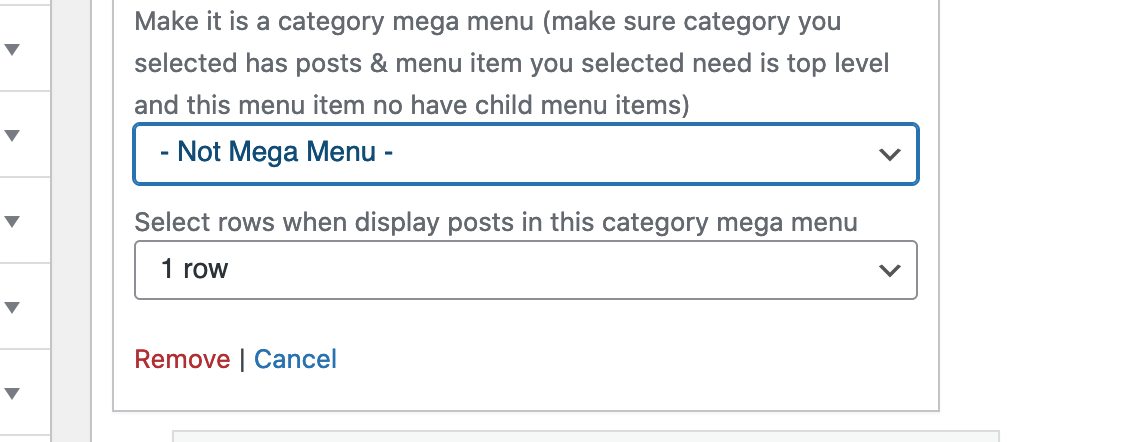
Please go to Appearance → Menus, select the menu item you want to show as Megamenu, then select the Category and row you want to show as the screenshot below:

image.png

Please note The menu item you selected to display the category mega menu needs to be the top level of your menu and this menu item doesn't have any child menu items.

Regards,
PenciDesign.


Dani started the conversation

Conversation Start

Hello,

I'd like to ask how to determine which categories are shown in a mega menu? In your tutorial video I see how I could possibly arrange the columns, but I'd rather know how to choose the rows of categories that are displayed when I have plenty of subcategories.

Best regards

Want to join this conversation or access attachments? Sign in first.