Skip to content
Public Ticket #18463

Menu Item Colors

Conversation thread

PenciDesign Supporter replied

Staff Reply

Hi,

Here is a class name of the current menu item, you can modify it as you want:

#navigation.menu-item-padding .menu > li.current-menu-item > a {
    color: #fff;
}

Regards,
PenciDesign.

fuse2marketing replied

Customer Reply

Any way to do this with CSS? I couldn't figure the combination of classes to find the "current" menu item. 

PenciDesign Supporter replied

Staff Reply

Hi,

Unfortunately, there is no option to add the color for each category in the menu item. We'll consider adding this as an extra feature in the future update.

Regards,
PenciDesign.


fuse2marketing replied

Customer Reply

This worked great. I'm also trying to change the current menu item colors in archive posts. I also want them to be different colors depending on the category. It defaults to the universal color.

PenciDesign Supporter replied

Staff Reply

Hi,

By default, all the color menus will have the same color. If you want to show color for each individual menu item, you must have some knowledge about HTML & CSS.

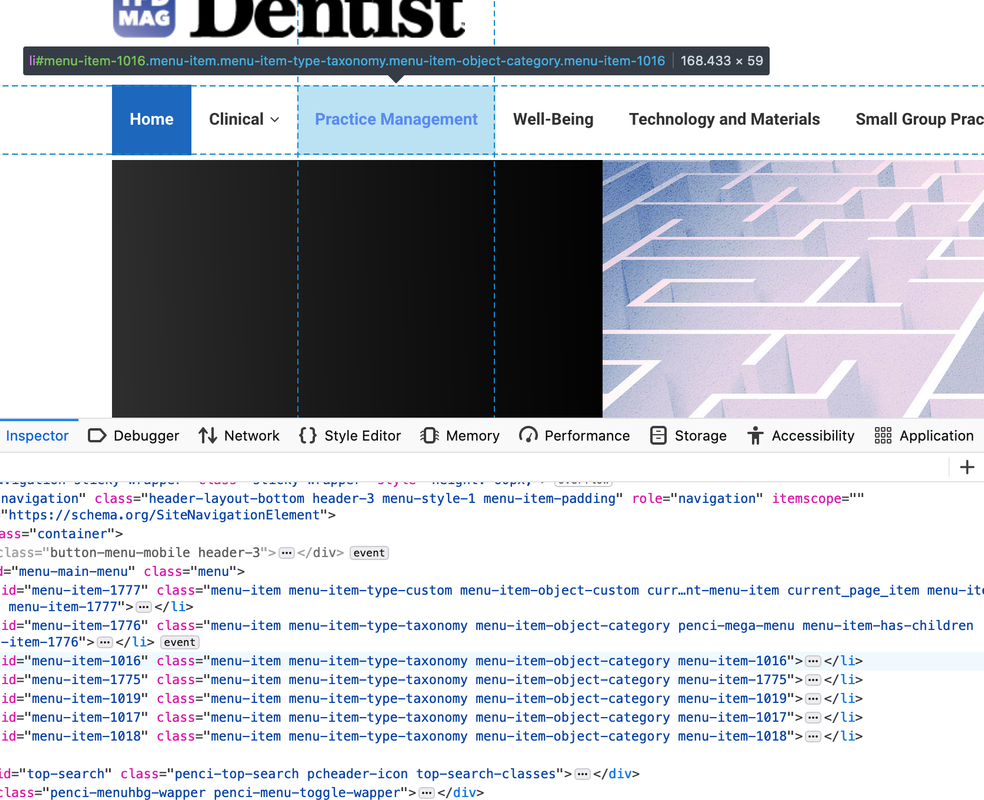
For example the color of the "Practice Management" item"

#navigation.menu-item-padding ul.menu > li#menu-item-1016 > a {
    color: blue;
}
#navigation.menu-item-padding ul.menu > li#menu-item-1016 > a:hover {
    color: #fff;
}

#menu-item-1016 is the ID of the menu item, you can find the menu item by opening the browser development mode:

image.png

Regards,
PenciDesign.


fuse2marketing started the conversation

Conversation Start

How can I change the color of each individual menu item? For instance, I want "Clinical" to be orange, "Practice Management" to be blue, etc. 

I also want the hover to be individually color coded.

Thank you!

Want to join this conversation or access attachments? Sign in first.