Skip to content
Public Ticket #18478

Pin button

Conversation thread

PenciDesign Supporter replied

Staff Reply

Hi,

This featured still in the development list and is not available in this update.

Regards,
PenciDesign.


tim-nieuwpoort replied

Customer Reply

Hi,

After the latest updates, I still don't see the Pin it button. I use 'recipe card layout 1'

Kind regards,

Tim

tim-nieuwpoort replied

Customer Reply

Thanks, you can close this ticket. I'll wait for the update :)

PenciDesign Supporter replied

Staff Reply

Hi,

Yes. We'll update this function in a future update.

In case you can't modify this file by yourself, please send me your site login information in a private reply. I'll help you edit.

Regards,
PenciDesign.


tim-nieuwpoort replied

Customer Reply

Hi,

Thanks, but I'd rather not mess with the php. Is it possible to fix it in the next update?

PenciDesign Supporter replied

Staff Reply

Hi,

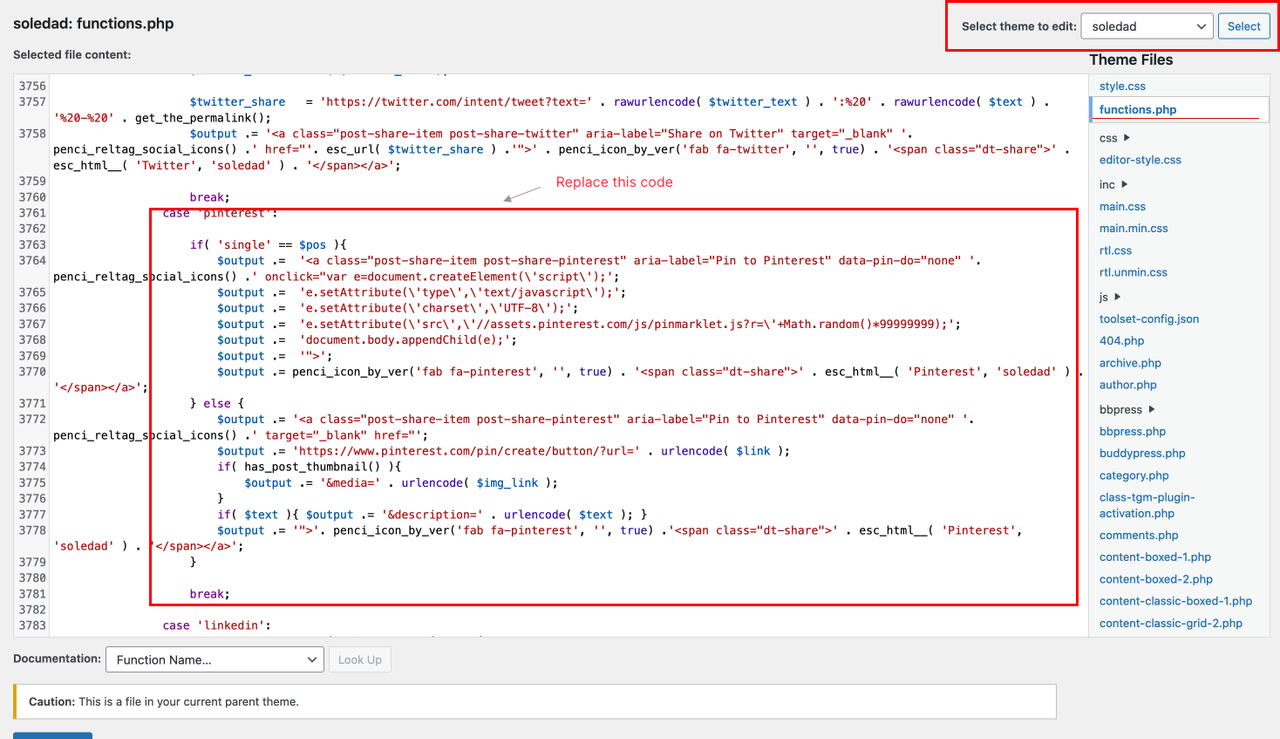
Please go to Appearance → Theme Editor → Select theme to edit: Soledad, select the functions.php file,

Find line 3761:

case 'pinterest':
    if( 'single' == $pos ){
        $output .=  '<a class="post-share-item post-share-pinterest" aria-label="Pin to Pinterest" data-pin-do="none" '. penci_reltag_social_icons() .' onclick="var e=document.createElement(\\'script\\');';
        $output .=  'e.setAttribute(\\'type\\',\\'text/javascript\\');';
        $output .=  'e.setAttribute(\\'charset\\',\\'UTF-8\\');';
        $output .=  'e.setAttribute(\\'src\\',\\'//assets.pinterest.com/js/pinmarklet.js?r=\\'+Math.random()*99999999);';
        $output .=  'document.body.appendChild(e);';
        $output .=  '">';
        $output .= penci_icon_by_ver('fab fa-pinterest', '', true) . '<span class="dt-share">' . esc_html__( 'Pinterest', 'soledad' ) . '</span></a>';
    } else {
        $output .= '<a class="post-share-item post-share-pinterest" aria-label="Pin to Pinterest" data-pin-do="none" '. penci_reltag_social_icons() .' target="_blank" href="';
        $output .= 'https://www.pinterest.com/pin/create/button/?url=' . urlencode( $link );
        if( has_post_thumbnail() ){
            $output .= '&media=' . urlencode( $img_link );
        }
        if( $text ){ $output .= '&description=' . urlencode( $text ); }
        $output .= '">'. penci_icon_by_ver('fab fa-pinterest', '', true) .'<span class="dt-share">' . esc_html__( 'Pinterest', 'soledad' ) . '</span></a>';
    } break;

Replace with:

case 'pinterest':
    $output .= '<a class="post-share-item post-share-pinterest" aria-label="Pin to Pinterest" data-pin-do="none" '. penci_reltag_social_icons() .' target="_blank" href="';
        $output .= 'https://www.pinterest.com/pin/create/button/?url=' . urlencode( $link );
        if( has_post_thumbnail() ){
            $output .= '&media=' . urlencode( $img_link );
        }
        if( $text ){ $output .= '&description=' . urlencode( $text ); }
        $output .= '">'. penci_icon_by_ver('fab fa-pinterest', '', true) .'<span class="dt-share">' . esc_html__( 'Pinterest', 'soledad' ) . '</span></a>';
    
break;
image.png

Then clear all site caches then check again.

Regards,
PenciDesign.


PenciDesign Supporter replied

Staff Reply

Hi,

In this case, please send me the related URL to this issue. I need to check on the live page.

Regards,
PenciDesign.


tim-nieuwpoort started the conversation

Conversation Start

Hi,

I've checked the: 'show Pin' option in customizer, but don't see it in my post.

Kind regards,

Tim 

Want to join this conversation or access attachments? Sign in first.