Skip to content
Public Ticket #18730

HEADER AND MENU

Conversation thread

Mariana replied

Customer Reply

Thanks, it seems that something weird is happening with wordpress as I had already corrected it and now it change again... thanks I will try that and also speak to my web hosting
Mariana replied

Customer Reply

I have no idea how that had changed as it was set properly before... but thanks.

Anyways... it still not showing   

PenciDesign replied

Staff Reply

Hi,

I found the problem, your site has some issues with the SSL - check this image: http://prntscr.com/20vdsuf

It makes the favicon can't be loads.

Your site loads via HTTPS:// but your settings still points to HTTP://  - check this image: http://prntscr.com/20vdw97

Please make sure your SSL config is correct and the problem will auto solved.

Best Regards,

PenciDesign

Mariana replied

Customer Reply

That's why I'm asking... you have only one place to set the favicon, and I only set it there. I had not add any new plugin (not even make a change on my website) since a long time ago and the favicon had disappeared since the update of the theme in which everything had exploded.   

I'm kind of worried as you are having so many updates in the last few days/weeks and if something crash again is a lot of time to try to fix it... and i can't afford to lose that time

PenciDesign replied

Staff Reply

Hi,

You can check where you set it by try to deactivate all plugins ( except plugins that come from the theme ) and try it again. If it works, let's enable each plugin to check what plugin caused this issue.  

Because we just set the favicon one time from our theme. I can sure 100% with you about this.

Best Regards,

PenciDesign

Mariana replied

Customer Reply

Hi, I understand you seeing that... what I don't understand is why... as the favicon was working until the theme was updated... the only thing I did after that was deleting the image already configured to put it again as it was not showing... and it is not showing anyway...

PenciDesign replied

Staff Reply

Hi,

As I checked, you've set the favicon on 2 places - one via the theme Customizer, one via another place  - check this image

Please remember where you've set it on another place and remove it because setup a favicon on more than one place will be caused the conflict and browsers can't detect your favicon.

Best Regards,

PenciDesign

Mariana replied

Customer Reply

Thank you very much. Have you been able to find out why the favicon is not showing even though it is configured? 

PenciDesign replied

Staff Reply

Hi,

This issue caused by you've selected to display the header builder via Customize > Logo & Header > Header Builder.

I just reset all to default "-- Select --" and everything is good now.

Best Regards,

PenciDesign

PenciDesign replied

Staff Reply

Hi,

Please send me your WordPress site admin URL and admin account ( username and password  ) - in a PRIVATE REPLY. I will take a look at this to help you.  

Best Regards,

PenciDesign

Mariana replied

Customer Reply

Hi, but I don’t want to use the header builder, I want it to be as usual. When I fixed the other menu this had not been fixed. 

I don't know why this is still active if I reseted from the first message on this thread. Please help me fix this, I cannot have a mobile site without a menu...

Also, the favicon is configured and not showing.

I'm not so happy with this last update to be honest. I have been using this template for a long time, I have 2 licenses and this time it only gave me trouble... everything is off 

PenciDesign Supporter replied

Staff Reply

Hi,

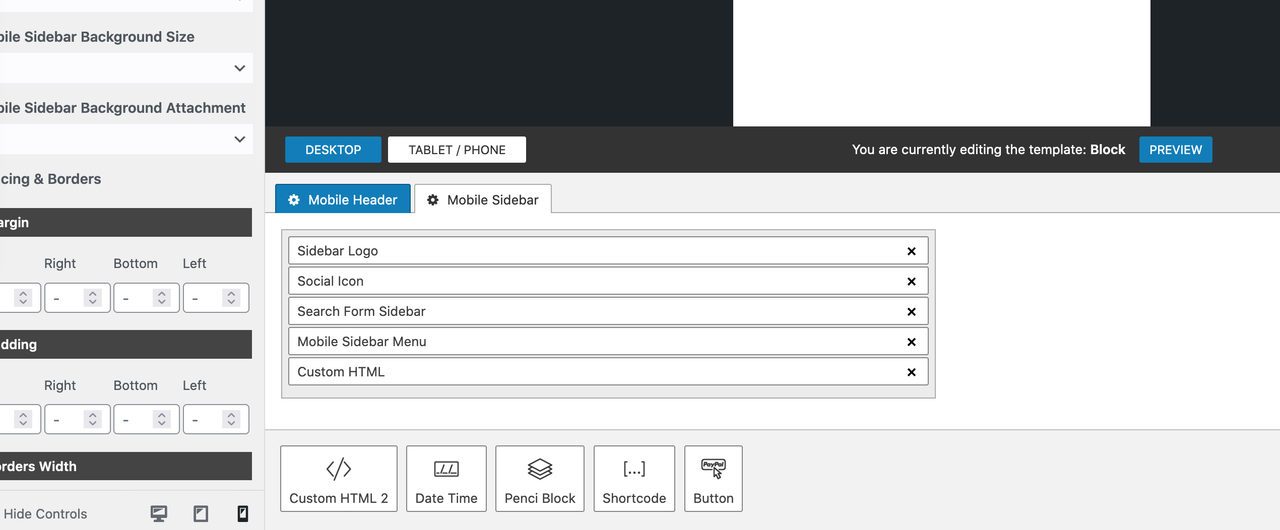
You're currently using the header builder, so you should drag & drop some content you want to display on this area by going to your dashboard → Header Builder: select the header you want to edit, click the Tablet/Phone button, select the Mobile Sidebar then add some content here:

image.png

You can also view the video tutorial here:

Regards,
PenciDesign.


Mariana replied

Customer Reply

Hi again,

I jus t realized that the menu on mobile didn't come back as before...

Attached there are 2 screenshots, one where you can see that there is a menu, and the other one show that menu empty when open. It is configured as always, AMP menu, but nothing is showing...

Yen replied

Customer Reply

Perfect! It works! 

Big thanks to you!

PenciDesign replied

Staff Reply

Hi @juzoe,

I pasted it below - click on the image to view the large image.

6907026176.png

Best Regards,

PenciDesign

Yen replied

Customer Reply

Hi, I have the same problem. 

I cannot see the screenshot pic. Could you attach the link again? 

Thank you.

Mariana replied

Customer Reply

Thanks, that worked!!! As usual 5 stars for the support! 

Mariana replied

Customer Reply

Doing that will also fix my footer? 

PenciDesign replied

Staff Reply

Hi,

Please re-update the theme, and the problem will be solved.

To re-update the theme, please edit the code like on this image - after that, go to Appearance > Themes > and click the update now button to re-update the theme. And the problem should be fixed now.

Best Regards, 

PenciDesign

Mariana started the conversation

Conversation Start

Hi there, since the last update my header, logo and menu had dissapeared. I understand that you had add a new header feature but I do not want to use that at the moment, I need my website as it was before that update... how can I get my header back?

Want to join this conversation or access attachments? Sign in first.