Skip to content
Public Ticket #18737

demo import problem

Conversation thread

PenciDesign Supporter replied

Staff Reply

Hi,

I've checked your site. You've added the Interior Design Magazine so you need to Uninstall it before trying a new one.
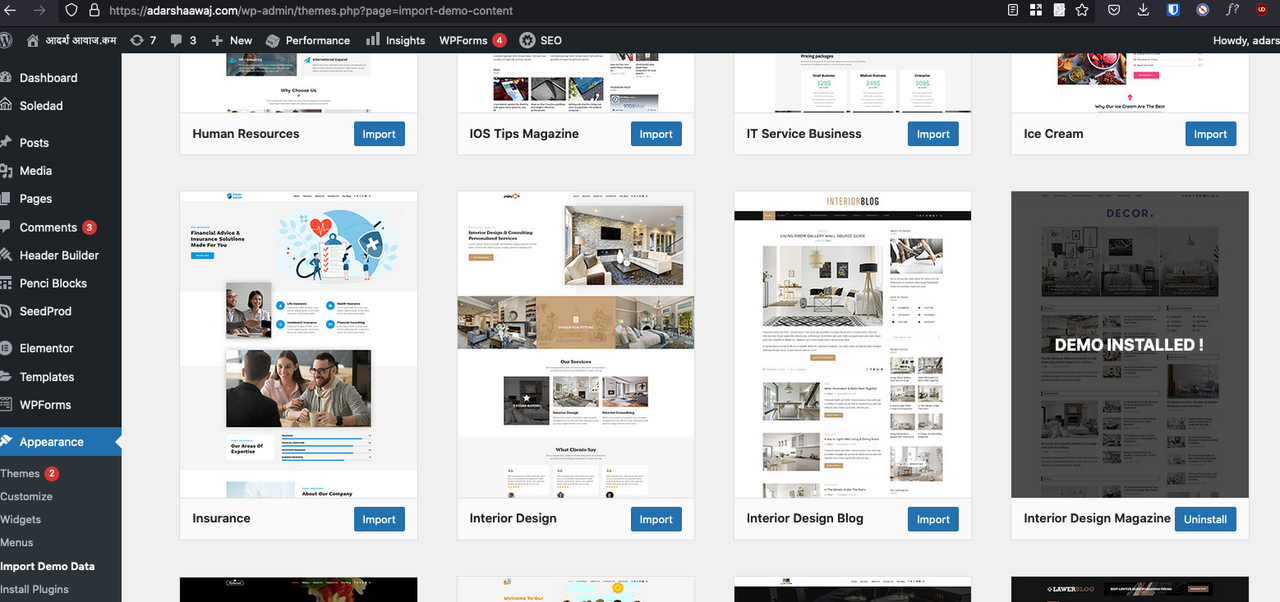
image.png

Please go to Appearance → Import Demo Data, search "Interior Design Magazine", click Uninstall button then try to import another demo.

Regards,
PenciDesign.

PenciDesign replied

Staff Reply

Hi,

Please send me: 

- Your WordPress site admin URL 

- Your WordPress site admin account ( username and password ) 

- What's the demo style you want to install now?

in a PRIVATE REPLY.

And I will check it to help you. 

Best Regards,

PenciDesign

bmindran started the conversation

Conversation Start

When I try to import demo a message pop saying 

You've imported a demo before, let's Uninstall that demo first before import a new demo - because if you import multiple demos together, it will be mixed. You can Uninstall the demo you've imported before by find the demo you've imported before and click on Uninstall button.

But I had not install the demo. why does this message comes?

Want to join this conversation or access attachments? Sign in first.