Skip to content
Public Ticket #19138

where to set # of posts on category page

Conversation thread

PenciDesign Supporter replied

Staff Reply

Hi,

I've checked your site source code rendered by the browser, the ads code already shows but your ad doesn't display because the Ezoic doesn't deliver the ad to this position.
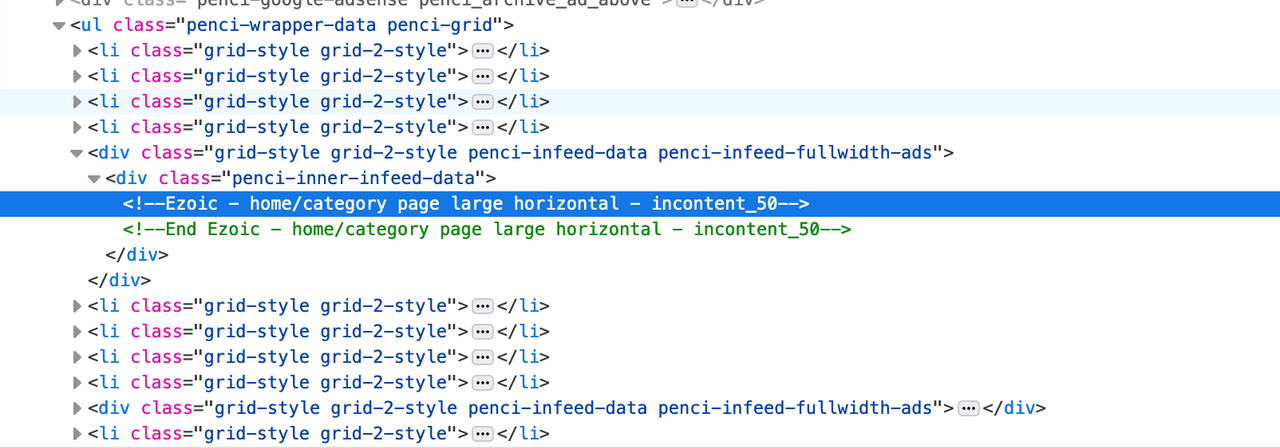
image.png

In this case, please check your ad code again.

Regards,
PenciDesign.


CalculatedTraveller replied

Customer Reply

I put the code there but it isn't displaying the ads.

I've also tried clearing the cache

PenciDesign Supporter replied

Staff Reply

Hi,

Please go to Appearance → Customize → General → Category, Tag, Search, Archive, scroll down to the bottom of this section the paste your ad code at In-feed Ads Code/HTML.

Regards,
PenciDesign.


CalculatedTraveller replied

Customer Reply

Another question about this same category page. 

On my home page, I have Ads set to appear after every 4th blog post. But that Ad setting isn't carried over to the category page. Where do I insert the ad code for category pages please?

Thank you!

CalculatedTraveller replied

Customer Reply

Excellent. Thank you!

PenciDesign Supporter replied

Staff Reply

Hi,

Please go to your dashboard → Settings → Reading: change the number of posts you want to display on Blog pages show at most option field.

Regards,
PenciDesign.


CalculatedTraveller started the conversation

Conversation Start

I've looked through all the tabs and I can't find where to set the number of posts that display on category pages. I have 20 displayed on 2 column grid and I only want to display 10

Thank you! 

Want to join this conversation or access attachments? Sign in first.