Skip to content
Public Ticket #19182

Penci Advanced Carousel use in Footer or Sidebar

Conversation thread

PenciDesign Supporter replied

Staff Reply

Hi,

Here is a trick to bypass the Adblock. All the users can view this content even their browser installed Adblock add-on.

1. Go to Appearance → Theme Editor: select theme to edit: Soledad, navigate to Theme Footer (footer.php) file, find line 52:

Replace:

<div class="container penci-google-adsense penci-google-adsense-footer">

With:

<div class="container">

Save change. You should repeat this step after you update Soledad to the newest version.
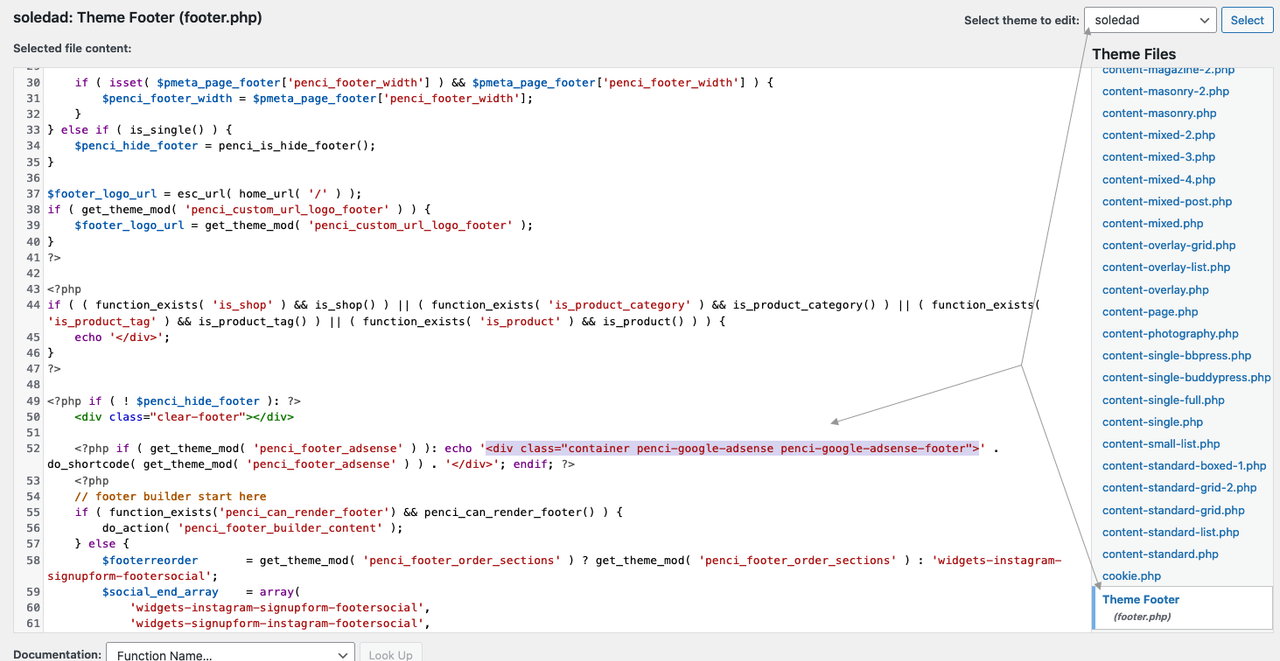
image.png

Regards,
PenciDesign.


La-Ness Albert replied

Customer Reply

oh this is not so good, as this area will be crucial. Is there any other way? Do Penci blocks always count as ads?

Is there any other way to have the Advanced Carousel integrated e.g. into the sidebar?

PenciDesign Supporter replied

Staff Reply

Hi,

If the user installs the AdBlocker on their browser, they also can't view this content.

Regards,
PenciDesign.


La-Ness Albert replied

Customer Reply

Thank you, I deactivated the Ad Blocker, now the Penci Block is visible. One question: when my website is life, will users with AdBlockers still see it? That would be of course important.

PenciDesign Supporter replied

Staff Reply

Hi,

Are you using any AdBlock extension on your browser? Please try to check your site in private mode.

Regards,
PenciDesign.


La-Ness Albert replied

Customer Reply

Thanks for your reply. I just tried it. I created a Penci Block with the 3 columns which I want to have displayed in the Footer Widget Area. I copied the shortcode and pasted it in the Customizer in exactly the field of your screenshot.

However, the block is not displayed in the Footer Widget Area. I refreshed the page several times.

Do you have any idea why it does not work yet?

Many thanks in advance

PenciDesign Supporter replied

Staff Reply

Hi,

Please follow these steps:

1. Go to dashboard → Penci Block → Add new: create a new block with product content as you want,

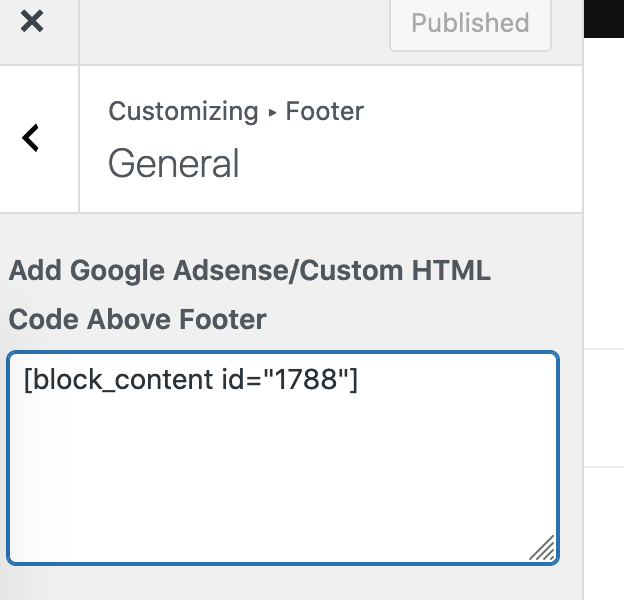
2. Navigate to Penci Block → All Blocks: copy the block shortcode, then paste it in Appearance → Customize → Footer → Add Google Adsense/Custom HTML Code Above Footer.

image.png

image.png

Regards,
PenciDesign.


La-Ness Albert started the conversation

Conversation Start

Hello, I have bought your theme recently and I am now setting up my blog page.

I have created for my homepage a section I call "Products I Love this month" in Elementor using the Penci Advanced Carousel Widget which is really beautiful. The thing is I want this section to be displayed on all pages - either in the sidebar or in the Footer Widget Area above the Instagram feed. 

How can I do this?  Or how can I find any way to have this Advanced Penci Carousel section displayed automatically on all pages? Please advise.

Many thanks in advance!

Want to join this conversation or access attachments? Sign in first.