Skip to content
Public Ticket #19348

update 8.0.09

Conversation thread

PenciDesign Supporter replied

Staff Reply

Hi,

Please go to Appearance → Customize → Custom CSS then add the following custom CSS code:

@media only screen and (min-width: 961px) {
    .sticky-wrapper:not(.is-sticky) #navigation .show-search:not(.pcbds-overlay) {
        height: auto !important;
    }
}

This ticket is too long, so I'll close it. Please create a new ticket if you've another problem.

Regards,
PenciDesign.


littlepellizza replied

Customer Reply

Also this

Search button problem ( not overlay all the slider )

PenciDesign Supporter replied

Staff Reply

Hi,

I'll double check it on my testing site and then send you an update soon.

Regards,
PenciDesign.

PenciDesign Supporter replied

Staff Reply

Hi,

All the new features working correctly on your site, here is a screen recorder video: https://streamable.com/eop47j

Please clear all the browser caches and check again.

Regards,
PenciDesign.


littlepellizza replied

Customer Reply

DEar i enabled progress reading bar but not see any effetc

example

BANG! - Playretro.it


Font changer is not so intuitive for a reader

PenciDesign Supporter replied

Staff Reply

Hi,

We'll check and consider adding this feature in future theme update.

Regards,
PenciDesign.


littlepellizza replied

Customer Reply

DEar penci i see u add the possibility to crop image in latest update , will u add the possibility ti select the size of slider pix in gallery? or fix it 

If i select dimension small, large big nothing happen

littlepellizza replied

Customer Reply

ok i have disabled some js and css option and lazyload , now works

littlepellizza replied

Customer Reply

done but not works

PenciDesign Supporter replied

Staff Reply

Hi,

Please disable all the LiteSpeed image optimization options, clear all the caches and check again.

Regards,
PenciDesign.


littlepellizza replied

Customer Reply

dear penci after update themw logo is dissappeared


it's still present in the editor but not site  ( see the pix )

i try to clear cache, to reload logo but nothing. may u help me?

littlepellizza replied

Customer Reply

i understand, if i update i loose all u'r modify

i'll wait a new version with all my things included

PenciDesign Supporter replied

Staff Reply

Hi,

In this case, you need to update the Penci Review to the latest version and then check again.

Regards,
PenciDesign.


littlepellizza replied

Customer Reply

i have cleared cache of litspeed cache ( all times ) and browser cache but no changes, i have tried different browplayretrser

PenciDesign Supporter replied

Staff Reply

Hi,

About the review display in the post grid, please clear all the CSS caches, site caches and check again.

Regards,
PenciDesign.


littlepellizza replied

Customer Reply

Hope soon

i think it's normal that final vote is not an avarege ( think games with bad gfx and great playability ), also decimal

also add the possibility to save preset ( every time i must insert the title in each box )

also background image or things similar to the pix

and last i see add background to the mini vote on the cover in home page or lots of time it's not visibile  se the pix

PenciDesign Supporter replied

Staff Reply

Hi,

We'll consider checking and integrating your custom code into the new version of the Penci Review plugin.

Regards,
PenciDesign.


littlepellizza replied

Customer Reply

can i have a new modified code? and also when this things will added , i think they are useful

PenciDesign Supporter replied

Staff Reply

Hi,

Yes. All the custom code I've made for your site will be lost if you've update the Penci Review to the latest version.

Regards,
PenciDesign.


littlepellizza replied

Customer Reply

dear penci i see in the theme new update thre is also penci review update 

i'll ask u if this update have the modified that u give me https://pencidesign.ticksy.com/ticket/2950881/#

- free to choose final vote and decimal for single vote 

thx

littlepellizza replied

Customer Reply

yes using penci animated heading title. ok i'll try

and for search icon?=

PenciDesign Supporter replied

Staff Reply

Hi,

This element was created with the Elementor Page Builder, please edit it in the Elementor mobile mode then modify the style.

Regards,
PenciDesign.


littlepellizza replied

Customer Reply

thx also search icon to left in mobile mode?

also i have this problem in mobile ( web is correct ) .see the two pix

PenciDesign Supporter replied

Staff Reply

Hi,

Please go to Appearance → Customize → Custom CSS then add the following custom CSS code:

#navigation .container:after,
#navigation  .container:before {
    display: none;
}

Regards,
PenciDesign.


littlepellizza replied

Customer Reply

dear penci on mobile i noticed that menu and search icon are in the center ( see the pix) ho can get to the left on mobile?

littlepellizza replied

Customer Reply

thx

PenciDesign Supporter replied

Staff Reply

Hi,

Please go to Appearance → Customize → Custom CSS then add the following custom CSS code:

#penci-toc-container {
    max-width: 420px;
    margin-left: auto;
    margin-right: auto;
}

Regards,
PenciDesign.


littlepellizza replied

Customer Reply

ALREADY SET SO

see the pix

PenciDesign Supporter replied

Staff Reply

Hi,

Please go to Appearance → Customize → Table of contents → Table of Contents Float: select "None".

Regards,
PenciDesign.


littlepellizza replied

Customer Reply

dear penci

it's possible to set the large of your toc, to have double columm

like in this pix

littlepellizza replied

Customer Reply

thx

i see that others theme ( like jannah) inluded a plug in called Taqyeem made for review . Maybe u can integrate in your

PenciDesign Supporter replied

Staff Reply

Hi,

Thank you for this information. I'll check and address this issue in the future plugin update.

Regards,
PenciDesign.


PenciDesign Supporter replied

Staff Reply

Hi,

Please publish these settings, clear all the cache and update this ticket.

I'll check and send you a quick fix.

Regards,
PenciDesign.


littlepellizza replied

Customer Reply

there is a bug in penci review plug in that prevents to change the colors i set

see the pix

I still use a modified penci review plug that u send to me to get free final vote and decimal  +.1 instead or +.5


i hope u update this old plug in

PenciDesign Supporter replied

Staff Reply

Hi,

For this case, please send me your WordPress admin account in a PRIVATE reply.
I'll log in and try to help you check this problem.

Regards,
PenciDesign.

littlepellizza replied

Customer Reply

Playretro.it

u can check

dear penci , i have active lightspeed cache with my provider because usa fastcache on server

I noticed every time  clear cache ( example adding a new article) it takes 6 7 sec to resolve and  load site first time

I have active lazy load etc...

I was expected that site page was loaded/resolved fast and alll contents loaded in second time

What am i doing wrong ?

PenciDesign Supporter replied

Staff Reply

Hi,

Please send me the URL that you've inserted this element.

Regards,
PenciDesign.

littlepellizza replied

Customer Reply

i try to make this but it's not nice like in the past pix

PenciDesign Supporter replied

Staff Reply

Hi,

Almost the Penci Elements already include the option that helps you add/modify the border between each item.

Please send me the URL and screenshot of the area you want to add the separate line, I'll send you a custom CSS code.

Regards,
PenciDesign.


littlepellizza replied

Customer Reply

thx hope soon

I see that penci plug in let choose title position left - center- right in horizontal mode but no vertical also i can't add separate line

i send a pix of what i like to do ( i'ts take frome another site )

PenciDesign Supporter replied

Staff Reply

Hi,

The current version of Soledad only supports showing the video from the custom list and playlist only.

We'll add more options in the future theme update.

Regards,
PenciDesign.


littlepellizza replied

Customer Reply

DEar

PEnci video playlist in elementor will support to show channel video? now are custom and playlist only

PenciDesign Supporter replied

Staff Reply

Hi,

At this time, the Elementor only supports 1 post type only for each block. We'll check and improve this option in the future.

Regards,
PenciDesign.


littlepellizza replied

Customer Reply

herea a sample image

as u can see i can select one source 

instead categories etc.. i can select multiple things

Problem is that some o my categories are divided and filetered separately by pod block

so can select more source?

PenciDesign Supporter replied

Staff Reply

Hi,

Please send me the screenshot and take a note.

I'll check and send you a quick solution.

Regards,
PenciDesign.


littlepellizza replied

Customer Reply

DEar penci

i created with pod different block of news ( news1 - news 2- news 3 etc..)


I see on elementor when i chooose for example penci big grid that as source i can select only one block and not all

if i like to select all pods blocks?

PenciDesign Supporter replied

Staff Reply

Hi,

You should enable it on the Penci Shortcode & Performance plugin (Appearance > Customize > Speed Optimization).

Regards,
PenciDesign.


littlepellizza replied

Customer Reply

better enabled in lightspeed plug in or penci speed optimizer?

PenciDesign Supporter replied

Staff Reply

Hi,

For all the options you've listed, you should enable it.

Regards,
PenciDesign.

littlepellizza replied

Customer Reply

and for

 "Enable Optimize CSS", "Minify All CSS", "Inline Optimized CSS", "Optimize Google Fonts", "Inline Google Fonts CSS", "Create Critical CSS?"

must be on?


PenciDesign Supporter replied

Staff Reply

Hi,

For stable loading, you shouldn't use this feature.

Regards,
PenciDesign.


littlepellizza replied

Customer Reply

dear penci in my light speed cache plug in i see the option "instant click"

the documention says that if i pass mouse on a link it will start to preload the page but its can be incompatible with some theme expecially if use elementor

so i can use or its better not?

also these option  : on "Optimize CSS" section - check to "Enable Optimize CSS", "Minify All CSS", "Inline Optimized CSS", "Optimize Google Fonts", "Inline Google Fonts CSS", "Create Critical CSS?"

are not enabled both in u'r speed optimizer that light speed cache

i must enable ? if yes  in witch of two ?

PenciDesign Supporter replied

Staff Reply

Hi,

Thank you for your suggestion, we'll research and consider adding this in the next theme update.

Regards,
PenciDesign.


littlepellizza replied

Customer Reply

dear penci hope u add a gallery plug in in next release! i use wordpress plug in and not like to install an external. I'dl like that basic plug in will be enchanted

littlepellizza replied

Customer Reply

DEar penci 

i noticed that in soledad facebook plug in for elementor works only the page link but not the groups link

example

facebook.com/playretro.it   is displayed ok and fine

facebook.com/groups/playretro.it  not displayed and not works

possible to fix?

littlepellizza replied

Customer Reply

i se ethat all important site have ads in background, hope u add

PenciDesign Supporter replied

Staff Reply

Hi,

We'll research and consider adding this feature in the future theme update.

Regards,
PenciDesign.

littlepellizza replied

Customer Reply

dear penci , think in the future your theme will bew support google ads in background body instead of a pix , like site multiplayer.it ?

PenciDesign Supporter replied

Staff Reply

Hi,

Please go to Appearance → Customize → Custom CSS then add the following custom CSS code:

@media only screen and (max-width: 767px) {
    ul.homepage-featured-boxes {
        display: block;
    }
}

Regards,
PenciDesign.


littlepellizza replied

Customer Reply

dear penci

i noticed that on mobile phone  elementor feautured box title  are not displayed correctky

see the pix

any fix?

PenciDesign Supporter replied

Staff Reply

Hi,

In the Elementor, you can use the Penci Block Heading to add the heading title.

Regards,
PenciDesign.


littlepellizza replied

Customer Reply

dear penci will u add heading title for penci features box in elementor?

PenciDesign Supporter replied

Staff Reply

Hi,

Thank you for your suggestion, we'll consider adding these features in the next theme update.

Regards,
PenciDesign.


littlepellizza replied

Customer Reply

dear penci

i like penci animed heading title

think in the future we

- have subtitle animed for slogan ? to put under first animated . My Idea is an animated name of the site then under the slogan

- animated heading title to put in article

littlepellizza replied

Customer Reply

hope in the future

PenciDesign Supporter replied

Staff Reply

Hi,

Unfortunately, the current version of Soledad doesn't support this effect.

Regards,
PenciDesign.


littlepellizza replied

Customer Reply

i's like to aks u also this

is possible to obtaine this effect with penci big grid or penci categories that use grid


see the pix

littlepellizza replied

Customer Reply

yes i see but not resolve the problem with heading title over 25 font and 3/4 categories arrow are put under categoriers like in the pix i send u. I think there is an allignament point limit

PenciDesign Supporter replied

Staff Reply

Hi,

Yes. You can change the arrow font size like the screenshot below:

EVa7PTw.png

Regards,
PenciDesign.


littlepellizza replied

Customer Reply

possibility to have arrow to the left near category with font over 25?

PenciDesign Supporter replied

Staff Reply

Hi,

1. Unfortunately, the current version of Soledad only support showing the arrow at the end of the categories list.

2. We'll improve the style and add more arrow options in the future theme update.

Regards,
PenciDesign.


littlepellizza replied

Customer Reply

i understand, just like som of more thing to duplicate penci block in penci block section ( not only delete )

i'd like to ask help,

I use penci big grid with arrow ajax filter. If i use font over 25 for the title the arrow go down ( see the pix ) under ajax categoy

- is possible maintan arrow in the line of category?

- is possible put the arrow before category ?

- in mobile mode is possible substitute the arrow with hamburgher icon style?

- in the future will be different arrow style?

littlepellizza replied

Customer Reply

Dear Penci is possible to duplicate a penci block ( to make  a backup where edit with elementor ) ?

PenciDesign Supporter replied

Staff Reply

Hi,

This option will show the post title on the single post differently from the title on the category/tag/search/custom pages.

Regards,
PenciDesign.


littlepellizza replied

Customer Reply

dera penci 

i don't understand how works

Featured Added: Custom post title for single post. So, you can show title of posts on the layouts & on single post pages is different.

PenciDesign Supporter replied

Staff Reply

Hi,

For this case, you should install the 404 to 301 – Redirect, Log and Notify 404 Errors plugin to check all the 404 errors on your site: https://wordpress.org/plugins/404-to-301/

Regards,
PenciDesign.


littlepellizza replied

Customer Reply

dear penci

trasient are index by google?

in last check of google search console has apperead 28mila pages non index with error 404

i check my article etc..but i don't understand where google pick this pages

littlepellizza replied

Customer Reply

dear penci i have on my site 3000 transients , it's safe remove all? light speed cache give me the option

PenciDesign Supporter replied

Staff Reply

Hi,

The backdoor file locates in the wp-content folder and this does not come from our theme.

You should re-install WordPress all plugins and the Soledad theme.

Regards,
PenciDesign.


littlepellizza replied

Customer Reply

BUT FIRST I MUST REINSTALL THE VERSION ON SITE? or its will be overwrite?

PenciDesign Supporter replied

Staff Reply

Hi,

Go to ThemeForest, downloaded the "Installable WordPress file only" file, then extract the soledad.zip file and upload the extracted folder to the /wp-content/themes/ folder on your server.

Regards,
PenciDesign.


littlepellizza replied

Customer Reply

how reinstal the theme ? 

PenciDesign Supporter replied

Staff Reply

Hi,

Yes. It is from our theme and your installed plugin.

You should re-update theme files to make sure it original without modification.

Regards,
PenciDesign.


littlepellizza replied

Customer Reply

my host will check the site

the file i send u are from you theme, seems normal? i see are differnt from the original i download, there i some code added at the end respect installation zip

littlepellizza replied

Customer Reply

these are the two file from my site that the user sign me infect

littlepellizza replied

Customer Reply

dear penci a user with avast scan sign this

i must contact my host?

PenciDesign Supporter replied

Staff Reply

Hi,

Please go to Appearance → Customize → Custom CSS then add the following custom CSS code:

#navigation .container{
    display: flex;
    justify-content: space-between;
}
#navigation .container > * {
    order: 2;
}
#navigation .container .penci-menuhbg-wapper {
    order: 1;
}

Regards,
PenciDesign.


littlepellizza replied

Customer Reply

Dear penc is possible to have hamburgher menu icon to the left without using header builder ?

PenciDesign Supporter replied

Staff Reply

Hi,

You should enable CSS/JS optimization in 1 plugin only. If you've enabled the CSS/JS Optimization on the LiteSpeech cache, you should turn this feature off in Appearance > Customize > Speed Optimization.

Regards,
PenciDesign.


littlepellizza replied

Customer Reply

this

https://pencidesign.ticksy.com/ticket/2950881/#

you reply  :

Hi,

Yes. All options are now correct.

Please also send me a screenshot of your plugins page.

then

https://pencidesign.ticksy.com/ticket/2950881/#comment-17128387

I mean you should turn off all the CSS/JS Optimization on another plugin and enable it on Penci Shortcode & Performance plugin.

i'm bit confused


PenciDesign Supporter replied

Staff Reply

Hi,

Which option is on in post 881?

Regards,
PenciDesign.


littlepellizza replied

Customer Reply

i udenrstand, so the option on in post 881 of light speed wil be off ?

littlepellizza replied

Customer Reply

these are option of penci speed

i'll send a screeen of my plugin

PenciDesign Supporter replied

Staff Reply

Hi,

Yes. All options are now correct.

Please also send me a screenshot of your plugins page.

Regards,
PenciDesign.


littlepellizza replied

Customer Reply

penci speed optimizer must be on?

these in the pix are option on on lightspeed page optimizion

littlepellizza replied

Customer Reply

penci speed optimer must be on?

i see lazy load disable on penci, must be active?play

PenciDesign Supporter replied

Staff Reply

Hi,

You need to disable them on the LiteSpeech cache plugin.

Regards,
PenciDesign.

littlepellizza replied

Customer Reply

disable on penci speed optimizer? or disable all penci speed optimizer plug in ?

lazy load must be active on light speed plug in?

PenciDesign Supporter replied

Staff Reply

Hi,

You should use the cache option only and disable:

- CSS/JS Optimization,

- Media Lazyload.

Regards,
PenciDesign.


littlepellizza replied

Customer Reply

Dear penci 

with my provider is active light speed cache plug in. there is options that may be conflict with penci speed optimizer? or option that can take active with light speed plug in active ?

for example lazy load image is disabled boths

PenciDesign Supporter replied

Staff Reply

Hi,

Yes. We'll add more options in the future.

Regards,
PenciDesign.


littlepellizza replied

Customer Reply

wordpress editor ( not classic editor) do'nt use gutemberg ?

i cheked this editor but i don't see pencil plug in ( only pods etc....)

i prefer not use elementor for create posts,. hope in the future u'll add plug in for title

PenciDesign Supporter replied

Staff Reply

Hi,

Unfortunately, the Penci Block Heading doesn't work correctly with this editor.

Please consider building your blog content with Elementor or Gutenberg editor.

Regards,
PenciDesign.


littlepellizza replied

Customer Reply

i use editor from boldgrid

PenciDesign Supporter replied

Staff Reply

Hi,

If you want to insert the Penci Block Heading into your post, you should use the Gutenberg editor.

Regards,
PenciDesign.


littlepellizza replied

Customer Reply

ah

but i see is from soledad !

PenciDesign Supporter replied

Staff Reply

Hi,

Unfortunately, the Penci Heading Block doesn't support this editor.

Regards,
PenciDesign.

littlepellizza replied

Customer Reply

yes but i must creat lots of title

in wordpress editor there is this ( see the pix), it's possibile add style here?

PenciDesign Supporter replied

Staff Reply

Hi,

WordPress editor doesn't support Penci Heading Block, but you can create a Penci Block with Elementor and then insert it into the WordPress Editor via the shortcode.

Regards,
PenciDesign.


littlepellizza replied

Customer Reply

i'ts possible add to widget  "penci heading block " with all styles ora modify the widget heading block adding the style? in wordpress editor not elementor

littlepellizza replied

Customer Reply

thx for fixing!

PenciDesign Supporter replied

Staff Reply

Hi,

I've fixed this issue.

Please clear all the site caches then check again.

Regards,
PenciDesign.


littlepellizza replied

Customer Reply

i have checked penci small list ajax filter is not correct if u try to move arrow to the right show the post order by date but if u clik again to the left to return to first page the post showed are not the recent

i send the pix


penci1 is first page when i load site

penci 2 is when i clik arrow to go to second page and click again to return to first page.the posts are not the same!

PenciDesign Supporter replied

Staff Reply

Hi,

I don't make any changes to your site, just clear the site cache.

I just checked your site again on my browser, and all the AJAX & theme features working properly.

Please check again.

Regards,
PenciDesign.


littlepellizza replied

Customer Reply

dear i'll check again

PenciDesign Supporter replied

Staff Reply

Hi,

I've checked your site, and all the ajax posts of the Penci Small List show correctly.

Please clear all the browser cache then check again.

Regards,
PenciDesign.


littlepellizza replied

Customer Reply

dear penci check

Playretro - Play Smart

and penci small " i love nintendo"

u see that if click on ajax arrow will not displayed in order by date

PenciDesign Supporter replied

Staff Reply

Hi,

1. Please send me the URL that contains this issue, and I'll check & help you fix it.

2. We'll consider adding more style in the future theme update.

Regards,
PenciDesign.


littlepellizza replied

Customer Reply

Dear penci 

i discover another bug, in penci small list  (elementor) if i activate ajax arrow post are not displayed by date if i click on.It's the same proble u fix for penci big grid

I ask u also if in the future ajax arrow will be with differente grafix and if in the future

penci heading title will ha ve a effect like the pix ( also in mega menu )

littlepellizza replied

Customer Reply

thx beacause sometimes i use lots of chapters and not like to move side bar to show all

PenciDesign Supporter replied

Staff Reply

Hi,

Unfortunately, the current Soledad version only supports showing the table of contents listing in 1 column.

We'll consider adding more options in the future update.

Regards,
PenciDesign.


littlepellizza replied

Customer Reply

Dear penci sorry for late reply

seems that instagram plug in now works.

btw ,it's possible to have "TOC" in double columbs?

littlepellizza replied

Customer Reply

i'll give as soon the account

i use the plug in until monday and works fine

PenciDesign Supporter replied

Staff Reply

Hi,

Please send me your WordPress admin account in a PRIVATE reply.
I'll log in and try to help you config it.

Regards,
PenciDesign.


PenciDesign Supporter replied

Staff Reply

Hi,

Please go to dashboard > Soledad > Connect Instagram: try to reconnect to your Instagram on this screen then check again.

Regards,
PenciDesign.


littlepellizza replied

Customer Reply

I report u also that instaGRAM PLUG IN DOSE NOT WORK, both in elementor and penci widget

i checked the connection in tha panel and is ok, i checked my account and is ok

also i try to delete and put again the plug in 

i got the msg in the pix

u can check my instagram

https://www.instagram.com/fabiopelliciari/

littlepellizza replied

Customer Reply

dear penci a bug in the latest version

in penci recent latest post (elementor ) , if i activate ajax button next prev and hide thumbail , and  2 columbs

the first page have a bug with line in the last post

if i clik next and go to page 2, its show thumbail even if hide thumbail option is active

se the screeen

also in Penci Posts Tabs ( elementor ) , i don't see ajax button options like  descrived in changelog

PenciDesign Supporter replied

Staff Reply

Hi,

The current version of Soledad already supports the post template, you can view the document detail here: https://soledad.pencidesign.net/soledad-document/#posts.

You can create a post template already insert the Facebook Widget then apply it to your post.

Regards,
PenciDesign.


littlepellizza replied

Customer Reply

dea pency will be possible in future to add in article facebook widget with preset loaded? every time i must insert facebook page.I can create a block but will be nice if there is preset saved in

littlepellizza replied

Customer Reply

ok i solve it's a proble of secondary title plug in that is not enabled for block

PenciDesign Supporter replied

Staff Reply

Hi,

At Soledad, we'll remove all HTML tags and special character on the title, so you should add the sub-title for your post by following the screenshot below:

8676197953.png

Regards,
PenciDesign.


littlepellizza replied

Customer Reply

i add to code snipp

but not works

PenciDesign Supporter replied

Staff Reply

Hi,

Please add the following code to the child theme functions file or via the CodeSnippet plugin:

add_filter( 'the_title', function ( $title, $id ) {
    $sub_title = get_post_meta( $id, 'penci_post_sub_title', true );
    if ( $sub_title && ! is_single() && ! is_admin() ) {
        $title .= '<h4 class="penci-psub-title"><span>' . $sub_title . '</span></h4>';
    }     return $title;
}, 10, 2 );

The code above will show the subtitle of your post for all elements.

Regards,
PenciDesign.


littlepellizza replied

Customer Reply

secondary title now only present inside post

littlepellizza replied

Customer Reply

dear penci i use now penci latest post with elementor , and i see that secondy title with secondary title plug in is no more showed, it's possibile to fix?

Before without elementor secondary title was showed

littlepellizza replied

Customer Reply

yes if i disble plug in preview is ok, also with plug in active and cover mode ( it's showrss feed image ) it's ok

i try to contact the author

PenciDesign Supporter replied

Staff Reply

Hi,

For this case, you need to disable the RSS feed for the "penci-block" post type then check again.

Regards,
PenciDesign.


littlepellizza replied

Customer Reply

ok i found, it's the Super RSS Reader, but i use it until last week without problem, how can fix?

PenciDesign Supporter replied

Staff Reply

Hi,

The problem is that one of your installed plugins has to modify the output content, so please try to disable all plugins (excerpt the plugins that come with Soledad) and then re-activate it one by one to check which plugins cause this issue.

Regards,
PenciDesign.


PenciDesign Supporter replied

Staff Reply

Hi,

Please send me the preview URL.

Regards,
PenciDesign.


PenciDesign Supporter replied

Staff Reply

Hi,

I'm not found any issue on the front page, please send me a screenshot & take a note.

Regards,
PenciDesign.


littlepellizza replied

Customer Reply

it's the main page of playretro.it under slider

the site seems ok ,  when edit in elementor i see all but when i try preview is a blank page

other blocks preview is ok

PenciDesign Supporter replied

Staff Reply

Hi,

Please publish this post then send me a link.

Regards,
PenciDesign.


PenciDesign Supporter replied

Staff Reply

Hi,

If you want to show the feed like the image you've uploaded on Instagram, please add the following CSS code:

.penci-insta-thumb .penci-image-holder {
    background-size: contain;
}

The code above will force display all images with the original ratio.

Regards,
PenciDesign.


littlepellizza replied

Customer Reply

i have tried but image are more big but still display non correctly ( i think they are not propotional )

it's not question to have big o small pix in instagram feed

PenciDesign Supporter replied

Staff Reply

Hi,

I've checked your site and have not found the code you've added.

Regards,
PenciDesign.


littlepellizza replied

Customer Reply

i try bur result it's the same pix are displayed not correctly

my instagram pix are differne resolution , i think so it's need the pix be cropped  to be displayed correctly in the square

PenciDesign Supporter replied

Staff Reply

Hi,

I've written in the previous reply, that you need to add the custom CSS if you want to show the Instagram image with the custom ratio. Here is an example:

.penci-insta-thumb .penci-image-holder:before {
    padding-top: 166%;
}

Regards,
PenciDesign.


littlepellizza replied

Customer Reply

i'd like that image are displayed correctly, maybe need to be cropped?

PenciDesign Supporter replied

Staff Reply

Hi,

By default, all the Instagram feed images are displayed in the 1:1 ratio (square image).

If you want to display it with another ratio, please go to Appearance → Customize → Custom CSS then add the following custom CSS code:

.penci-insta-thumb .penci-image-holder:before {
    padding-top: 100%;
}

Change 100% with the value you want to show.

Regards,
PenciDesign.


littlepellizza replied

Customer Reply

dear penci i see with last update that image in penci instagram feed are not displayed correctly

seems resolution not scalded correct

how fix?

PenciDesign Supporter replied

Staff Reply

Hi,

1. By default, Soledad will show the full image resolution for the Slider layout. We'll add the option for image size in the future theme update,

2. If you want to insert the slider with the custom image size at this time, please install & use the Meta Slider here: https://wordpress.org/plugins/ml-slider/

Regards,
PenciDesign.


littlepellizza replied

Customer Reply

yes i have tried several time , but not works, for example now gallery  i select thumbail but no changes

i have seen that in my case size dosen't affect image ( also if i select masonary, grid etc.. )

may u fix?

PenciDesign Supporter replied

Staff Reply

Hi,

For this case, you can select the image size for a single slider when you creating the gallery like the screenshot below:

a90Xxrg.png

Regards,
PenciDesign.


PenciDesign Supporter replied

Staff Reply

Hi,

Please send me some post URLs that contain the slider, I'll check and then send you a solution.

Regards,
PenciDesign.


littlepellizza replied

Customer Reply

Dear penci

when i set a gallery and choose slider, i have sometimes big screen and sometimes small

ho can set the size of slider gallery?

littlepellizza replied

Customer Reply

uhm not this

i 'd like to change to full this parametr

PenciDesign Supporter replied

Staff Reply

Hi,

Please go to Appearance → Customize → Single Posts → General: change the image size at the "Custom Image Size for Featured Image" option.

Regards,
PenciDesign.


littlepellizza replied

Customer Reply

Dear penci when i load a image for a post , it's load miniature by default

can i choose to load by default to real size? 

PenciDesign Supporter replied

Staff Reply

Hi,

I'll mark your reply as a feature requirement and notify you if it is available on the new update.

Regards,
PenciDesign.


littlepellizza replied

Customer Reply

DEar penci

in penci big grid under style it's possible to choose "hoover option"

this possibility is missed in penci last post and penci small list

may u add to them?

PenciDesign Supporter replied

Staff Reply

Hi,

We'll try to add more features in the future theme update.

Please keep waiting and updating.

Regards,
PenciDesign.


PenciDesign Supporter replied

Staff Reply

Hi,

Yes. I'll address this bug in the latest update.

For this case, please send me your WordPress admin account in a PRIVATE reply. I'll log in and help you fix it.

Regards,
PenciDesign.


PenciDesign Supporter replied

Staff Reply

Hi,

The current update doesn't include your reprorted issue. I'm still working on the local development about it.

Regards,
PenciDesign.


littlepellizza replied

Customer Reply

dear penci i se new realese of the the theme but bug is still present. not fix ?

littlepellizza replied

Customer Reply

no urgent, u can fix in u'r next realese

and if add dot point ( like in popular post ) will be apprecciated

PenciDesign Supporter replied

Staff Reply

Hi,

About this case, I need to double-check it on the local development site and then send you a quick fix soon.

Regards,
PenciDesign.


littlepellizza replied

Customer Reply

u can check issue here : https://playretro.it/elementor-12628/

if u clik the arrrow the second page will load big box , then if u click the left arrow to return to main page will display big bog instead of medium

may u fix?

littlepellizza replied

Customer Reply

think that if select page will load only the post no reload the page

for second issue i try to make a link sample

Hope u add dot display instead of number page in future release

PenciDesign Supporter replied

Staff Reply

Hi,

1. By default, the page navigation number will load the next page without AJAX, so it will load the full page. If you want to load the Big Grid section only, please use the AJAX navigation,

2. Please send me the URL that is related to this issue.

Regards,
PenciDesign.


littlepellizza replied

Customer Reply

dear penci some other issue in penci big grid

if i choose page navigation with number, its load the second page   but reload the full page of site. u can check on the site ( see pix)

If i choose ajax category without filter , with grid style, its load big box and not respect the ratio ( not present on the site it's a draft )

PenciDesign Supporter replied

Staff Reply

Hi,

This code will work with all cases:

.penci_recent-posts-sc ul li .side-item .side-item-text h4 a {
    text-align: left;
}

Regards,
PenciDesign.


littlepellizza replied

Customer Reply

it works!

it's possible have the code if i choose 1 column ?

PenciDesign Supporter replied

Staff Reply

Hi,

Please go to Appearance → Customize → Custom CSS then add the following custom CSS code:

.penci_recent-posts-sc ul.penci-feed-2columns li .side-item .side-item-text h4 a {
    text-align: left;
}

Regards,
PenciDesign.


littlepellizza replied

Customer Reply

it's possible to force the allignament ? i see some of you penci plug in have this option

or any other way to fix it?

PenciDesign Supporter replied

Staff Reply

Hi,

The problem is that you've added the HTML tag <center> to the post title, so it will also display at the center in the recent post list.

Regards,
PenciDesign.


littlepellizza replied

Customer Reply

it's a penci block for the moment saved as draft

but u can check here : https://playretro.it/koolnews/12387/


where are use secondary title plug in is gona to the center.Maybe an option to force the alignment will solve all

PenciDesign Supporter replied

Staff Reply

Hi,

Please send me a URL you've added this element, I need to check it on the live site.

Regards,
PenciDesign.


PenciDesign Supporter replied

Staff Reply

Hi,

Please send me a screenshot of the title issue.

Regards,
PenciDesign.


littlepellizza replied

Customer Reply

and for the problem of the title? some title are in the center some at the left ( in the center that use secondary title)

PenciDesign Supporter replied

Staff Reply

Hi,

The post timeline dots doesn't support multi-columns. We'll check and more options in the future update.

Regards,
PenciDesign.


littlepellizza replied

Customer Reply

dear penci

i have tested in a block called penciblock  ( it's only a draft for the moment ) with penci widget latest post

I see 2 things :


timeline dot is only in the first colombus if i use to display 2

if i don't wanna use thumbail in editor seems fine ( but seconday title seems missed) but in preview the title that use secondary title plug in are displayed at the center

I send the pix

any possibility to fix?

littlepellizza replied

Customer Reply

thx

if i see other bugs i will segnalate to you

PenciDesign Supporter replied

Staff Reply

Hi,

We'll fixed this issue in the future theme update, about the ajax click number of posts, please clear all the browser cache then check again.

Regards,
PenciDesign.


littlepellizza replied

Customer Reply

here pix

littlepellizza replied

Customer Reply

thx, in future realese of your theme this fix will remain? or it wil be overwrite

and if i clik on ayax filter or arrow why post pass from 8 to four?

PenciDesign Supporter replied

Staff Reply

Hi,

I've fixed your site issue,

Please check.

Regards,
PenciDesign.


PenciDesign Supporter replied

Staff Reply

Hi,

Please send me your WordPress admin account in a PRIVATE reply, I need to check these element settings.

Regards,
PenciDesign.


littlepellizza replied

Customer Reply

dear penci i checked https://playretro.it/ with different browser and different connection and also mobile phone and its showed

it's a block made with elementor and penciblock

cliking on ayax give me : https://playretro.it/#

PenciDesign Supporter replied

Staff Reply

Hi,

I'm not found the "ultime recensioni" section on your site, please send me a page that contains this element or clears all the site cache then update this ticket.

Regards,
PenciDesign.


littlepellizza replied

Customer Reply

dear penci i make some change to my site and add penci big grid with elementator to some block

as u can see when cliking on ayax filter , the post are not showed ordered by date but mixed

try ayax in "ultime recensioni"

littlepellizza replied

Customer Reply

thx hope u add lots of style!

PenciDesign Supporter replied

Staff Reply

Hi,

We'll check & add this feature soon.

Regards,
PenciDesign.


littlepellizza replied

Customer Reply

yes with my apu key active not possible to show channel?  i use a free plug in called youtubewp that with api key show channel video

PenciDesign Supporter replied

Staff Reply

Hi,

Yes. You need to enter the Youtube API to get this feature working.

Regards,
PenciDesign.


littlepellizza replied

Customer Reply

and using the api key that u tube give to wvery user?

PenciDesign Supporter replied

Staff Reply

Hi,

The current public API of Youtube doesn't allow get the content from the channel. We'll add this feature when Youtube allows it.

Regards,
PenciDesign.

littlepellizza replied

Customer Reply

ok update thx , hope for video playlist u add the support of video channel ( i have a youtube channel) and add different styles

PenciDesign Supporter replied

Staff Reply

Hi,

Please wait a little time then check again by going to Dashboard → Updates.

Regards,
PenciDesign.


littlepellizza replied

Customer Reply

Dear penci i didn't see 8.2.1 update on envato market plug in. I clear all the cache and log in again but nothing

littlepellizza replied

Customer Reply

dear penci i see another bug in penci big grid of elementor

if i choose to display by date , works fine

if i add category and clik on they show post not by date but randomly

for the moment it's a draft ( not on my site), but i cansend the pix if needed

i see lots of problem with ajax category and elementor

PenciDesign Supporter replied

Staff Reply

Hi,

I can't debug as a visitor so I need to check your page settings and then find the solution to get it working correctly.

Regards,
PenciDesign.


littlepellizza replied

Customer Reply

dear penci seems all  penci blocks are missed

but i checked again from my browser chrome edge on pc .

i checked from apple tablet and is visible

i checked also from mobile phone

all blocks are visible

PenciDesign Supporter replied

Staff Reply

Hi,

Here is a screenshot of your homepage on my browser:

z9cB5hU.jpg

Regards,
PenciDesign.


littlepellizza replied

Customer Reply

dear penci  here the pix

PenciDesign Supporter replied

Staff Reply

Hi,

I've checked your site and have not found any ajax filter on your homepage.

Regards,
PenciDesign.


littlepellizza replied

Customer Reply

I leave the problem on site so u can check

if u go to my site there is hot news with ajax

try to clik gamez! and "not found"

try to click "conversioni varie " and its works but are article made not with pod plug in

try to clik arrow and see that load article differt from what i choose

With penci big grid seems instead all ok

also i have problem with the code you give for  penci recent post

its show    ">" and double subtile and date is still in different position. Also i see that i choose 2 columbs display  Timeline is only in one columbs ( i try to make a screen )

PenciDesign Supporter replied

Staff Reply

Hi,

Please send me the screenshot or URL related to your problem.

Regards,
PenciDesign.


littlepellizza replied

Customer Reply

i tried penci big grid and works fine with pod

its' pensi small list that have problem

littlepellizza replied

Customer Reply

think have big problem with pods plug in and you ajax category and arrow

i create a block with with news from Pods. The main page works well

i activate ajax arow and category

- if i clik arrow its loads "article post of word press" .this is very wrong.

- If i clik a category its results not found! i checked the post and the category is active!

I try to make a sample with "article of wordpress" without the pods plug in and works fine 

PenciDesign Supporter replied

Staff Reply

Hi,

1. I've written in the previous reply, that you can customize the category page as you want by using the Archive Template builder already included on Soledad,

2. The current version of Soledad supports the ajax filter for some elements on Elementor. We'll add more features for WPBakery & Customizer in the future theme update.

Regards,
PenciDesign.


littlepellizza replied

Customer Reply

take you demo.jpg

i see

big pix to the left

2 pix in the center

recent list to the right

u made this with 3 different block and different content category ( i suppose)

i'd to get the same effect using one category

Explame "review"

i'd like to have

big pix to the left

2 pix in the center

recent list to the right

showing only one category post "review"

maybe it's possible to do if u let choose different style after a determinate number of post 

example

first post : i choose style

2 post to Nr.X post :  i choose the style

Nr.X postoto Nr.X post : i choose another style

all into one block

hope i explained well

Btw it's possible in the future have ajax next/prev and ajax category under heading title?

PenciDesign Supporter replied

Staff Reply

Hi,

Which single category post did you've mentioned? Please send me an example URL.

Regards,
PenciDesign.


littlepellizza replied

Customer Reply

i read instruction but i didn't undestard much

seems gonna edit all template, i'd like to add a block with inside mix style for single category post

PenciDesign Supporter replied

Staff Reply

Hi,

1. You can build the mix style for the single category by following the document here: https://soledad.pencidesign.net/soledad-document/#archive_page

2. If you want to align the center of the post title, please go to Appearance → Customize → Custom CSS then add the following custom CSS code:

.penci_recent-posts-sc ul.side-newsfeed li .side-item .side-item-text h4,
.widget ul.side-newsfeed li .side-item .side-item-text h4 {
    text-align: center;
}

Regards,
PenciDesign.


littlepellizza replied

Customer Reply

thx! so i can't use fro single category

hope u do a mixed style option  that reproduce this thing, would be nice

I think would be nice for all style that after a determinate number of post there is only the title without thumbail

Also in recent post timeline is missed the option to force the allignement of title and i get title one the center, date on the left

PenciDesign Supporter replied

Staff Reply

Hi,

This is a mixed content from 3 elements on Elemtor:

- Left Big Item: Penci Big Grid,

- Center Columns: Penci Small Lists,

- Right Timeline: Penci Recent/Popular Posts,

Regards,
PenciDesign.


littlepellizza replied

Customer Reply

yes but i'd like to have a block like you r demo

i see at the left a big pix - center 3 pix - right timeline

how u do this?

are 3 things different? 2 category/tag differnet?

5723964100.jpg

like the pix

PenciDesign Supporter replied

Staff Reply

Hi,

You can use the Penci Recent/Popular Posts element on the Elementor like the screenshot below:

9QMDLSI.png

Regards,
PenciDesign.


littlepellizza replied

Customer Reply

yes in sidebar

I'd like add this effect using a block to put in the center of main page .i 'd like the effect for latest post or penci big grid etc..


also i'd like know ho get the same of demo.jpg .U use 3 block?

PenciDesign Supporter replied

Staff Reply

Hi,

Your widgets post is already displayed with the timeline dots, here is the screenshot:

pUhkGPk.png

Regards,
PenciDesign.


littlepellizza replied

Customer Reply

btw i try but  can't get the effect of this demo

littlepellizza replied

Customer Reply

i have deleted a penci heading block added as title up to feutered box and now seems works

littlepellizza replied

Customer Reply

her the screen 

original was before add penci block

hope u fix it

PenciDesign Supporter replied

Staff Reply

Hi,

Please send me a screenshot & take a note about your question.

Regards,
PenciDesign.


littlepellizza replied

Customer Reply

Thx

i added to my site playretro.it a penci block with inside Penci small list made with elementor, i see that gonna stretch the container under  where are the two sidebar

i try to go in Custom Container Width for Two Sidebars and set mor space but without effect,  how i can fix?

PenciDesign Supporter replied

Staff Reply

Hi,

This option is also available on the .Soledad Recent Posts widget.

Regards,
PenciDesign.


littlepellizza replied

Customer Reply

thx!

 Show Timeline Dots is  only in popular post?

PenciDesign Supporter replied

Staff Reply

Hi,

1. If you want to add the search button on the top bar, please build your header with the Penci Header Builder by following the document here: https://soledad.pencidesign.net/soledad-document/#header-footer-builder,

2. Go to Appearance → Customize → Social Media: modify the social media profile here,

3. Navigate to Appearance → Widgets: add the .Soledad Popular Post to the widget you want to show, then enable the "Show Timeline Dots?" option.

Regards,
PenciDesign.


littlepellizza replied

Customer Reply

Dear penci

it's possible to have search button on topbar?

And

at the bottom of my site there is 3 social icon, but i don't remember how i put it.it's possible to add a contact button ( i'ts under the 3 footer, , see the pix )

last

in the the demo world express news i see the timeline ( see the pix) , whick elementor option i must choose?

littlepellizza replied

Customer Reply

.

PenciDesign Supporter replied

Staff Reply

Hi,

Thank you for your suggestion, we'll check each request & consider adding this in the future theme update.

Regards,
PenciDesign.


littlepellizza replied

Customer Reply

Dear penci hope u add in future realese : 


1-heading ajax filter for categories/tags/authors without use elementator but the panel menu last post

2-  when i write a post to add penci heading block style  without use html code, i use its for title of chapters

3- to choose a style with 3 columbs in last post, or categories without use elementor ( using the soledad panel option) in main page

4- to add heading block title to featured box in elementator

5- to enchanted penci review ( for example save a preset with options)

thx in advance

littlepellizza replied

Customer Reply

i try to make another post now , and its seems now works

PenciDesign Supporter replied

Staff Reply

Hi,

Please send me a URL that contains this element. I need to check it on the live site.

Regards,
PenciDesign.


littlepellizza replied

Customer Reply

think there is some problem with pensi post tabs in elementor

i got this screen in preview  ( and if present other widget will not showed)

littlepellizza replied

Customer Reply

it's works!

penci post tabs for elementor is the same that

  • Feature Added: New widget “Soledad Tabs” – a widget contain default 3 tabs: “Popular Posts”, “Recent Posts” and “Comments” – showing your post data shorter by use this widget.

of 8.1.18?

PenciDesign Supporter replied

Staff Reply

Hi,

Please take a little time, clear all the site cache then check again.

Regards,
PenciDesign.


littlepellizza replied

Customer Reply

dear penci i don't see 8.1.9 in evato market plug in update

PenciDesign Supporter replied

Staff Reply

Hi,

Thank you for your suggestion, we'll consider add more feature in the future theme update.

Regards,
PenciDesign.


littlepellizza replied

Customer Reply

dear penci really thx for adding widget tab for popular post/recent/comment!

hope u add a similar widget tab for "Archive "  e "Category"

Also a widget tab for category where i can choose which show ( review etc.. ) with every effect for ( slideshow , feutered post etc.. )

littlepellizza replied

Customer Reply

think there is a bug


in topbar and home page the date is showed to yesterday ( see the pix ), if i clik on a post date is showed correctly on topbar

PenciDesign Supporter replied

Staff Reply

Hi,

Unfortunately, there is no plugin has this features like your request at this time.

Regards,
PenciDesign.


littlepellizza replied

Customer Reply

yes i know but its works by using short code, i'd like to have insert directly in the article and save like Advanced Editor Tools ( Tinymce)

littlepellizza replied

Customer Reply

not the table of content but a table like pix i send u

PenciDesign Supporter replied

Staff Reply

Hi,

We've already included the table of content features in Soledad. Please update your site to the latest version then check again. 

For other features, I'll research and consider adding this in the future theme update.

Regards,
PenciDesign.


littlepellizza replied

Customer Reply

thx!

It's exacly what i want. thx

i'd like to ask if in futures update will add the possibility to add tables to  post ( i use easy table of contet plug in but i can't chosee coulour for every line tables are not responsive ) and  more powerful option for gallery image (  the default is very limited and i don't wanna a plug in with short code)

littlepellizza replied

Customer Reply

Dear penci, i'd like ask an advice.I wanna ad a news section with short article when clik on single post.

For the moment i create a normal article and put in the section that i like using filter.

It's possible ( or there is any plug in ) that allow to create a news article but not save under admin article section ? i'd like separete the news articles/post in admin section an not mix

littlepellizza replied

Customer Reply

i try to use elementor Feautured Box, i see that i can only put box in horizontal mode and one line

For Example it's not possible have 4 box divided 2 in a line and under 2 in a another line

littlepellizza replied

Customer Reply

thx, hope in the future

PenciDesign Supporter replied

Staff Reply

Hi,

The customizer version doesn't support changing the heading color for each category, you only can customize it via the Elementor/WP Bakery Page Builder.

Regards,
PenciDesign.


littlepellizza replied

Customer Reply

maybe yes, i'll try

last question is possible to change colour for single feautered categories header and bacground ? ( send a pix )

PenciDesign Supporter replied

Staff Reply

Hi,

At this time, for the advanced customize, you should customize your homepage with the Elementor.

Regards,
PenciDesign.


littlepellizza replied

Customer Reply

yes 'im using under featured slider , but for example popular post and Featured are alaways under featured slider and over last post

i can't add short code like in  featured slider

PenciDesign Supporter replied

Staff Reply

Hi,

If you want to show the Elementor Block under the feature slider, you can put a shortcode at Appearance → Customize → Featured Slider → General → Add Google Adsense/Custom HTML Code Below Featured Slider.

Regards,

PenciDesign.


littlepellizza replied

Customer Reply

ok

i'm trying using elementator in combination of penci blocks.I hope will be possible to put short code in all part of page.

for example i can put under feautured slider , but not under/above popular post or featured box or featured categories

PenciDesign Supporter replied

Staff Reply

Hi,

The current version only shows the dynamic content when you've to click the tab, we'll add more action in the future theme update.

Regards,
PenciDesign.


littlepellizza replied

Customer Reply

thinks it will be possible change category with only mouse on ? and only with the mouse click

littlepellizza replied

Customer Reply

ah ok! hope you add this in normal way ,  i use latest post using the option in the panel ( no Elementor)

PenciDesign Supporter replied

Staff Reply

Hi,

Yes. We've added this in the Elementor Element.

Regards,
PenciDesign.


littlepellizza replied

Customer Reply

i see in 8.1.4 log that u add this feature! but i read it's only using elementator , right?

PenciDesign Supporter replied

Staff Reply

Hi,

Yes. We'll add this feature soon.

Regards,
PenciDesign.


littlepellizza replied

Customer Reply

lots of theme use this feature

like i see jannah

PenciDesign Supporter replied

Staff Reply

Hi,

Thank you for your suggestion. We'll consider adding this feature in the future theme update.

Regards,
PenciDesign.


littlepellizza replied

Customer Reply

think in a next update wil be possible to have this ( see the pixe) in last post in home page, to choose categories?

littlepellizza replied

Customer Reply

thx i asked u because i see different leght respect update ( custom are more short )

i hope in nect release u add this modify permanently so therei no p roblem in update

PenciDesign Supporter replied

Staff Reply

Hi,

I've checked your old tickets.

You can download these files on the link you've sent and overwrite them without any risk.

Regards,
PenciDesign.


PenciDesign Supporter replied

Staff Reply

Hi,

Are you using any backup service? Let restore the Penci Recipe plugin because I'm not saving your custom file.

Regards,
PenciDesign.


littlepellizza replied

Customer Reply

so ican overwrite with all files or i'll mess all?

littlepellizza replied

Customer Reply

argh

i have already update

can i overwrite with u'r old file?

or make a new version of this 2 file?

PenciDesign Supporter replied

Staff Reply

Hi,

In this case, please ignore the Penci Review update and keep the current version of this plugin.

Regards,
PenciDesign.


PenciDesign Supporter replied

Staff Reply

Hi,

Please click the update button, this is version 8.0.9.

Regards,
PenciDesign.


littlepellizza replied

Customer Reply

i make it

but i see updat to 8.0.8

9572676444.png

PenciDesign Supporter replied

Staff Reply

Hi,

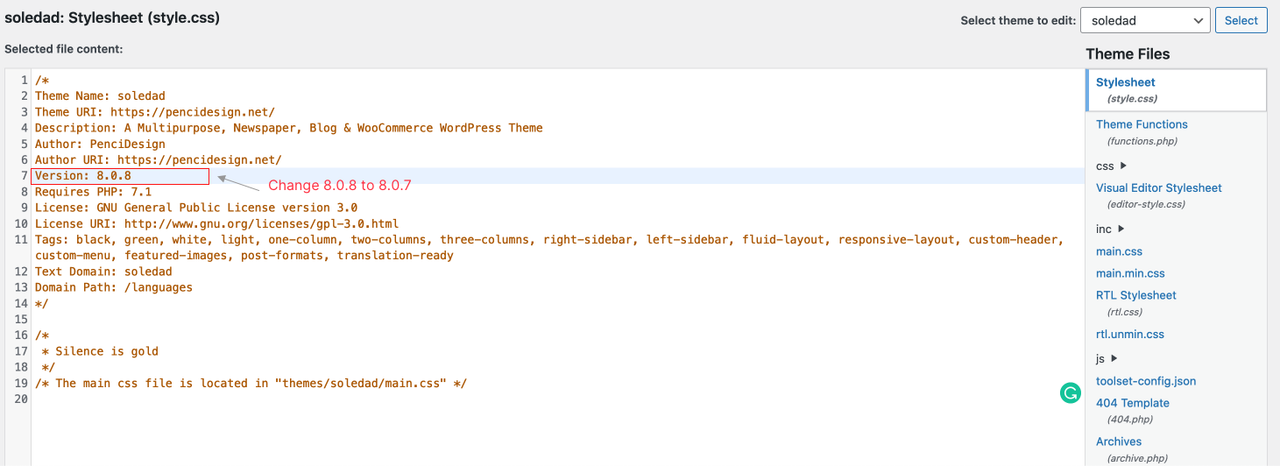
You can force the update by following these steps:

  • Go to Appearance → Theme Editor, Select theme to edit: Soledad,
  • Change Version: 8.0.8 to Version: 8.0.7,
  • Go to Update & check again.

image.png

Regards,
PenciDesign.

littlepellizza replied

Customer Reply

DEar

i try to clear full cache in 2 browser , also clear plug in cache inside wordpress

but dosen't work

stil 8.0.8

PenciDesign Supporter replied

Staff Reply

Hi,

About this issue, please clear all the browser cache then check again.

Regards,
PenciDesign.


littlepellizza started the conversation

Conversation Start

DEar pencil i have received  a mail of update theme to 8.0.9

ma in envato markt plug in i didn't see nothing. i checked api and is ok

what's the problem?

Want to join this conversation or access attachments? Sign in first.