comzept replied
Customer Reply
Hi,
now everything works as expected. All necessary files were copied to the child(s) and now it should be update-safe.
Thank you again and kind regards
Tom
Hi,
ah, I see. That´s tricky. Thank you.
Do you maybe have a hint to prevent that overriding - maybe some options to be adapted within Elementor Pro?
Kind regards
Tom
Hi,
this is where I would have located it. The attached screenshot shows that this option is missing. Is there a general setting for showing this option?
kind regards
Tom
Hi,
thank you for your quick answer. Within the page "Home" opened with Elementor I am not able to find this option, sorry.
Kind regards
Tom
Hi,
I did as you mentioned - the pictures are back and I hope it will stay that way ;-).
Only problem: sticky posts are not shown any longer inter the first slider of the homepage. Was there also a change and how can this be re activated?
Kind regards
Tom
Hi,
I understand that completely. Just to be sure: best way would be to copy the files including the whole inc/elementor folder from the latest version into the child theme replacing the "older" files, right?
If so doesn´t that mean that the modifications within the child have to be made again?
Kind regards
Tom
Hi,
thank you - this did good in the first step. If you could please take a look at the front-end you will see that the pictures are not loaded. You also have a step for this to solve?
Thank you, kind regards
Tom
Hi, it´s Tom again,
sorry for coming back after marking this case as solved: I updated to the last version 8.1.2 and the modifications from the child seem to be gone.
Do I have to do the whole procedure again after updating the parent?
kind regards
Tom
Hi,
thank you very much. Please see this ticket as solved.
kind regards
Tom
Hi,
this look VERY GOOD. This did the trick. I also checked again by renaming the style-20.php in the parent: works fine.
If you would tell me what I have to do in the other websites with you soledad to make that work the case is done, I would appreciate that, thank you.
kind regards
Tom
Hi,
I checked again by just putting a "test-child" as word within the style-20.php before the title in "child/inc/elementor/modules/penci-featured-sliders/widgets/". Unfortunately it is not shown on the website.
Furthermore I did the same in the parent with "test-parent" as the word and it shows (is both active now). So I would say that the website still takes just the things done within the parent. Please check on that.
kind regards
Tom
Hi,
maybe I´m doing something wrong but I can´t see a difference. The whole case is about scheduling sticky posts. Without modifications the "penci-featured-sliders" justs adds the sticky to the amount of posts to be shown. This results in unwanted optical features (I just made that yet - pls check in the frontend homepage).
We just made a slide modification in the penci-featured-sliders.php to correct that. Now its is just in the one from the child theme and it´s not working.
kind regards
Tom
Hello,
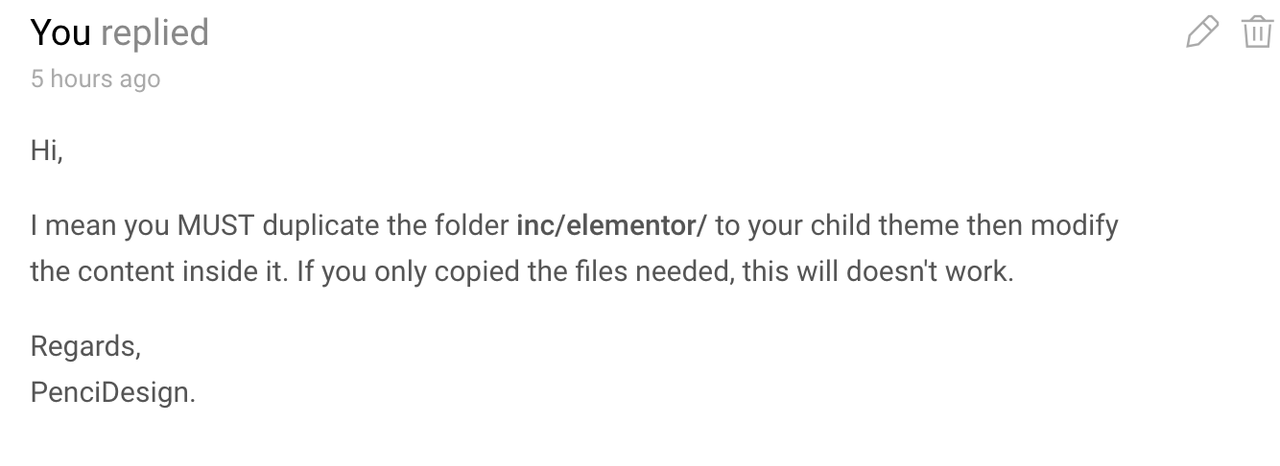
I did as you told and made a complete duplicate of inc/elementor. Then I made the necessary adaptations. Unfortunately they are not really showing in front end.
So where could be my mistake?
regards
Tom
Hi,
now I am a little confused: in one reply you answered
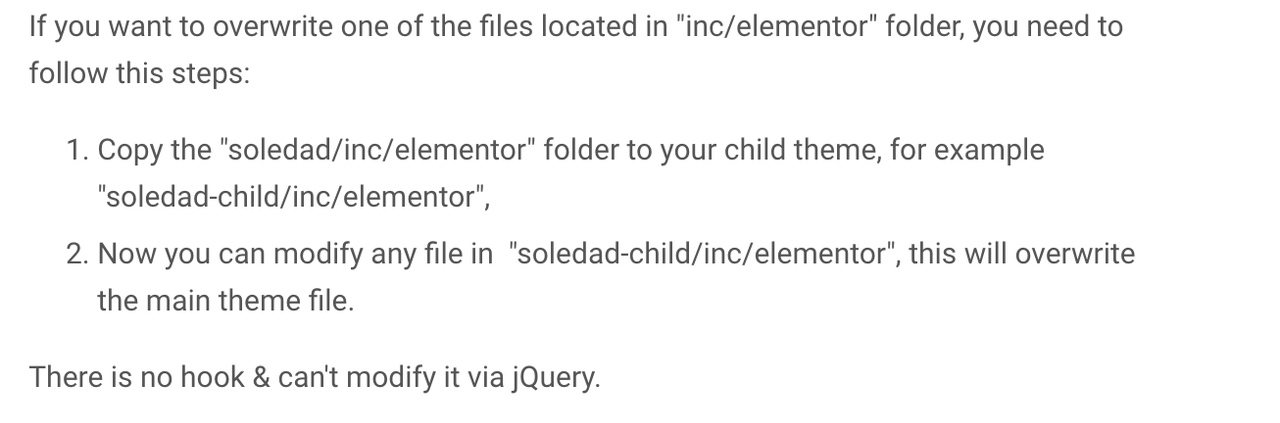
"3. All the content in "inc/elementor" folder has been registering in a different way, so you can't overwrite the individual file in this folder."
and if I got that right it means it is not possible to overwrite in the child. That there SHOULD not be done overwriting in the parent is clear.
Problem is that we did exactly what you suggest in this reply: we copied the needed files from the parent into the same folder structure of the child and did adaptions in these files (as you mentioned in the last reply) and it does not work. Allthough it works with other files from other folder (as I mentioned before).
And this is the case to solve: what is to be done differetly than copy fils from the parent into the child and do the adaptions there? Has there to be another kind of folder structure like it is with WooCommerce sometimes? Must there be a kind of seperate registration? Or any other hint would be of help.
Thank you
Tom
Hello,
so that means if we need adaptions in files that are located in "inc/elementor" cannot be overruled in the child in any way. And every adaption has to be done within the file in the parent theme and repeated after everey update of the theme, right?
Or is there maybe a possibility to do it via jQuery or other hooks maybe?
kind regards,
Tom
Hi,
yes, excuse me: but I know and did that. Info: I am a developer and inplementor for cms with focus on Wordpress. And I did exactly that: copy the files needed in the same file path in the child theme, did adaptations there (besides in the functions file in the child) but the adaptation do now show any effect.
Besides in other files in this structure like in file I copied into /template-parts/magazine-sc/ adaptations made are shown on the frontend. And because there are files that show I was asking what the reason could be that some others won't.
Maybe I should have mentioned that earlier but I assumed I made a general mistake. Obviously not if I understand your answer correctly.
So what reason else could lead to the result that some files copied into the child and showing adaptations and some are not?
kind regards
Tom
Hi also,
both mentioned things are familiar with us. Only difference: we just copied the files needed into the same file paths in the child. Do we have to copy the whole content? Because the way with just copying the files needed is not working - changes are not shown on frontend. Please find attached a screenshot from Filezilla showing the situation.
kind regards
Tom
Hello,
my question is reagrding the correct handling of the child theme. A few individualisations are to be made in some files from the parent and as to do this right we duplicated them into the child. But e.g. a file from /soledad/inc/elementor/modules/penci-featured-sliders/widgets/ is copied to the child with the same file path and unfortunately has no effect on the page.
Do you have any advice how to set the file path in the child theme correctly to make that happen?
Thank you and kind regards Tom
Want to join this conversation or access attachments? Sign in first.
Open your ticket archive, review validated licenses, and continue product support conversations from one customer portal.