PenciDesign Supporter replied
Hi,
Please go to Appearance → Customize → Custom CSS then add the following custom CSS code:
.menu-item-has-label .menu-label {
font-size: 9px;
}Change 9px to the size you want to show.
Regards,
PenciDesign.
ok thank you very much other thing I can increase the font size of the circled word like in the screen
ok i succeeded now i would like to remove the category name showing i leave screen
ok but then how do I remove the default one and in insert the one so that only the one with the correct category name is displayed?
OK but where do I find this item?
ok now when I select the category it displays the correct posts however regarding the category title no
then I created the template that I want to insert so I go to customize and I 've inserted it as per screen (1)
then I go to select the category as per screen (2)
the problem is that when I change the category it stays the same as in the screen (3)
How do I get the right category to appear?
ok I created the category menu when I go to load it puts the same categoia on different categories how can I get the right category displayed on the others?
inserted and I'm editing the only poblem is that as you see it displays really badly..
I'm starting to edit and I wanted to ask that on desktop it doesn't show the sidebar how can I add it?
I forgot to add screen
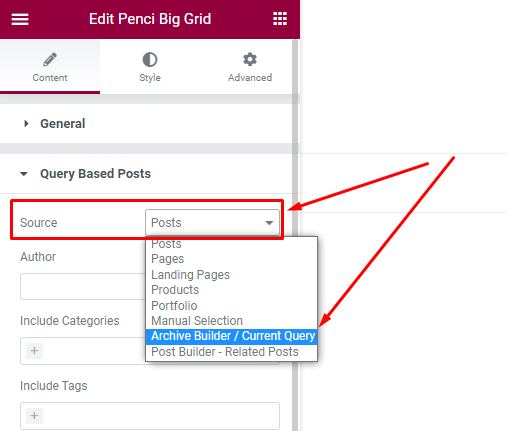
I saw this in the settings so I guess you can do editing with elementor from 0 right? can I know how this works?
I'll leave you a screen I would like to edit the category layourts how can I do it?
Want to join this conversation or access attachments? Sign in first.
Open your ticket archive, review validated licenses, and continue product support conversations from one customer portal.