Skip to content
Public Ticket #26127

Speed Optimization on mobile

Conversation thread

PenciDesign Supporter replied

Staff Reply

Hi,

You can reactivate the CDN without any risk.

Regards,
PenciDesign.


Morgane Charlier replied

Customer Reply

Thanks a lot for your help and for solving this problem. I will contact you later for other purposes but will concentrate on some other things for now. Can I reactivate my CDN from my host or do you think it will cause a problem?

Thanks

PenciDesign Supporter replied

Staff Reply

Hi,

I've fixed your site issue.

Please clear your browser's cache and then recheck.

Regards,
PenciDesign.


Morgane Charlier replied

Customer Reply

I would really appreciate your help as it's happening after you did something... Thank you

PenciDesign Supporter replied

Staff Reply

Hi,

I do not use OVH services, so I am unfamiliar with their functionality. It might be advisable for you to contact their support team and request that they temporarily disable this feature until the WordPress backend functions correctly.

Regards,
PenciDesign.


Morgane Charlier replied

Customer Reply

Hello, 

I don't have cPanel, I have OVH. What are the steps I have to follow on this server? 

Thank you

PenciDesign Supporter replied

Staff Reply

Hi,

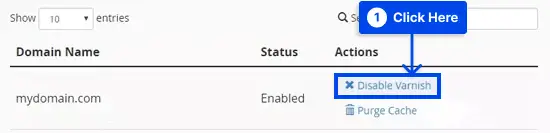
Please try to disable the Varnish cache by following these steps:

Step 1: Log in to your cPanel.

Step 2: Choose Manage Varnish, then Disable Varnish under the Web Accelerator section.

1.-Log-in-to-your-cPanel-choose-Manage-Varnish-then-Disable-Varnish.pngLog in to your cPanel, choose Manage Varnish, then Disable Varnish

Step 3: Click Confirm Action to disable it.

Step 4: Check your website to see if it is loading correctly.

Regards,
PenciDesign.


Morgane Charlier replied

Customer Reply

Hello, 

I deleted the plugin as you said. So now the blog can appear but when I want to access to the wp-admin of my blog, I still have the message 503. Even if I cleared my cache. What can I do next?

Thank you

PenciDesign Supporter replied

Staff Reply

Hi,

I recently switched the WordPress cache plugin from WPFatest Cache to the W3 Total Cache plugin, but after activating this plugin, your site began displaying a 503 error.

You can revert this change by accessing the FTP and navigating to the following path:

wp-content/plugins/

Delete/rename the "w3-total-cache" folder.

Regards,
PenciDesign.


PenciDesign Supporter replied

Staff Reply

Hi,

I've config the new cache plugin for your site but got the "Error 503 Backend fetch failed" notice.

Please send me the FTP account or contact the hosting support about this problem.

Regards,
PenciDesign.


PenciDesign Supporter replied

Staff Reply

Hi,

For this specific situation, please send me your WordPress admin account details through a PRIVATE message. I will then log in and make an effort to assist you in diagnosing and resolving this issue.

Regards,
PenciDesign.


Morgane Charlier started the conversation

Conversation Start

Hello, 

When I test my website on Page Speed Insights, looks like that it's not optimized for mobile. How can I do speed the mobile version? 

Thanks a lot

Want to join this conversation or access attachments? Sign in first.