Skip to content
Public Ticket #31340

Navigation

Conversation thread

Okugi replied

Customer Reply

Thank you for your quick reply. I previously experimented with this as it seemed like the natural solution...nesting the menu items. I could not get it to work for this menu. It seemed like the Mega Menu Penci Block, "Advanced List 5 Columns" required you to add the menu items on the element itself (image C) and not in the Menu area of the WP admin.

I will try again to create the Penci block and link it to a top-level menu item again. Perhaps I just missed something.

Thank you
PenciDesign Supporter replied

Staff Reply

Hi,

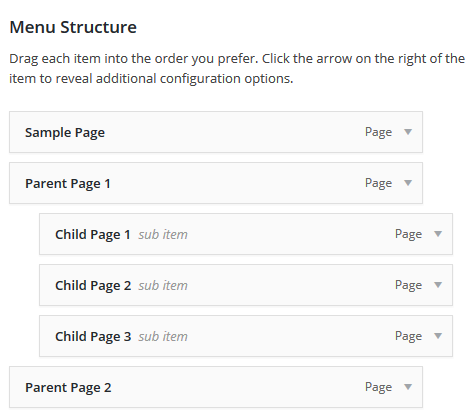
You can drag and drop menu items into one another to create a child (dropdown) list. Here is the image: 

menu-screen5.png

Regards,
PenciDesign.

Okugi replied

Customer Reply

Sorry if I continue to miss something. But, this doesn't help at all. The I already reviewed the documentation and videos. They only seem to cover Parent > Child. I do not see how to add a third level like the images  (A & B) below.

I am trying to use the Mega Menu Penci Block, "Advanced List 5 Columns" (picture C).

Thank you.

Okugi started the conversation

Conversation Start

I would like to create a 3-tier, multi-level main navigation like the one in the demo at the link below. I understand I could download the demo and likely figure it out, but I was hoping I could get a quick answer.

https://soledad.pencidesign.net/soledad-simple/

Features > Headers > Header Style 1

Parent > Child > Grandchild

The Parent > Child seems to be the default for menus and Penci blocks. I did play with blocks, categories, and settings as well as try to find it in the docs. I am sure I am missing something right in front of me.

Thank you in advance.

Want to join this conversation or access attachments? Sign in first.