PenciDesign Supporter replied
Staff Reply
Hi,
Please scroll down to the bottom of this page; it appears in the options plugins area.
Regards,
PenciDesign.
Thanks... The shortcode is what I was missing.
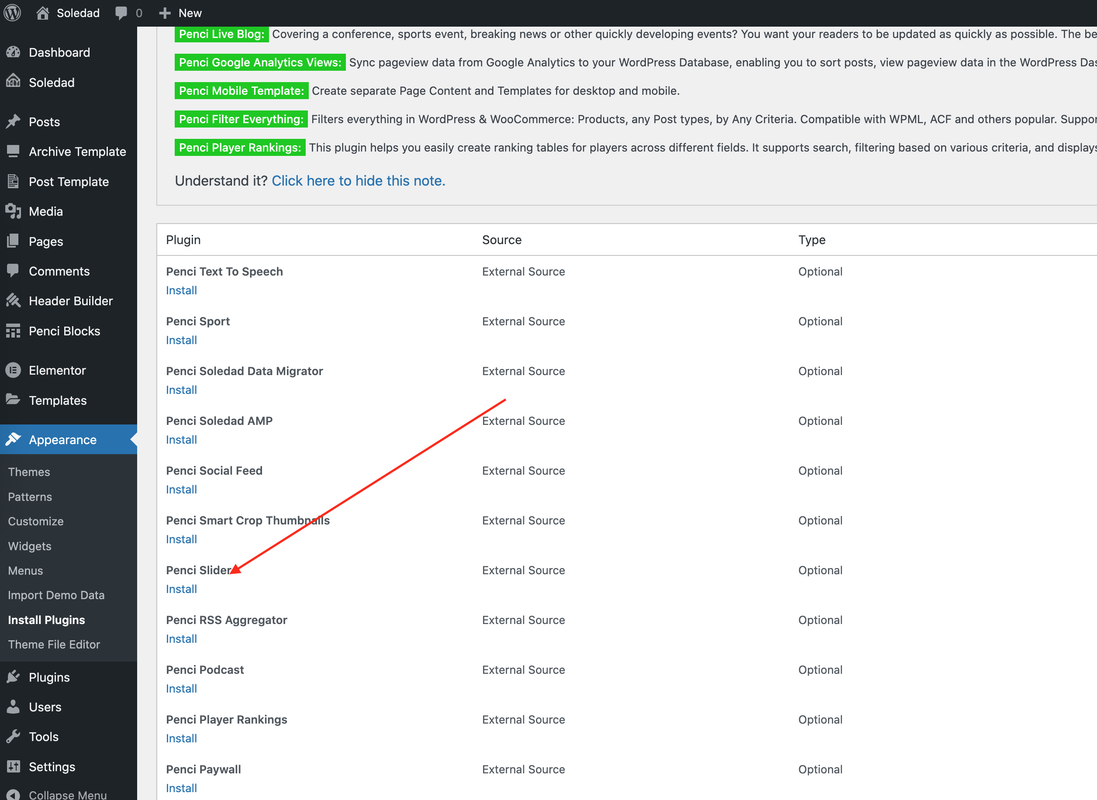
attached is a screen-cap that shows no Penci Slide plugin
The Penci Slider plugin does not appear on the list of theme plugins. Documentation says it is deprecated.
Again, I created a block. I named Penci Slider Style 1 (or 2) slider type but my slide does not appear on the home page. How can I make it appear?
Documentation says to use the penci slider plugin.The problem is there is no more penci slider plugin. It is only penci blocks which I did use to make a custom slider. But custom slider does not display on home page.
Thanks... I'll give this a go.
In a prior version, I was able to create a static image (full width) on the home page using a penci slide. I guess the slide is replaced by penci-blocks. How to recreate this full width image like: https://northamptoncountygop.com/
Want to join this conversation or access attachments? Sign in first.
Open your ticket archive, review validated licenses, and continue product support conversations from one customer portal.