Skip to content
Public Ticket #31800

Errors in ads/header question

Conversation thread

Phil S. replied

Customer Reply

Please givbe me more time, I found a problem, our TAGS db is like 150,000 entries, that's what causing the memory problems. I will see if there is a way to bulk clear them. I will get back t o you when done.
Phil S. replied

Customer Reply

Hi, i have increased memory so it now works;.

PenciDesign Supporter replied

Staff Reply

Hi,

I’ve checked your site and found the following issues:

  • The hosting server has limited memory and timeout settings, which prevents the Widgets page and Customizer from loading correctly.

  • Please review the Advanced Ads plugin, as it may be causing this issue and consuming a large amount of server resources, resulting in slow site performance. You may want to consider using an alternative plugin with similar features.

Regards,
PenciDesign.

PenciDesign Supporter replied

Staff Reply

Hi,

I’ve configured the PageSpeed optimizations and cache plugin for your site. Please note that the Customizer panel on your site contains an error due to conflicts with some installed plugins. If you would like this issue fixed, please provide your FTP account details, as I cannot modify the file directly from the WordPress backend.

Regards,
PenciDesign.

Phil S. replied

Customer Reply

Also please keep in mind we also use Edge Caching/Cloudflare too.

Phil S. replied

Customer Reply

yes if that fixes it. please

PenciDesign Supporter replied

Staff Reply

Hi,

I just checked your site settings and found a conflict between your installed plugins and our Optimizations plugin. In general, you need to disable the Core Web Vitals & PageSpeed Booster plugin and install the W3 Total Cache plugin to ensure proper compatibility with the Penci Shortcode & Performance plugin.

If you agree with this solution, please confirm, and we will help you configure it.

Regards,
PenciDesign.

PenciDesign Supporter replied

Staff Reply

Hi,

For this case, please send me your WordPress admin account in a PRIVATE reply.
I'll log in and try to help you check this problem.

Regards,
PenciDesign.

Phil S. replied

Customer Reply

I notice a bunch of things stopped working, even after unloading all plugins but penci plugins and updating to latest:

Ad block popup not working for Opera browsers

There are hexcodes showing on the main menu before first interaction

Phil S. replied

Customer Reply

None of it seems to be working. is there any way you can check it out on our end?

PenciDesign Supporter replied

Staff Reply

Hi,

Please go to Appearance → Customize → Speed Optimizations → Optimize CSS, make sure the "Create Critical CSS" option is enabled, clear all caches, and then check again.

Regards,
PenciDesign.

Phil S. replied

Customer Reply

Thank you what about the second part? The menus showing all text/html before first interaction?

PenciDesign Supporter replied

Staff Reply

Hi,

1/ Please go to Appearance → Customize → Logo & Header → Main Bar & Primary Menu: turn on the following options:

  • Display Logo on Main Bar on Mobile Devices
  • Move Logo on Main Bar on Mobile to Center 

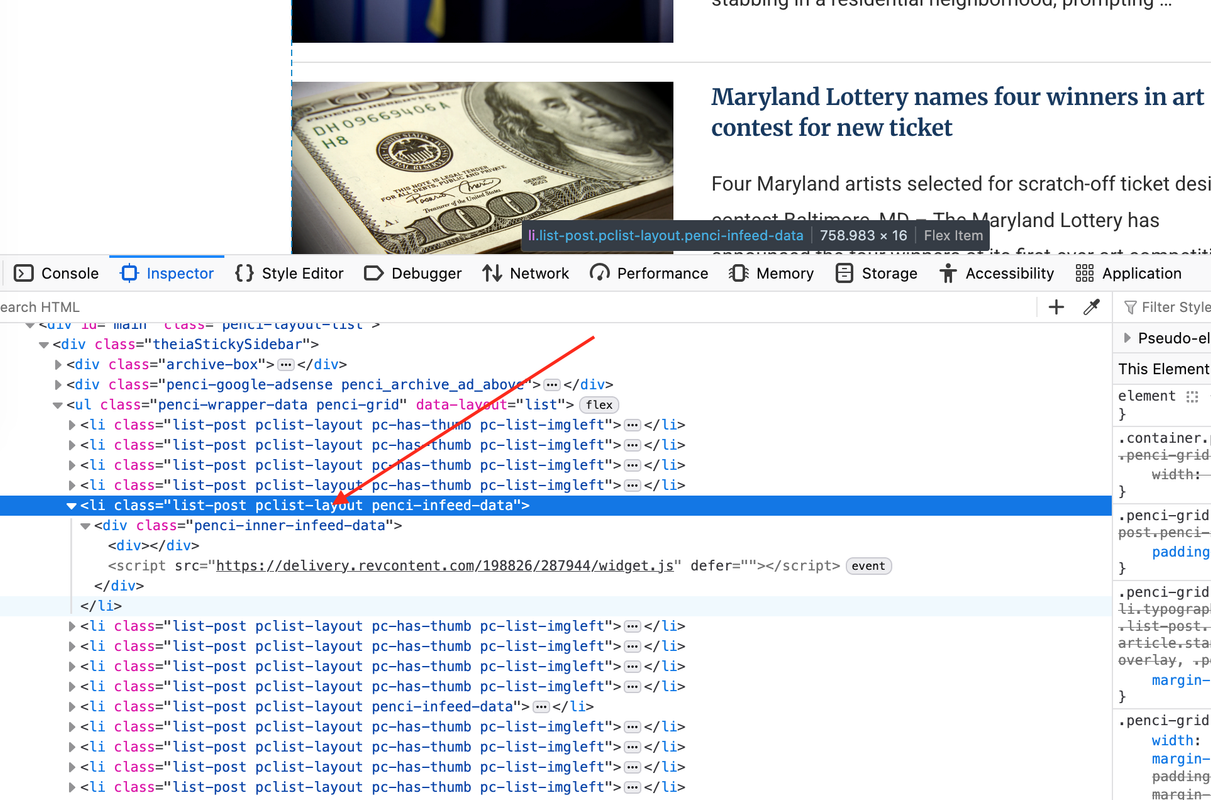
2/ Please check all the code you’ve inserted. Here is the screenshot of the code rendered based on the ads code—it displays correctly after every 4 post items, but the ads themselves are not showing. This means the issue is with your ads code.

Screen-Shot-2025-09-18-at-08-43-49.png

Regards,
PenciDesign.

Phil S. replied

Customer Reply

Also on Main page, it loads a stripped down version of our page then shows the properly formatted page.

Phil S. started the conversation

Conversation Start

Two problems..

1. on all pages, on mobile only: It shows our logo then the menu with the hamburger icon between two lines.

How do we get our logo ONLY to appear within the lines next to the hamburger menu?

2. In feed "post layout" ads not showing no matter what ad code we put there:

example every 4 items:

Maryland News - Shore News Network

Want to join this conversation or access attachments? Sign in first.