maximilianruschepaul replied
Customer Reply
I appreciate your help - thanks a million!
As I have new users signed-up since the theme update, a re-roll to the back-up would be quite unfortunate. I really appreciate your timely help here.
Hi there,
it seems not to be a cache re-build issue from what I see in the devloper tool. The theme update seems to cause a significant longer Cumulative Layout Shift.. Proofing the point, after 8 hours, there is still no change to the metrics - cache should have rebuild within that time.
Best,
Max
More details attached.
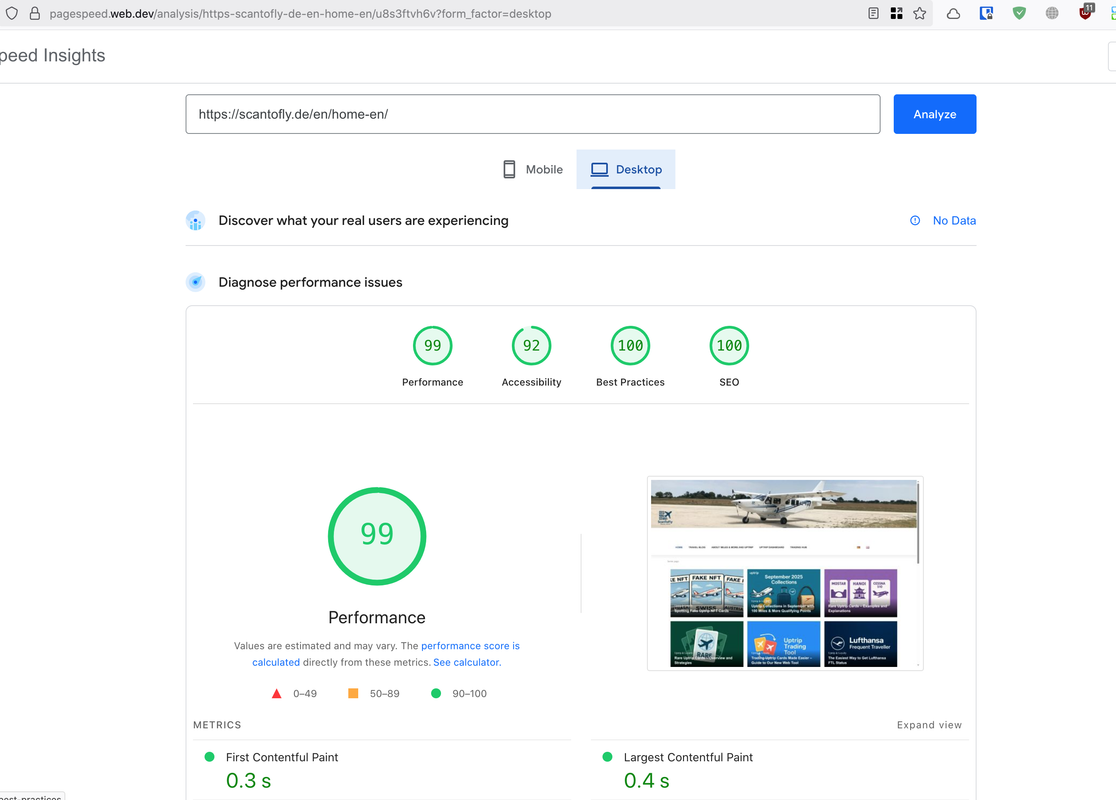
Hey there. Another side effect of the update: on desktop view the performance dropped in the google page view analysis from 100 to 80 after updating with one core topic:
Cumulative Layout Shift / Forced reflow/layout
Wow, that easy :D
Works. Thanks for pointing me at this!
Hi,
I added 3 screenshots. All related to the post section. Seems it is resetting to standard section here (at least partially). I deactivated social media icons, next post and comment section. Also the post image and author is showing now, which is switched off.
The thing is, I cannot yet tell for sure its only the post section. I also have some custom css (which you gave me some weeks ago) and other smaller adjustments that may get lost? But I would love to keep up with the most recent version, of course.
Looking forward to you advise!
Best,
Max
Hi there,
on my staging environment I updated from 8.6.8 to 8.6.9. I noticed that it will set-back quite a few theme settings. Is there a way to keep my settings as is, or at least identify all set-backs as I am not even sure where to start. For sure Header, Social, Post settings are affected. As for now, I would not want to update my live environment as I do not have an overview on where to even start fixing back the changes of the 8.6.9 set-backs.
Thanks for any hint and best.
Want to join this conversation or access attachments? Sign in first.
Open your ticket archive, review validated licenses, and continue product support conversations from one customer portal.