Skip to content
Public Ticket #32015

Favikon and Logo Resizing

Conversation thread

paulw replied

Customer Reply
9442288937.png

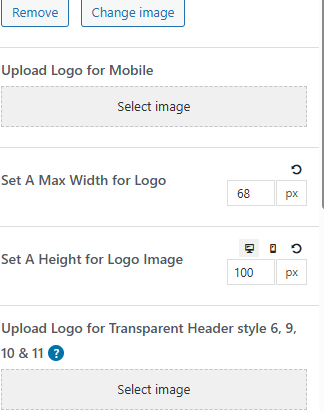
Is this where the logo can be resized? Because I've tried changing the max width and height around, but the logo is staying the same size.

PenciDesign Supporter replied

Staff Reply

Hi,

1/ The Simple News demo builds the header with the Penci Header Builder, so you can upload your custom logo by going to Dashboard → Header Builder.

2/ Regarding the favicon, you can upload it at Appearance → Customize → General → General Settings.

3/ If you would like further assistance, please send me your site URL.

Regards,
PenciDesign.

paulw started the conversation

Conversation Start

I've imported two demos so far and have not been able to get the Favikon after uploading and publishing to show on my public site, and I've also tried to resize my logo when I change the default logo in the headers, but the resizing isn't working either. My logo is very small, and there seems to be no way to make it larger. I installed the "Simple News" demo most recently.

Not having a good experience so far with this theme and since it's only been a couple hours I wonder if you could approve a refund for me.

Want to join this conversation or access attachments? Sign in first.