PenciDesign Supporter replied
Staff Reply
Hi,
Please go to Appearance → Customize → General Options: uncheck the "Disable Sticky For All "Penci Container" elements" option.
Regards,
PenciDesign.
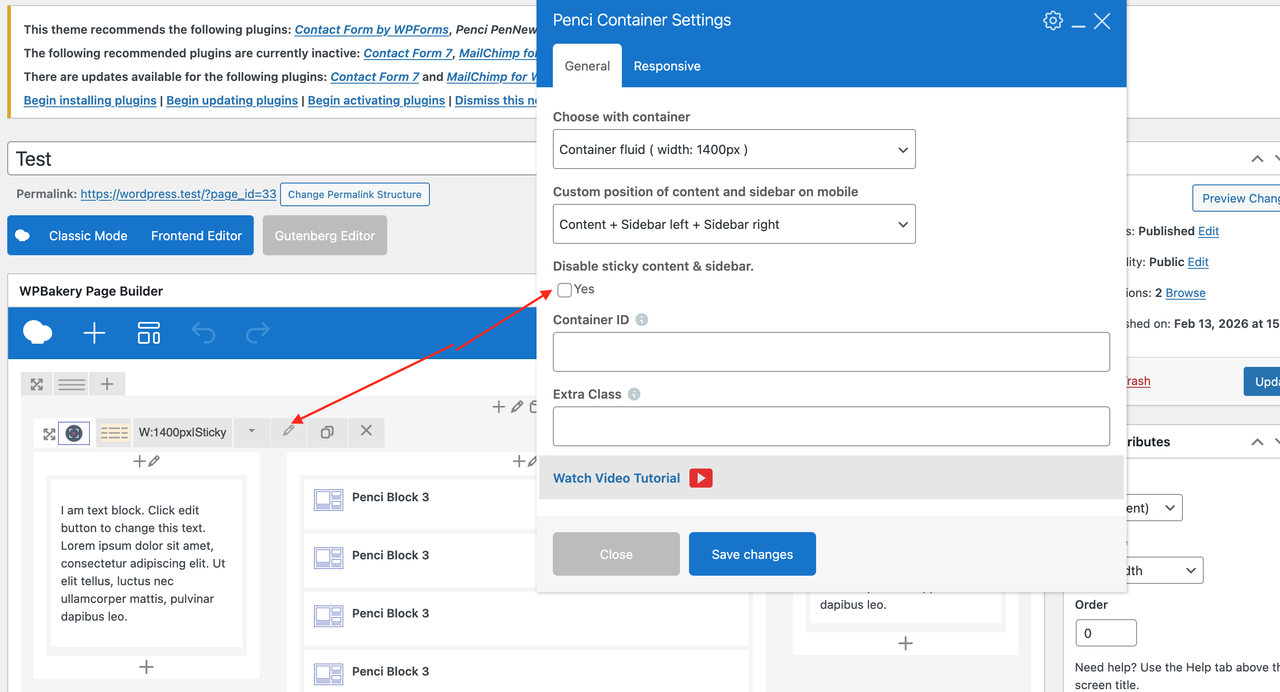
I've wrote about this earlier mentioning that everything has been checked. Did it again. Shown on the screenshot
The problem I’m trying to solve is making the sidebars sticky on the main page. I followed all the steps from the video tutorial you kindly sent in your previous responses. However, the sidebars stubbornly refuse to “stick” and scroll along with the rest of the content. The checkbox "Disable the sticky content & sidebars" is unchecked as well.
What am I doing wrong? Or is this technically impossible at all? If so, I need help figuring out how to create a responsive layout so that all three columns automatically align at the bottom edge. Or is that also not feasible?
I’ve attached a screenshot showing how my efforts are reflected — everything seems to be done according to your video tutorial, including the text blocks.
Regarding your suggestion to manually make the blocks the same — I understand this solution, but I was hoping to avoid it. That’s precisely one of the reasons why I purchased a ready‑made theme.
Thank you very much for your response.
The issue is that I didn’t phrase the question correctly, although “a well‑phrased question is half the answer”.
Now, due to a strange coincidence, on the homepage (https://the-tales.site/) the left and right sidebars are created and belong to the WordPress editor. They are edited using the WYSIWYG editor WPBakery. Meanwhile, on the post pages, the sidebars come from your theme and are edited via the backend editor through Appearance → Widgets (as shown in the screenshot).
What I actually want to avoid is using the WordPress editor. Instead, I’d like the sidebars on both the homepage and the post pages to be identical and managed through your theme's interface in Appearance → Widgets.
So my actual question is: how can I make the sidebars from your theme appear on the homepage — the same way they work on this page: https://the-tales.site/2026/01/29/d1-82-d0-b5-d1-81-d1-82-1/?
I apologise for taking up your time with clarifications regarding an incorrectly phrased question.
To summarise: I need the sidebars from your theme (screenshot) to be displayed on the homepage instead of Wordpress sidebars.
I spent several hours studying the documentation via the links you kindly provided. I couldn’t find an answer to the question: «How to make the sidebars on the main page stick to the top edge of the page, while the central block continues to scroll».
I’d like to achieve an effect similar to the one on the post page https://the-tales.site/2026/01/29/d1-82-d0-b5-d1-81-d1-82-1/, but for the main page https://the-tales.site/. The goal is to have the sidebars fixed in place, while the central content block keeps scrolling.
I couldn’t find the necessary information either in the manual or in the videos. I would appreciate your help.
https://the-tales.site/ This is my test page (Main) and there is no independent scrolling on it, how it was when I've loaded you example. On the single post page https://the-tales.site/2026/01/29/d1-82-d0-b5-d1-81-d1-82-1/ scrolling is working
If you so kind helping me, please answer on one more question. How can I make the independent scrolling of the sidebars and central (main content) columns?
And talking "default@ WP widgets what page exactly do you mean? The main or the single post page?
What do you mean by "Text" widget?
And one more thing/ How can I add a block to the single post sidebars using Dashboard → Appearance → Widgets? I don't see any "plus: sign or "add" button. However "Delete" I can see and use.
How I can make sidebars on the main page the single post pages identical?
So, only with code? No WYSIWYG option? On the main page I see the different sidebars then on the single post. Plus on the main page I can edit the sidebars by just choosing them.
От the single post page I don't have such an option. I've understood how tj edit the main page sidebars, but the question was about the single post sidebars
I can edit the sidebars on the main page with the WPBakery with more or less success. I can switch sidebars on/off от the post page. Sidebars are alive, displaying the changes in the posts. But I'm totally confused on how to edit the sidebars (left & right) for the post pages or for the blog pages. I've studied the documentations and found nothing about that. Need help.
And one more thing. When I just loaded the demo, the sidebars on the main page behaved great, scrolling differently comparing to central blocks. But then something went wrong and now I have the the broken main page (talking about sidebars behavior). You can see the result of my "tuning" at the URL provided in this ticket.
Thanks in advance. And I'm sorry for possible mistakes - English is foreign language for me.
Want to join this conversation or access attachments? Sign in first.
Open your ticket archive, review validated licenses, and continue product support conversations from one customer portal.