Skip to content
Public Ticket #32475

Inline related posts issue

Conversation thread

PenciDesign Supporter replied

Staff Reply

Hi,

Some headings are different because the inline related posts were inserted via shortcode.

You can do this by installing the Penci Shortcode & Performance plugin via Appearance → Install Plugins, then inserting the inline related posts through Soledad → Inline Related Post in the Classic Editor.
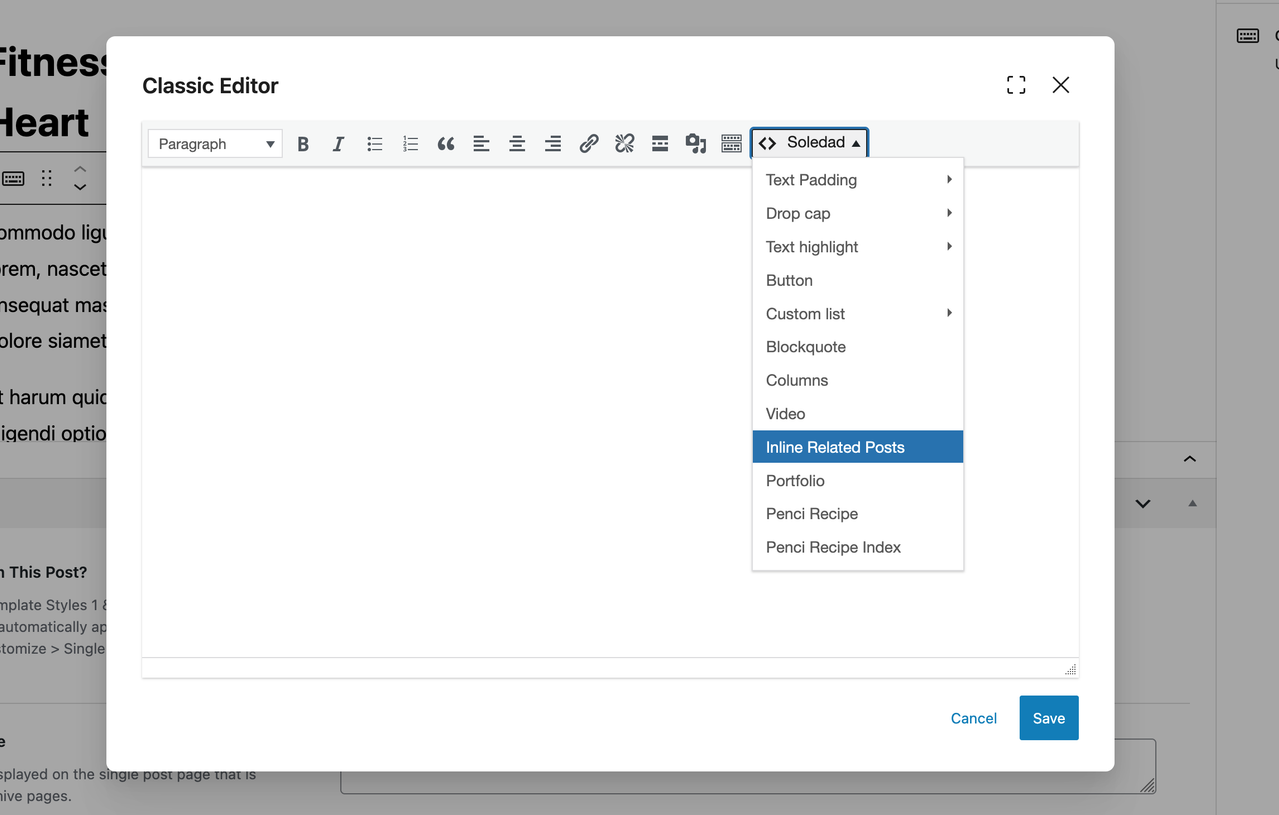
image.png

Regards,
PenciDesign.

PenciDesign Supporter replied

Staff Reply

Hi,

In this case, you can configure it by going to Appearance → Customize → Single Posts → Inline Related Posts → Inline Related Posts Inside Post Content, then set the number of inline related posts you want to display.

Regards,
PenciDesign.

shammaswafy started the conversation

Conversation Start

"In your 24h News demo, I noticed that inline related posts feature two different headings: 'RELATED POSTS' (using a grid layout inside the content) and 'You Might Be Interested In' (using a list layout at the top).

Currently, I am only able to set one heading, even when switching between the grid and list layouts. You can see the demo example

here and my Arabic site here.

Regardless of the language, I cannot find the option to assign different titles to these different layouts. If the grid style in your demo is not actually an 'inline related post,' could you please explain how I can achieve that same look on my site?"

https://soledaddemo.pencidesign.net/24h-news-magazine/net-zero-by-2050-will-hit-a-major-timing-problem-technology-cant-solve-we-need-to-talk-about-cutting-consumption/

https://darkblue-chinchilla-343830.hostingersite.com/2025/10/post-802.html

Want to join this conversation or access attachments? Sign in first.