PenciDesign replied
Hi,
It can work with your case, but maybe if you change the settings - that custom css code can be make your header broken.. So, let's attention to that![]()
Best Regards,
PenciDesign
OK i already do that by using this code:
https://stackoverflow.com/a/14446663/8473734
#header .inner-header {
height: 0;
padding: 0; /* remove any pre-existing padding, just in case */
padding-bottom: 40%;
background-image: url(img.jpg);
background-position: center center;
background-size: 100%;
background-repeat: no-repeat;
}
I add this code to Custom CSS and its working
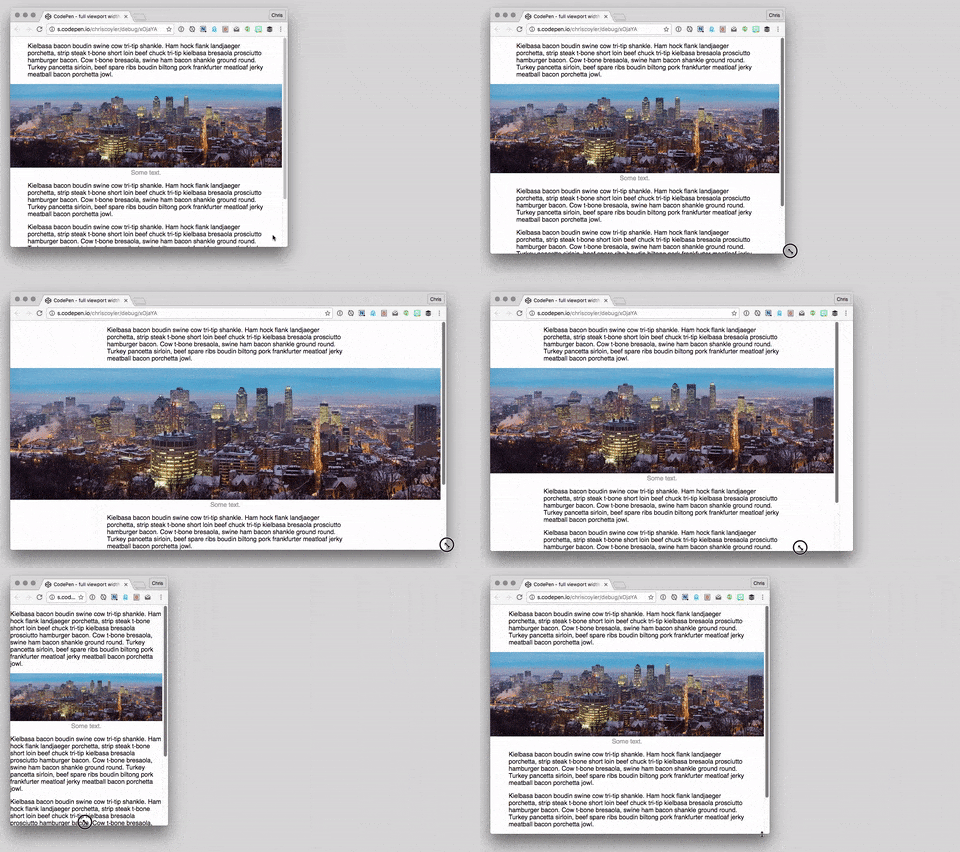
Its looks better but its possible to get effect like this?:

Hello,
I would like the image of my header background to adapt to the resolution. I want to achieve the effect that the picture always had the original width and height. I do not know how to describe it exactly, so I will post the screen which effect I want to get.
Is it possible to set it directly in the admin panel or do it need css editions?
Want to join this conversation or access attachments? Sign in first.
Open your ticket archive, review validated licenses, and continue product support conversations from one customer portal.